Fast fit check
Use these as decision filters before you buy another plan, antenna, hotspot, or dish.
Cellular-first fit
Coverage-rich routes
Best when you move through towns, highways, private parks, and public-land edges with usable Verizon, AT&T, or T-Mobile service.
Starlink-first fit
Open-sky remote camps
Best when you choose places where towers are weak but the dish can see enough sky to stay stable.
Power spread
5W vs 25-100W
Many hotspots behave like small accessories. Starlink Mini averages 25-40W, while the Standard kit averages 75-100W.
Plan reality
$50 to $165 Starlink Roam
Starlink's current public Roam lanes are 100GB and Unlimited, but hardware pricing should still be confirmed in checkout.
Video-call risk
Stability beats speed
A slower but steady connection usually beats a fast connection that drops every few minutes.
Best next step
Plan the stack
Run the connectivity planner after you know your route style, meeting load, power budget, and outage tolerance.
Why this comparison gets people into trouble
Starlink and hotspots are not two versions of the same tool. A hotspot connects through cellular towers. Starlink connects through satellites and still needs a clean enough sky view to behave well.
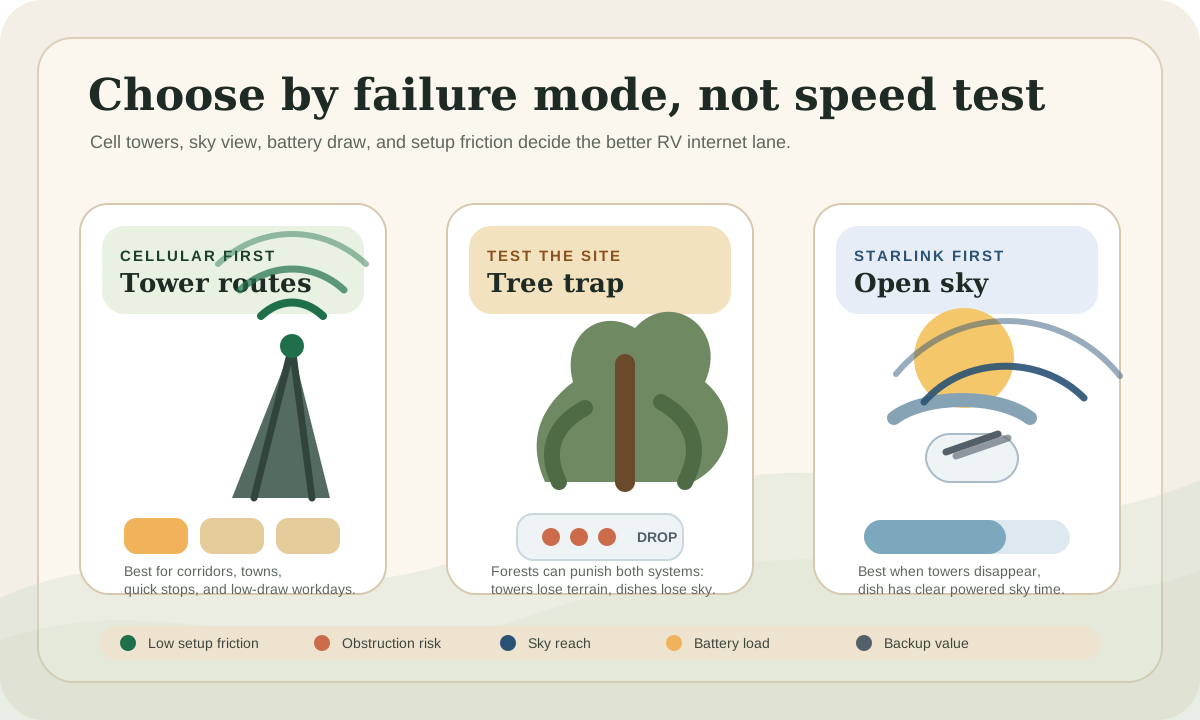
That difference matters more than the speed-test screenshot. A hotspot can be excellent in a town with strong 5G and useless in a canyon with no tower reach. Starlink can be excellent in open desert and frustrating under trees where the app keeps warning about obstructions.
The expensive mistake is buying the system that solves someone else's route. Your question is not "Which is better?" It is "Which failure mode keeps wrecking my workday?"
If you are still building the full connectivity plan, start with the broader internet for RVers guide and then use this page to choose the satellite-versus-cellular emphasis.
The short answer
Choose cellular first if your camps and travel days usually have usable tower coverage. A good hotspot, a phone plan with meaningful hotspot data, and a second carrier often beat Starlink on simplicity.
Choose Starlink first if your preferred camps regularly outrun cellular coverage and you work in open-sky places. It earns its keep when it unlocks camps that would otherwise be no-work zones.
Choose both if internet failure costs you money. The cleanest serious remote-work setup is not "Starlink or hotspot." It is a primary connection plus a backup connection that fails for a different reason.
Do not buy for the best campsite you imagine
Buy for the worst workday you repeat. If you mostly work from forested state parks, the answer may be different than if you spend winter on open BLM desert land.
Official plan checks used for this comparison
Official plan and spec checks
Plan names, pricing, throttling, and kit promos can change. Recheck these pages before you treat any number as final.
Pre-arrival checks
Confirm the checkout page
Starlink kit pricing and carrier device promos can vary by region, account, autopay, voice-line bundle, and current promotion.
Confirm the failure mode
Cellular fails from tower distance, congestion, terrain, or plan limits. Starlink fails from sky obstruction, power limits, or setup friction.
Cost and data are not the same decision
Starlink's public Roam lanes currently sit in two practical buckets: a lower-cost 100GB lane and a higher-cost Unlimited lane. That makes the first filter simple: if your work and streaming burn through data quickly, the 100GB lane may be a trip supplement, not a complete remote-work plan.
Hardware pricing is the less stable number. Starlink kit prices and promos can change by kit, region, availability, and checkout context, so treat the hardware line as "verify at checkout" instead of building your whole decision around one cached price.
Cellular is messier because the price depends on whether the data comes from a phone plan, a tablet line, a dedicated hotspot device, or a carrier-specific RV/home-internet-style product. Official carrier pages currently show examples like AT&T DataConnect 50GB and 100GB hotspot plans, Verizon dedicated hotspot-device plans with add-on data boosts, and T-Mobile AWAY as a mobile 5G internet plan aimed at life on the road.
That does not mean cellular is automatically cheaper. Two carriers, two devices, antennas, and enough data can get expensive. It does mean cellular lets you scale in smaller steps before buying a satellite kit.
Compare
Starlink versus cellular hotspot cost and data limits
Use one comparison matrix to scan the practical differences. Small screens stack each row; wider screens keep the first column pinned.
| Spec | Dual-carrier cellular | Starlink Roam | Layered stack |
|---|---|---|---|
| Monthly cost | Highly carrier-dependent; often built from phone hotspot data, data-only plans, or dedicated hotspot lines | $50/mo lower-data Roam lane (Starlink has recently shown both 50GB and 100GB labels here) or $165/mo Roam Unlimited, checked against official Starlink plan details | Highest monthly cost, but lowest single-point-of-failure risk for income-dependent work |
| Data ceiling | Plan-specific; examples include 50GB, 100GB, and higher premium hotspot buckets depending on carrier and plan | Lower-data Roam lane has a clear ceiling whether the current label says 50GB or 100GB; Unlimited is the practical full-workday option | Use Starlink for heavy work or remote camps, cellular for travel days and quick stops |
| Hardware pricing | Can be low if you already own a phone or hotspot; higher if you add routers, antennas, or multiple carriers | Verify at Starlink checkout because kit pricing and promos move | Most expensive upfront because it usually includes satellite hardware plus at least one cellular path |
| Best budget fit | RVers who mostly camp within tower reach and want to add redundancy in steps | RVers whose favorite camps are often beyond usable cellular service | Remote workers whose meetings or deadlines justify paying for redundancy |
For current plan examples, use the mobile internet plans guide for RVers before you compare exact carrier lineups. Carrier names, data buckets, and autopay math move often enough that stale plan advice can get expensive.
Power draw is where Starlink changes the rig math
A hotspot is usually a small load. Many dedicated hotspots and phone-tethering setups draw single-digit watts, and they can often run from a USB battery bank, laptop port, or 12V USB outlet.
Starlink belongs in the RV power plan. The official Starlink Mini spec sheet lists average power at 25-40W. The Standard kit spec sheet lists average power at 75-100W.
That means an 8-hour work block looks roughly like this before inverter losses and router extras:
- Hotspot at 5W: about 40Wh
- Starlink Mini at 25-40W: about 200-320Wh
- Starlink Standard at 75-100W: about 600-800Wh
At 12V, 320Wh is about 27Ah before losses. 800Wh is about 67Ah before losses. That is not impossible, but it is no longer a rounding error if you are also running a laptop, monitor, fans, fridge, lights, and charging gear.
If Starlink is part of the plan, run the solar calculator and include the internet load as a real daytime appliance. If the battery bank is already tight, Starlink may force a power upgrade before it fixes the workday.
Trees, towers, and latency
Cellular cares about tower reach, terrain, congestion, carrier priority, and antenna placement. Trees can weaken cellular signal, but they usually do not block it as abruptly as they can block satellite.
Starlink cares about sky. Open desert, prairie, beaches, high overlooks, and sparse forest edges are where it can feel calm. Heavy canopy, narrow canyons, dense campgrounds, and rigs parked tight under branches can turn the dish into a fussy piece of hardware.
Latency is not one-sided. Strong 5G can feel excellent for video calls. Starlink can also be work-safe, but the experience depends heavily on obstruction, network load, weather, and the plan/device context.
For calls, packet loss and dropouts matter more than the speed number. A 40 Mbps connection with clean latency is better than a 200 Mbps connection that freezes every time the tower gets congested or the dish sees trees.
Video calls expose the weak link
Email and browsing are forgiving. Video calls are not.
If your workday includes client calls, screen sharing, teaching, sales demos, telehealth, interviews, or live support, judge the connection by interruption risk. Upload stability matters too, especially if you share video while someone else in the rig streams, uploads photos, or syncs cloud files.
Cellular tends to win when you have a strong, uncongested tower and enough premium hotspot data. It also wins on quick setup: open laptop, connect, work.
Starlink tends to win when cellular is absent or unstable and the campsite has enough sky. It can make a remote public-land site usable for work, but only if you are willing to place the dish properly and protect the cable from foot traffic, pets, doors, and trip hazards.
The internet backup planner is useful here because it forces the decision around workday tolerance instead of gadget preference.
Route style decides the winner
Your route is the real spec sheet.
Compare
Best RV internet choice by route style
Use one comparison matrix to scan the practical differences. Small screens stack each row; wider screens keep the first column pinned.
| Spec | Best first move | Main watchout | Backup move |
|---|---|---|---|
| Highway corridors and town edges | Dual-carrier cellular | Tower congestion, plan limits, and weak campground interior sites | Starlink only if you regularly leave the corridor for workdays |
| Open desert BLM camps | Starlink or layered stack | Power draw, wind exposure, dust, and cable handling | Keep a hotspot for town days and errands |
| Forested public campgrounds | Cellular first if towers are reachable | Starlink obstruction under canopy and crowded site placement | Scout site-by-site before assuming either path works |
| Mountain forest roads | Layered stack | Terrain can block towers and trees can block satellite in the same afternoon | Carry offline work and a lower-elevation fallback |
| Frequent one-night moves | Hotspot first | Setup fatigue if the dish comes out every stop | Use Starlink for planned longer stays where setup pays back |
| Income-critical remote work | Layered stack | Monthly cost and power budget climb quickly | Use the backup path before the primary fails completely |
This is also why crowd-sourced campsite reviews can mislead you. "Great internet" might mean one carrier worked from one site on one weekend. It may not mean your carrier, your plan, your antenna, your meeting schedule, or your Starlink sky view will work.
Setup friction is a real cost
Hotspots are easy to live with. They can sit on a counter, window ledge, dashboard, or router shelf. If the signal is good, setup is barely a task.
Starlink asks for more handling. You need to place the dish, watch sky visibility, route the cable, avoid pinch points, prevent trip hazards, think about theft risk, and store the kit on travel days.
That friction is not a reason to skip Starlink if it solves the actual problem. It is a reason to be honest. If you travel every other day and mostly work near towns, a dish that technically works may still be the wrong daily workflow.
If you already know Starlink is on the table, read the dedicated Starlink for RVs guide and the Starlink Mini review for RVers before choosing hardware.
The cleanest backup strategy
The strongest RV internet stacks avoid duplicate failure modes.
A second cellular carrier helps when one network has weak coverage or congestion. It does not help much if the campsite is simply too far from every tower. Starlink helps with that tower-distance problem, but it does not help if you park under heavy canopy.
That gives you three clean backup patterns:
- Cellular primary plus Starlink backup for remote open-sky camps.
- Starlink primary plus hotspot backup for travel days, quick stops, towns, and obstructed sites.
- Dual-carrier cellular plus offline fallback if your work is flexible and your routes stay near coverage.
For serious work, test the backup before you need it. A backup that has not been powered on, updated, logged in, charged, and checked against the current plan is not really a backup.
The backup internet options guide walks through the redundancy side in more detail.
Common mistakes
The first mistake is buying Starlink because cellular was bad once. A one-off bad campsite does not automatically justify satellite hardware, plan cost, and power draw.
The second mistake is refusing Starlink when the route has clearly outgrown cellular. If your favorite camps repeatedly turn video calls into apologies, a better hotspot plan may only delay the real decision.
The third mistake is ignoring power. Internet gear feels like tech, but in an RV it is still a load on the battery bank. The internet decision belongs beside your laptop, monitor, router, and charging math.
The fourth mistake is treating "unlimited" as identical across services. Unlimited can still involve priority rules, congestion behavior, speed reductions, device restrictions, hotspot caps, or terms that do not match how RVers actually move.
Final thought
Hotspots are not beginner internet, and Starlink is not automatically the serious answer. A hotspot is the serious answer when your route has towers. Starlink is the serious answer when your route has sky. The most dependable RV work setup starts with where you actually camp, how badly an outage hurts, and whether your battery bank can carry the connection all day.
Frequently asked
Questions RVers usually ask next.
Is Starlink better than a hotspot for RV internet?
Starlink is better when your camps are outside dependable cellular coverage and you can give the dish clear sky. A hotspot is often better when you travel through coverage-rich areas, need quick setup, and want lower power draw.
Do I still need cellular if I have Starlink?
Often yes, especially if you work from the road. Cellular is useful for travel days, quick stops, urban errands, forested sites, and moments when setting up the dish is inconvenient or impossible.
How much battery does Starlink use compared with a hotspot?
A typical hotspot is often a single-digit-watt load. Starlink Mini averages 25-40W, while the Standard kit averages 75-100W, so a long workday can become a real battery-bank decision.
Which is better for video calls from an RV?
Use whichever connection is steadier at that campsite. Strong 5G can be excellent for video calls, but Starlink may be the better option where cellular is weak and the sky is open.
Should I buy Starlink or a second hotspot plan first?
If most of your route has usable cellular, add a second carrier before buying satellite. If your route regularly has no usable tower coverage but open sky, Starlink may solve the bigger failure mode first.
Freshness note
Last checked May 13, 2026
This topic can change when products, plans, prices, campsite rules, or fit guidance move. These notes show what was reviewed most recently.
This review included
- Re-checked Starlink's official Roam and service-plan pages for the current lower-data Roam lane (recently shown with both 50GB and 100GB labels in public plan wording) and the $165/mo Roam Unlimited anchor; treated hardware pricing as checkout-variable because kit promotions and availability can change by order context.
- Checked Starlink Mini and Standard official specification sheets for power draw, field of view, dimensions, and weight details used in the RV battery comparison.
- Checked official Verizon, AT&T, and T-Mobile hotspot or mobile-internet pages for representative data allowances, pricing, device requirements, and throttling or prioritization notes.
Recent change log
May 13, 2026
Replaced hard-coded Roam 100GB language with checkout-safe lower-data Roam wording so the comparison stays accurate while Starlink's public plan labels move between 50GB and 100GB.
April 11, 2026
Rebuilt the comparison around route style, sky view, data ceilings, power draw, video-call risk, and layered backup strategy using official Starlink and carrier plan checks.
April 9, 2026
Published the first Starlink versus hotspot decision framework for RV remote workers.
Broader editorial corrections are tracked on the Corrections and Updates page.

