Remote Work10 guides
Connectivity and workspace advice for getting real work done on the road.
Connectivity, office setup, and workflow tips for getting real work done from the road.
Featured paths
Use these entry points when you already know the kind of decision you are making.
Field evidence
Real workdays reveal the weak link.
Remote-work planning gets better when the guide links out to call-day failures, tree-cover limits, power-order problems, and reader questions from actual setups.
Field noteThe backup hotspot only earned its place once the call-day workflow was written down.The hardware was not enough on its own. The stack only became reliable once mounts, power order, and failover rules were simple enough to repeat under pressure.Create a primary-connection and backup-connection routine before call days.Field noteCold mornings changed the whole battery plan more than the nominal amp-hour rating did.The battery bank looked adequate on paper, but cold starts plus a coffee maker and laptops made the early-day voltage story much tighter than expected.Add reserve and set a stricter morning load order before adding more comfort loads.Reader Q&AIs Starlink worth it if I mostly camp in state parks?Sometimes, but not automatically. If most of your camping happens under tree cover or in shorter state-park stays, a hotspot-first setup with a backup option often makes more sense than paying for Starlink by default. Starlink earns its keep fastest when your route regularly outruns cellular reliability and gives the dish enough sky to matter.Read the answerReader Q&AHow many batteries do I need for remote work in an RV?For many remote workers, the first honest answer is usually around 200Ah to 300Ah of lithium for calmer everyday use, but the real number depends on whether the workday includes Starlink, multiple monitors, cloudy-weather reserve, and how quickly the rig can recharge the bank afterward.Read the answer
Key takeaways
- Plan remote work around failure modes: weak signal, limited data, power draw, noise, heat, and backup locations.
- A reliable RV office usually needs one primary connection, one backup with a different failure mode, and enough battery for the workday.
- Choose the campsite for the job first when live calls, uploads, or client-facing work cannot fail.
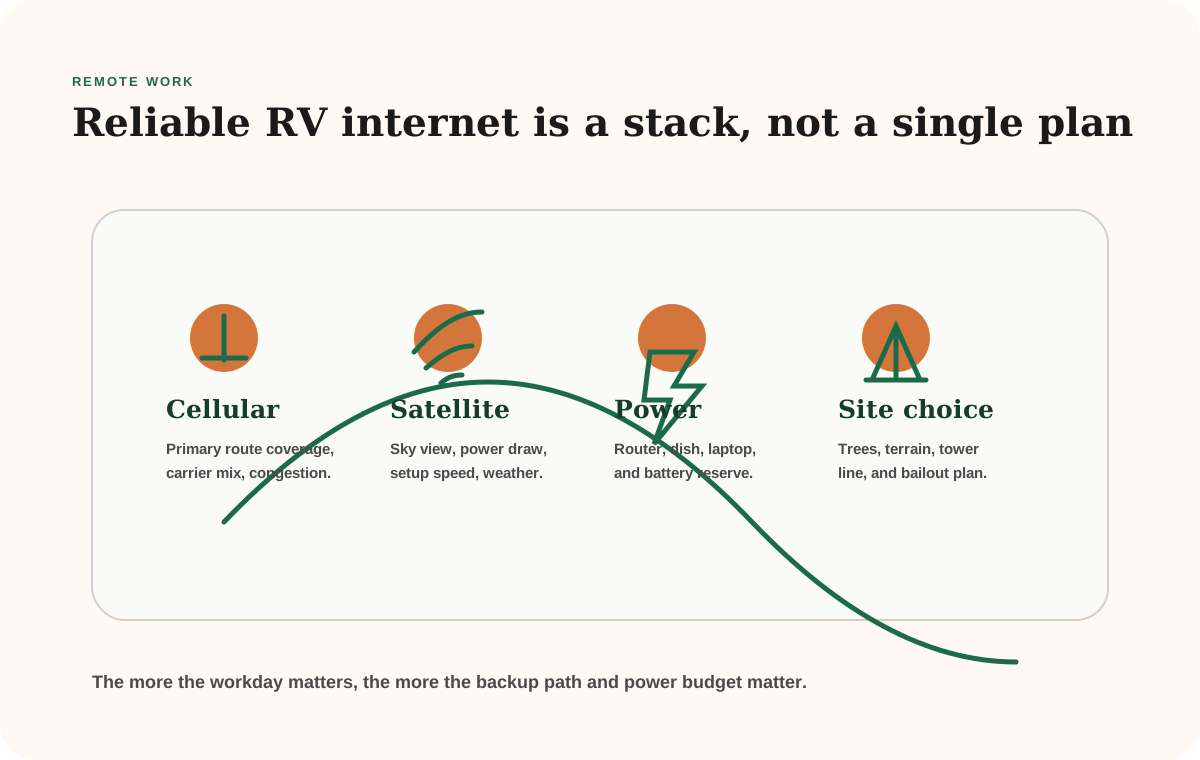
Remote work changes the whole power plan
Once your RV is part office, internet reliability and daytime battery reserve matter much more. This section is built around those tradeoffs.
A weekend camper can wait for better signal, drive into town, or upload photos later. A remote worker often cannot. The campsite has to support meetings, uploads, documents, weather, battery reserve, and sometimes a second person trying to use the rig at the same time.
That is why this hub starts with failure modes instead of carrier logos. The right answer changes if the workday is mostly async writing, six hours of Zoom calls, large media uploads, customer support shifts, or school-from-the-road days. The tools and plans matter, but the work pattern decides which tool gets to be primary.
Use the internet backup planner when you need to compare cellular, Starlink, campground Wi-Fi, and town fallback days in one place. Use the battery calculator if the router, laptop, monitor, Starlink dish, fans, and charging blocks are starting to look like a real daytime load instead of background noise.
Official checks behind the remote-work hub
Internet plans and hardware behavior change quickly, so this hub points readers toward the source categories that need re-checking before a work-heavy route.
T-Mobile Home Internet AwayUseful for checking current mobile home-internet-away plan structure before treating a cellular router as the primary work path.Opens in a new tabStarlink Mini specification sheetUsed for power-draw planning when satellite internet becomes part of the RV office stack.Opens in a new tabZoom bandwidth requirementsUseful for translating video-call expectations into data use, upload needs, and backup planning.Opens in a new tab
Start with the internet backup plan, not the gadget
The fastest way to clean up this topic is to decide the stack first:
- what has to work live
- how often the route leaves cellular behind
- what backup path saves the day
- whether the battery plan can support the gear
Internet backup planner
What internet backup plan fits your route?
Answer the job, route, downtime, and power questions first. Then build the connection plan around those answers instead of around whichever device is loudest.
Recommended pattern
Dual-cellular workday stack
You do not need to jump straight to satellite, but you do need two options that fail differently: a real workday cellular setup and a backup path that can finish the day.
Verify current carrier maps, plan terms, hotspot caps, campsite reports, sky view, and device power draw before treating this as a buying decision.
Primary connection
Lead with a dedicated hotspot or router-friendly cellular plan so the phone is not carrying the whole office.
Backup connection
Keep a second-carrier phone or hotspot for failover. The backup matters more than squeezing one more gimmick out of the primary plan.
Satellite decision
Satellite is optional here. Add it only if the route starts pushing beyond mixed coverage into repeated true dead zones.
Power read
Your power budget is strong enough to support a full workday hotspot/router setup and the battery overhead that comes with it.
Save, share, and follow up
Your inputs autosave in this browser, the URL updates as the plan changes, and the matching free planner stays attached to the result.
Top metrics
- Workday
- Steady laptop work
- Primary job pressure
- Route
- Mixed coverage
- Coverage volatility
- Downtime
- Same-day reliable
- Reliability tolerance
- Power margin
- Balanced power
- Daily device budget
Copy this result
Copy this result without showing a long URL on the page. Search engines are pointed back to the canonical calculator.
Result actions
Save the useful version of this result, send yourself the matching worksheet, or jump back to compare another setup.
Start over
This calculator stores inputs locally in this browser. Clear saved inputs when stale values are getting in the way.
Shareable plan previewDual-cellular workday stackReview the summary before you copy, export, or print it.
A printable internet backup plan snapshot that keeps the workday, route, downtime tolerance, power margin, and next review together.
- Workday
- Steady laptop work
- Primary job pressure
- Route
- Mixed coverage
- Coverage volatility
- Downtime
- Same-day reliable
- Reliability tolerance
- Power margin
- Balanced power
- Daily device budget
Quick answer
Best-fit stack
Dual-cellular workday stack
Backup path
Keep a second-carrier phone or hotspot for failover. The backup matters more than squeezing one more gimmick out of the primary plan.
- You do not need to jump straight to satellite, but you do need two options that fail differently: a real workday cellular setup and a backup path that can finish the day.
- Lead with a dedicated hotspot or router-friendly cellular plan so the phone is not carrying the whole office.
- Satellite is optional here. Add it only if the route starts pushing beyond mixed coverage into repeated true dead zones.
- Check carrier hotspot allotments, deprioritization rules, and the backup-carrier fit every quarter. Cellular plans change faster than the hardware.
Assumptions and confidence
- Verify the route lane (Mixed coverage) against current carrier maps and recent campground reports before relying on the stack.
- Check hotspot caps, deprioritization rules, and Starlink plan terms before buying hardware for steady laptop work.
- Test the primary and backup connection from the actual camp position before a call-heavy workday.
- Confirm the power system can support the stack: Your power budget is strong enough to support a full workday hotspot/router setup and the battery overhead that comes with it.
Biggest answer movers
- A route that shifts from town-edge camps to public-land dead zones can justify satellite sooner.
- A job that moves from flexible admin to live calls changes backup from optional to core infrastructure.
- A lean battery plan can make efficient cellular gear better than a heavier stack, even when satellite looks appealing.
Planning boundary
Do not treat this planner as a current carrier-coverage promise, subscription-price quote, safety communication plan, or electrical installation review.
Helpful guides and accessories
Workday hotspot setup
A hotspot or router-first setup that keeps laptop work off the phone and makes location testing faster at each stop.
Backup carrier plan
A second carrier, second SIM, or spare hotspot path so one plan change or congestion event does not own the whole day.
Signal and setup habits
Antenna, window placement, and call-day setup habits that make the same hardware perform better at camp.
Quarterly review rhythm
Check carrier hotspot allotments, deprioritization rules, and the backup-carrier fit every quarter. Cellular plans change faster than the hardware.
- Do not treat two lines on the same weak carrier as true redundancy.
- Price hotspot caps and throttling rules as hard constraints, not afterthoughts.
- Plan the call-day setup around signal and power together, not separately.
Quarterly brief
Get the short version when plans, caps, or pricing move.
New satellite planning lane
If your route keeps beating up cellular coverage, start with Starlink for RVs. It compares current Roam plan lanes, Mini versus Standard hardware, power draw, mounting friction, and when hotspot-only is still the cleaner answer.
If you are choosing between satellite and cellular first, use the Starlink vs hotspot comparison. It breaks the decision by route style, trees, latency, video calls, power draw, setup friction, and the backup strategy that keeps workdays from depending on one fragile connection.
Choose the remote-work path by failure mode
Compare
Compare fast
Use one comparison matrix to scan the practical differences. Small screens stack each row; wider screens keep the first column pinned.
| Work problem | Start with | Why |
|---|---|---|
| I need a basic internet plan | Internet for RVers | It explains the primary-plus-backup stack before hardware shopping. |
| Cell coverage keeps failing | Starlink for RVs | Satellite may solve dead zones, but power draw and sky view still matter. |
| I do a lot of live calls | Video calls from an RV | Upload, latency, backup location, and power reserve matter more than download speed alone. |
| The office hurts to use | RV office setup and desk ergonomics | Comfort, screen height, seating, lighting, and stowage decide whether the setup lasts. |
| One outage would hurt | Backup internet options | The backup needs a different failure mode than the primary connection. |
What makes a workday different from casual browsing
A casual travel day can tolerate slow email, delayed uploads, and a town reset. A workday cannot always do that. The hub is organized around the parts that break first: signal, data, power, ergonomics, and backup location.
If your job depends on live meetings, the campsite decision needs to happen before the scenic decision. Check cellular data, Starlink sky view, battery reserve, weather, and a bailout location before you settle in. That is the difference between an RV office and a hopeful laptop in a pretty campsite.
For call-heavy jobs, start with how to take video calls from an RV. That page is the bridge between internet theory and the real pressure of needing a quiet place, enough upload, enough power, and a plan if the campground network collapses.
For power-limited workdays, use the RV remote-work power budget before adding another screen or satellite dish. A laptop can look small next to an air conditioner, but a full workday of laptop charging, router runtime, lights, fans, and internet hardware adds up.
For office comfort, use the RV desk ergonomics guide after the signal plan is settled. A perfect connection still becomes hard to live with if the desk height, chair, glare, heat, and storage routine make every workday feel temporary.
The cleanest remote-work stack
The most stable RV office usually has one primary connection, one backup connection with a different failure mode, a known town fallback, and enough battery to finish the workday without rationing the router. That might mean cellular primary plus Starlink backup in open desert. It might mean Starlink primary plus a cellular hotspot for tree-covered state parks. It might mean campground Wi-Fi only when the work is low-stakes and the next town is close.
Do not buy the most expensive device until the route tells you what keeps failing. If trees are the problem, more cellular data may not help. If congestion is the problem, another hotspot on the same overloaded tower may not help. If power is the problem, the better internet device can make the campsite worse.
Frequently asked
Questions RVers usually ask next.
What internet setup works best for remote RV work?
Most working RVers need a layered setup: one primary connection, one backup connection, and a plan for bad campsites. Satellite, cellular, campground Wi-Fi, and town fallback days each solve different problems.
Does remote work change the RV power plan?
Yes. Laptops, routers, Starlink, monitors, fans, and charging blocks create a daytime load that casual weekend math often misses. Size the power system around workdays, not just lights and a fridge.
How do I protect video calls from campsite problems?
Choose the work location before the campsite gets romantic. Check signal, trees, power reserve, weather, and a backup place to take the call before relying on one connection.
Choose what you need next
Pick the path that matches the job.
Use these groups when you want the primer, the comparison, or the calculator without scanning every guide.
Learn the system
Foundational explainers and planning guides that make the rest of the topic easier to understand.
Compare options
Buyer guides and tradeoff-focused reads for choosing between approaches, products, or upgrade paths.
Run the numbers
Use the related calculator first, then jump into the guide that explains the result.
Update notesFreshness notes for remote workLatest check date, review scope, and recent changes after the main guide routes.
Freshness note
Last checked April 22, 2026
This topic can change when products, plans, prices, campsite rules, or fit guidance move. These notes show what was reviewed most recently.
This review included
- Moved freshness proof below the primary guide routing and promoted the four featured remote-work paths as cleaner stack, comparison, calls, and planning cards.
- Added a hub-level remote-work decision table, official internet/power source checks, and clearer routing between connectivity, video-call, office, and backup planning pages.
- Added hub-level FAQ answers so the remote-work category can emit FAQPage structured data from the visible MDX FAQ section.
- Re-reviewed the current internet planning guides, comparison pages, Starlink planning guide, and tool entry points in this section.
- Refreshed the hub paths to keep the best starting pages in front of readers whose route or workday changed.
- Checked that the hub still points toward layered connectivity planning instead of single-product shopping, including the updated Starlink versus hotspot comparison.
Recent change log
April 22, 2026
Cleaned up the Remote Work hub featured paths and moved freshness notes below the first guide-routing block.
April 21, 2026
Expanded the Remote Work hub with source checks, workday lanes, and clearer stack-first routing.
April 17, 2026
Added a visible FAQ section for internet stack planning, power budget, and video-call fallbacks.
April 11, 2026
Refreshed the remote-work hub paths and kept the section centered on layered connectivity planning.
Broader editorial corrections are tracked on the Corrections and Updates page.
Fast comparisons
Remote-work setups usually break on reliability tradeoffs, not gadget count.
These are the comparisons that matter most when the internet and power setup need to support real workdays.
Primary connection
Starlink vs hotspot
- Best when
- You need to decide whether wide-area convenience or better remote-site reach matters more for your route.
- Watch for
- The right answer changes fast when tree cover, power budget, and meeting reliability are part of the picture.
Backup strategy
Single connection vs backup plan
- Best when
- You want a calmer answer to outages than just hoping one provider will be enough everywhere.
- Watch for
- Redundancy adds cost and setup, but it usually lowers workday risk more than chasing one perfect connection.
Workload fit
Power budget for real workdays
- Best when
- You need to see whether the office setup belongs in the battery plan before you keep upgrading internet gear.
- Watch for
- A reliable connection still fails the workday if the power system cannot support it comfortably.
In this topic
Browse all 10 remote work guides.
This index is generated from the full published remote work library, not a hand-picked preview.

Remote Work19 min read
Best Mobile Internet Plans for RVers in 2026
A practical guide to mobile internet plans for RVers, comparing hotspot-heavy phone plans, dedicated data plans, and when Starlink still deserves a place in the conversation.
Remote Work14 min read
Starlink vs Hotspot for RVers: Which Internet Setup Actually Fits Your Workday?
Compare Starlink and cellular hotspots for RV travel by route style, trees, data limits, power draw, latency, video calls, setup friction, and backup strategy.
Remote Work17 min read
Internet for RVers: What Actually Works Off-Grid
A practical guide to choosing RV internet based on work demands, travel regions, backup strategy, data use, and power constraints.
Remote Work13 min read
Starlink for RVs: Plans, Power Draw, Hardware, and Hotspot Tradeoffs
A practical Starlink for RV guide comparing Roam plan lanes, Standard and Mini hardware, power draw, mounting friction, and when cellular still belongs in the stack.
Remote Work11 min read
Backup Internet Options for RVers: How to Build a Safer Connectivity Plan
A practical guide to RV internet backups, including layered connection planning, what kind of redundancy actually helps, and how to avoid paying for overlap you never use.
Remote Work10 min read
How to Take Video Calls From an RV Without Fighting Your Setup All Day
A practical guide to taking reliable video calls from an RV, including internet planning, power timing, audio quality, background control, and what to do before a call starts.
Remote Work11 min read
How to Work Off-Grid With Limited Power Without Feeling Like the Rig Is Always About to Lose
A practical guide to working remotely in an RV when battery reserve and solar recovery are limited, including workflow changes, device priorities, and smarter timing.
Remote Work9 min read
Remote-Work RV Desk Ergonomics: How to Make a Small Workspace Feel Sustainable
Improve RV desk ergonomics with screen height, input position, seating support, glare control, movement breaks, and a setup you can reset.
Remote Work10 min read
How to Set Up an RV Mobile Office
A practical guide to building a small RV office that supports real work without overwhelming your power, storage, or daily routine.
Remote Work10 min read
RV Remote Work Power Budget: How to Support a Full Workday Without Guessing
A practical guide to building an RV remote-work power budget around laptops, monitors, Starlink, routers, charging patterns, inverter losses, and real work habits.