Source checks used for this guide
Office comfort and call reliability depend on both ergonomics and the internet layer. These references anchor the setup guidance.
Pre-arrival checks
Before buying office gear
Confirm the desk location, seating height, internet path, battery draw, cable path, and how the workspace resets at the end of the day.
A good RV office is small on purpose
The best RV office is not the one with the most equipment. It is the one you can start quickly, use for real work, and clear without making the rest of the rig feel like a storage unit.
That means an RV office should be designed backward from the workday:
- how many hours you sit
- how many calls you take
- whether you need a second screen
- how much power the office uses
- where the internet gear works
- how the space resets for dinner, sleep, travel, or guests
If you are still choosing a rig or layout, pair this with the remote-work floorplan guide. A bad floorplan can make even good office gear feel awkward.
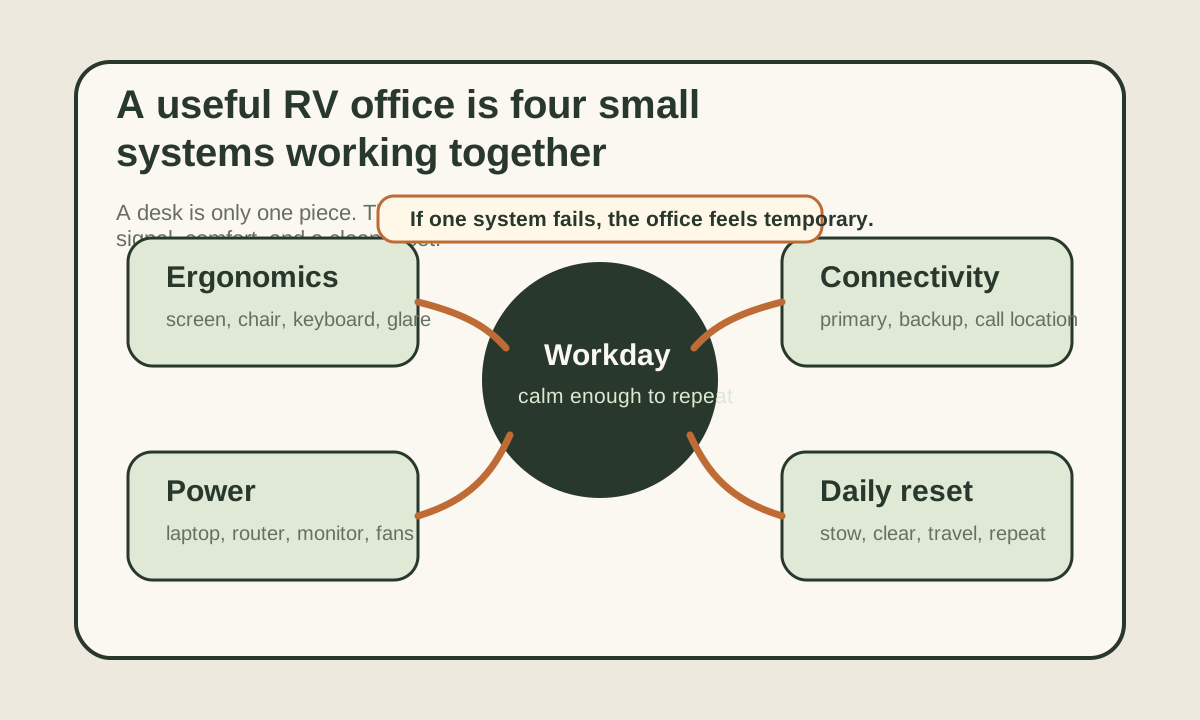
The four systems that make the office work
Compare
RV mobile office systems
Use one comparison matrix to scan the practical differences. Small screens stack each row; wider screens keep the first column pinned.
| Spec | Ergonomics | Power | Connectivity | Daily reset |
|---|---|---|---|---|
| What it protects | Neck, wrists, back, eyes, and fatigue | Laptop, monitor, internet gear, lighting, and fans | Calls, uploads, cloud apps, and backup access | Living space, travel readiness, and mental friction |
| Common weak point | Screen too low or seat too soft | Hidden inverter and internet loads | No backup when the site is weak | Cables and gear never get put away |
| Simple fix | Raise the screen and separate keyboard/mouse when possible | Measure the office load in watt-hours | Plan primary plus backup before call day | Use one bin, one cable path, and one shutdown routine |
| Best internal check | Desk ergonomics guide | Battery calculator | Connectivity planner | Office teardown checklist |
Pick the work location before buying gear
Many RV office mistakes start with buying a desk, arm, chair, monitor, or mount before the actual work location is settled.
First, test the likely places:
- dinette
- passenger seat
- bedroom corner
- bunk conversion
- outdoor table
- swivel cab seat
- fold-down wall desk
Then judge each spot by five questions:
- Can you sit there for two focused hours without pain?
- Can a laptop screen or monitor reach a reasonable height?
- Is the power path clean?
- Does the internet signal behave there?
- Can the space reset after work?
The winner is rarely perfect. You are looking for the least fragile location.
Ergonomics: good enough beats heroic suffering
An RV workspace is smaller than a home office, but the workday is still a real workday.
OSHA's workstation guidance points to the same fundamentals RVers should protect:
- screen at a comfortable height and distance
- keyboard and mouse positioned so wrists stay neutral
- seating that supports the body rather than folding it around the laptop
- glare controlled enough that you are not leaning forward all day
You do not need a full ergonomic showroom. You do need to stop treating the dinette as harmless just because it is convenient.
A simple mobile setup can work well:
- laptop stand
- compact external keyboard
- small mouse or trackpad
- cushion or lumbar support if the seat is too deep
- task light that does not glare into the screen
For the deeper posture setup, use the RV desk ergonomics guide.
Solve the screen-height problem first
The biggest easy win is often raising the laptop or monitor and using a separate keyboard. It turns a hunched laptop posture into something closer to a repeatable workstation without permanently rebuilding the rig.
Power: measure the office as one load block
An RV office can feel small and still use meaningful power.
A normal work block might include:
- laptop charging
- monitor
- phone
- headset
- router, hotspot, or Starlink
- task light
- small fan
- inverter idle draw if anything runs on AC
That office stack should be measured as one work block, not scattered through the whole rig plan.
Example:
- laptop averaging 45W for 8 hours: 360Wh
- monitor at 20W for 6 hours: 120Wh
- hotspot/router at 8W for 8 hours: 64Wh
- task light and devices: 80Wh
- inverter overhead: 100-200Wh
That is already roughly 724-824Wh before Starlink, cooking, fans, furnace, fridge, or evening loads.
If Starlink Mini runs for the workday at its official 25-40W average range, add roughly 200-320Wh for eight hours. That is why the office plan belongs next to the remote-work power budget, the battery calculator, and the limited-power work guide.
Connectivity: the desk location has to match the signal plan
Internet is not separate from the office. It decides whether the office location is usable.
Before settling on a work zone, test:
- cell signal inside the rig
- cell signal near windows
- hotspot placement with the laptop connected
- Starlink placement and cable route if satellite is part of the setup
- video-call stability at the time of day you usually work
- backup plan if the site fails
Zoom's official bandwidth guidance is a reminder that video calls need more than a speed-test screenshot. Stability, upload, latency, and congestion all matter.
Use the internet backup planner before a work-critical route. If calls are frequent, the video calls from an RV guide should shape where you sit and when you test the connection.
Match the office to the rig size
The right office setup changes with the floorplan.
Van or small Class B
In a small rig, the office should be almost completely resettable. A laptop stand, compact keyboard, power bank or DC charging path, and one small gear pouch may beat a larger desk solution because every permanent item costs living space.
The key question is not "Can I fit it?" It is "Can I live with it after work?"
Travel trailer or Class C
These rigs often have more realistic desk options, but the danger is turning the dinette into a permanent pile. A monitor can make sense here if it has a protected storage spot and does not require a messy cable rebuild every morning.
The best upgrade is usually a repeatable station: same seat, same power path, same hotspot or router location, same teardown routine.
Fifth wheel or larger motorhome
Larger rigs can support a dedicated desk, but that does not remove the need for power and signal planning. A real desk with poor cellular placement or a weak battery plan still fails as an office.
Use the extra space to reduce friction, not to add equipment that creates more load and cable clutter than the workday needs.
The daily reset is part of the design
An office that never resets turns a small rig into a smaller rig.
The daily reset should answer:
- where the laptop goes
- where the keyboard and mouse go
- where the monitor or stand goes
- which cables stay routed
- which devices charge overnight
- what has to move before travel
The simplest version is one bin and one cable path.
That sounds basic. It is also the difference between an office that feels integrated and one that slowly takes over the rig.
What to buy first
Buy in this order:
- A stable work location.
- Screen-height and input fixes.
- Power measurement and charging plan.
- Internet primary and backup plan.
- Storage/reset tools.
- Nice-to-have accessories.
Most people want to buy the visible things first. The less visible decisions are what make the office feel calm.
If you only make one purchase, make it the one that removes the biggest daily pain. For some people that is a laptop stand. For others it is a better hotspot plan, a battery monitor, or a second charging method.
A simple setup checklist
Before calling the office done, run one full mock workday:
- start from travel mode
- set up the desk
- join a test video call
- work for at least two hours
- check comfort and heat
- check battery draw
- tear the office down
- return the rig to normal living mode
If any step feels annoying now, it will feel worse after three weeks on the road.
Final thought
An RV mobile office should make work feel repeatable, not improvised.
The best setup is usually not big. It is clear:
- one place to sit
- one power plan
- one internet plan
- one reset routine
Get those right, and the office becomes part of the rig instead of a daily negotiation with it.
Frequently asked
Questions RVers usually ask next.
What matters most in an RV office setup?
Reliable internet, enough power for the full work block, workable ergonomics, and a repeatable reset routine matter more than having a large desk. The setup should support the workday and then give the space back to the rig.
Do I need a separate monitor in an RV office?
Not always. A monitor helps if you do long focus work, design, analysis, or meetings with notes, but it adds power draw and storage friction. A laptop stand plus compact keyboard may be the cleaner first step.
How much battery does an RV office use?
A basic laptop-and-hotspot office can stay under 1kWh for a normal day, while monitors, Starlink, inverter losses, fans, and long calls can push the office higher. Measure the whole work block in watt-hours before buying batteries.
Where is the best place to work inside an RV?
The best spot is the one that balances posture, power access, internet signal, noise, and reset friction. A slightly smaller workspace that resets cleanly is usually better than a larger one that blocks the rig all day.
Freshness note
Last checked April 21, 2026
This topic can change when products, plans, prices, campsite rules, or fit guidance move. These notes show what was reviewed most recently.
This review included
- Checked OSHA's computer workstation guidance for monitor, keyboard, mouse, and seating setup principles.
- Checked Zoom's official bandwidth guidance and Starlink Mini official specifications for video-call and internet power planning context.
- Expanded the guide with a four-system office framework, decision table, power examples, reset workflow, and official source routing.
Recent change log
April 21, 2026
Expanded the RV office guide with official ergonomics and connectivity checks, a custom office-system visual, and a fuller setup workflow.
April 17, 2026
Published RV office setup guide with verified power and connectivity requirements and current product links.
Broader editorial corrections are tracked on the Corrections and Updates page.
