Official plan and spec checks
Internet plans and hardware prices change often. Use these official pages as starting points before treating any plan name, price, or data allowance as final.
Pre-arrival checks
Before adding a backup
Confirm the backup uses a different network path, can be powered on the worst workday, and has already been tested at a real campsite.
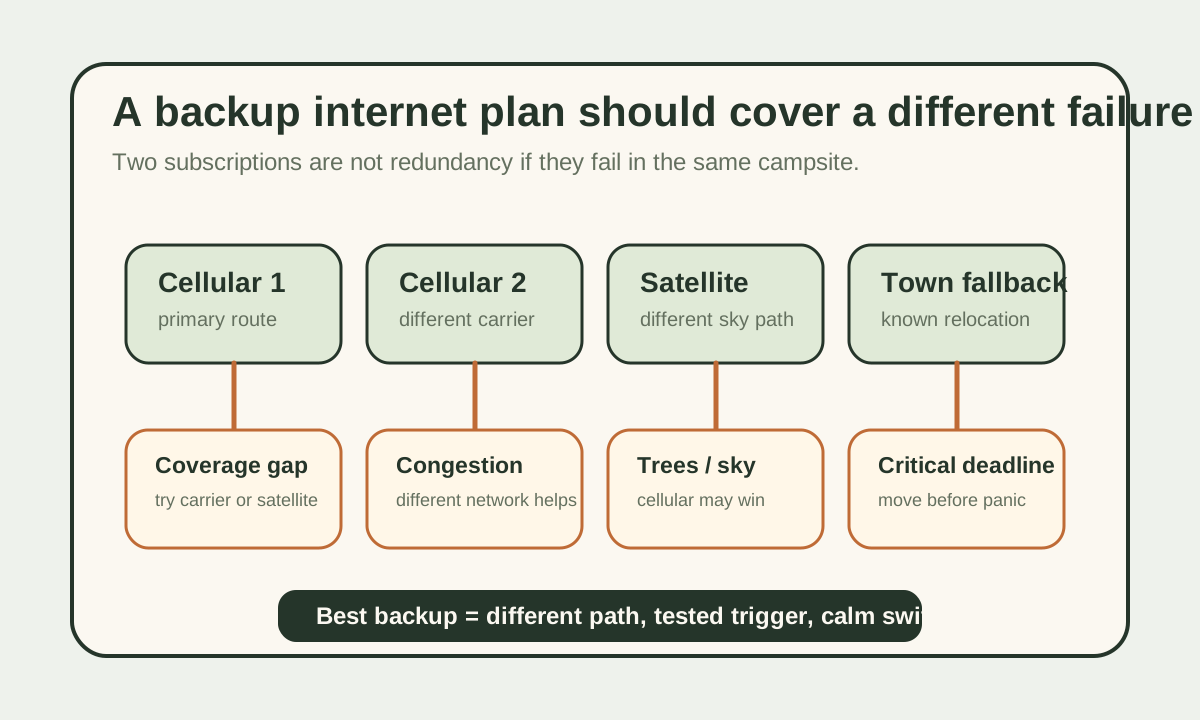
Backup internet starts with the failure mode
A lot of RVers say they need backup internet when they really mean, "I do not want the next campsite to surprise me."
That is reasonable. The mistake is buying a second connection before naming the first connection's weakness.
Most RV internet failures fall into one of these lanes:
- no usable tower coverage
- tower congestion during busy park hours
- blocked satellite sky view
- too much power draw for the workday
- gear that is too slow to deploy under pressure
- no known relocation option when the site fails
If you do not know which failure you are protecting against, the backup can become expensive overlap. It may look more serious without actually making the workday safer.
Start with the broader internet for RVers guide if you are still choosing a primary connection. Use this guide after you know which part of that plan could fail.
The practical backup options
Compare
RV backup internet options
Use one comparison matrix to scan the practical differences. Small screens stack each row; wider screens keep the first column pinned.
| Spec | Second cellular carrier | Starlink backup | Known relocation plan |
|---|---|---|---|
| Best at | Coverage or congestion diversity when one carrier struggles | Remote open-sky camps where cell service fails | Saving critical deadlines when the campsite is the problem |
| Fails when | All carriers are weak or the area is overloaded | Trees, canyon walls, or power limits block the satellite setup | You cannot move or did not identify the fallback early enough |
| Power demand | Usually low | Meaningful; include dish and router draw | Depends on destination, but avoids troubleshooting onsite |
| Cost discipline | Good if the plan is used often | Good when it prevents real work failure | Good when rare emergencies do not justify another monthly plan |
| Best fit | Park, town-edge, and corridor travel | Public-land, remote, and poor-cell routes | Occasional critical calls or uploads |
Option 1: second cellular carrier
A second cellular carrier is the cleanest first backup for many RVers because it is easy to deploy, low draw, and useful while driving, parking, and walking around town.
It works best when your problem is carrier-specific:
- Verizon is weak but T-Mobile is strong
- the campground has one overloaded tower path
- your phone plan has limited hotspot data
- a dedicated hotspot can be placed where the phone is not
It works poorly when the entire area lacks coverage. A second carrier does not fix a canyon, a remote valley, or a campsite that is simply too far from usable towers.
The carrier route is strongest when you treat it like a system:
- one primary plan for normal days
- one different carrier for backup
- one external antenna or better device placement strategy if the rig layout needs it
- one written trigger for when to switch
That last point matters. If you wait until five minutes before a meeting, every backup feels worse.
Option 2: Starlink as the backup layer
Starlink can be an excellent backup because it fails differently than cellular. If the problem is tower distance, tower congestion, or no carrier coverage, satellite can change the outcome completely.
But it is not a magic backup for every campsite.
It still needs:
- enough open sky
- enough power
- a place to deploy safely
- time to set up before the meeting starts
- a plan that fits your actual data use
Starlink Mini's official spec sheet lists average power consumption at 25-40W. Over a long work block, that is a real battery load. It is manageable for many rigs, but it should be budgeted like any other work device.
Use the Starlink for RVs guide before treating satellite as the answer. Use Starlink vs hotspot for RVers if you are still deciding whether satellite should be primary or backup.
Option 3: relocation as a serious backup
This is the least glamorous backup and one of the most useful.
A known relocation option might be:
- a nearby library
- a coffee shop with reliable upload speed
- a coworking day pass
- a campground office area
- a town parking spot with strong cellular service
- a second campsite with better sky or tower access
Relocation is not failure. It is an operational plan.
For some RVers, especially those who only have a few high-stakes calls per month, it is more sensible to know the local fallback than to pay for another subscription all year.
The catch is that relocation only works if you decide early. A good trigger might be: if the primary connection cannot pass a test call one hour before the meeting, move.
Build the stack around work consequence
The more income depends on the connection, the less you should rely on hope.
Backup stack by consequence
Match the backup cost to the cost of being offline. Not every traveler needs the same level of redundancy.
Casual use
Phone + known town fallback
Good for email, maps, light browsing, and low-stakes tasks where a missed hour is annoying, not expensive.
Routine work
Hotspot + second carrier
Good for regular meetings and deliverables when most camps stay near usable tower coverage.
High-consequence work
Cellular + satellite + relocation trigger
Better when failed calls, uploads, or availability directly affect income.
Remote route
Satellite primary + cellular backup
Best when camps often outrun cell coverage but still provide enough sky for the dish.
Three example backup stacks
These examples are not prescriptions. They show how the backup changes when the route and work consequence change.
Weekend park traveler
This RVer mostly needs maps, messages, light browsing, and maybe one casual video call.
A sensible stack might be:
- phone hotspot on the primary carrier
- downloaded maps and reservation info
- known town fallback if the park is weak
Buying satellite for this pattern may be overkill unless the traveler repeatedly chooses parks with no usable cell service.
Normal remote worker
This RVer has regular meetings, cloud apps, and deadlines, but usually camps near towns, highways, private parks, and established public campgrounds.
A sensible stack might be:
- dedicated hotspot or phone plan on the strongest carrier
- second carrier as backup
- test-call routine before important meetings
- saved relocation option in the next town
This is where the video calls from an RV guide helps because it turns "internet seems okay" into a repeatable pre-call check.
Remote-route worker
This RVer chooses public land, open desert, rural trailheads, or places where cell service regularly disappears.
A sensible stack might be:
- Starlink as the main work connection when sky view is available
- cellular as the travel-day and tree-cover backup
- battery budget for the dish and router
- relocation rule if both satellite and cellular fail the morning test
This is the pattern where satellite can be the rational expense. It is not about speed-test bragging. It is about making the route possible.
Test the backup before it matters
A backup plan should have a rehearsal.
At a normal campsite, test:
- how long the backup takes to activate
- where the device or dish actually works
- whether the laptop switches cleanly
- whether video calls behave well enough
- how much battery the backup uses over a realistic block
- whether the plan has enough data for the job
Then write down the trigger.
Examples:
- if upload speed is unstable two hours before a client call, switch carriers
- if cellular fails by 8 a.m., deploy Starlink before the workday starts
- if both fail a test call, relocate before noon
This sounds fussy until the first time it saves a deadline.
The best backup is boring
A backup that feels familiar is stronger than a backup with better theoretical specs. Practice matters because the worst time to learn the second connection is during the call you cannot miss.
Avoid the expensive overlap trap
The weakest backup plan is two services that fail together.
Examples:
- two phone plans on the same overloaded network
- satellite plus a wooded campsite with no clear placement option
- a hotspot backup with no meaningful data allowance
- a dish backup that the battery bank cannot power for the work block
- a relocation plan that is not close enough to use before the meeting
Before adding cost, ask what weakness the new layer solves.
If the answer is vague, pause. You may need better testing, a clearer route plan, or the internet backup planner more than another device.
A simple failover checklist
Use this before any work-critical stay:
- Test the primary connection before unpacking the whole office.
- Test the backup connection before the first important meeting.
- Confirm the power plan can run the internet gear for the work block.
- Save the relocation fallback before you need it.
- Decide the switch trigger while calm.
The point is not paranoia. It is reducing decision load when the connection gets weird.
Final thought
Backup internet for RVers is not a pile of subscriptions. It is a short, tested sequence for what happens when the first path fails.
For light travelers, that may be a phone and a town fallback. For normal remote workers, it may be two carriers. For income-dependent workers, it may be cellular, satellite, and a relocation rule.
Build the stack around the worst realistic workday, and the whole remote-work setup gets calmer.
Frequently asked
Questions RVers usually ask next.
What is the best backup internet option for RVers?
The best backup is the one that solves a different failure than your primary connection. For many RVers that means a second cellular carrier, Starlink for open-sky poor-cell routes, or a known relocation option for rare critical deadlines.
Do I need Starlink as a backup if I already have a hotspot?
Only if the hotspot's failure mode is common enough to justify satellite cost, setup, and power draw. If your problem is mostly one weak carrier, a second cellular carrier may be the better first backup.
Can a coffee shop or library count as a backup internet plan?
Yes, if it is identified ahead of time and close enough to use before the deadline. Relocation is not as convenient as an onboard backup, but it can be the most cost-effective solution for occasional high-stakes calls.
How often should I test RV internet backups?
Test them before any work-critical stay and whenever a plan, device, or route changes. A backup you have not tested recently may not behave like a real backup when the primary connection fails.
Freshness note
Last checked April 21, 2026
This topic can change when products, plans, prices, campsite rules, or fit guidance move. These notes show what was reviewed most recently.
This review included
- Checked current official Starlink Roam and Starlink Mini information for satellite backup cost, power, and setup context.
- Checked current official Verizon, AT&T, and T-Mobile mobile-internet pages for representative hotspot and away-from-home cellular backup lanes.
- Expanded the guide with failover scenarios, backup-stack examples, testing triggers, official source routing, and a visual failure-mode map.
Recent change log
April 21, 2026
Expanded backup-internet guidance with official plan checks, failover examples, a comparison table, and a dedicated backup-stack visual.
April 11, 2026
Refreshed backup-internet guidance around layered failover instead of one-carrier assumptions.
Broader editorial corrections are tracked on the Corrections and Updates page.
