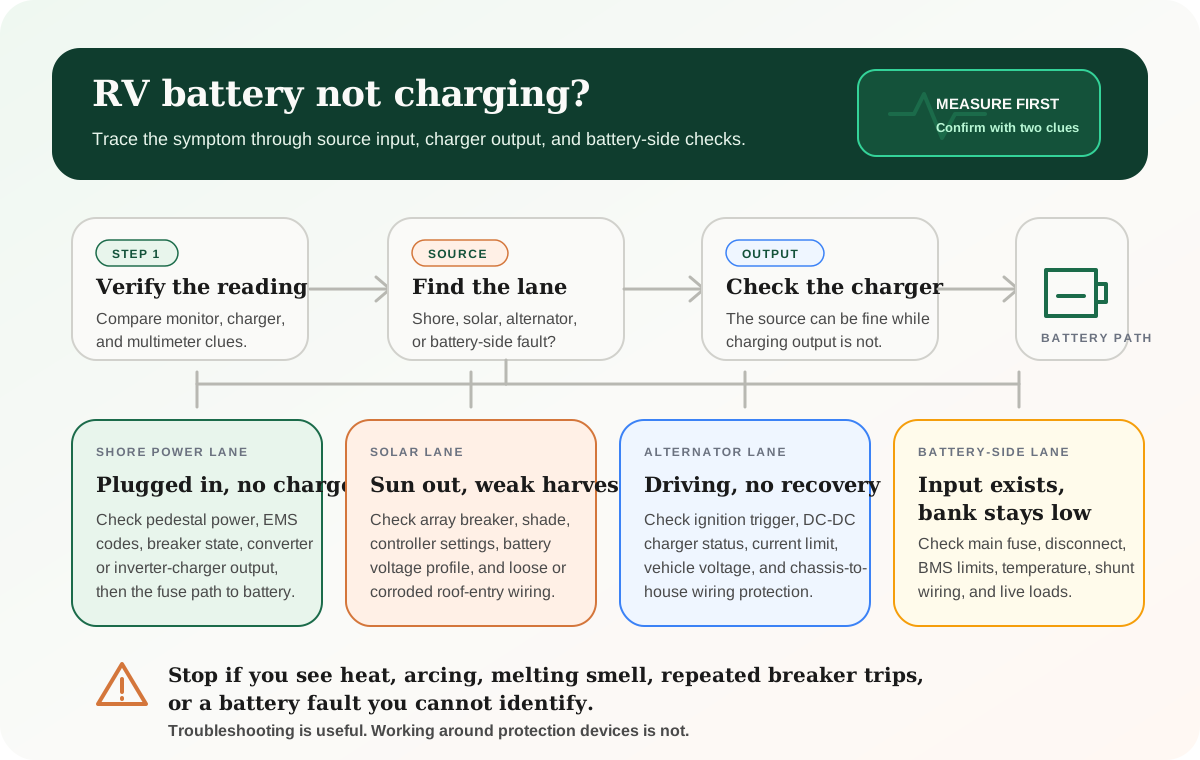
Battery charging diagnosis at a glance
Use this as the first-pass map before assuming the battery itself has failed.
First question
Is the reading real?
Compare the monitor, charger display, controller app, and a direct voltage check before trusting one confusing number.
Shore symptom
Plugged in, no recovery
Think pedestal, breaker, EMS fault, converter or inverter-charger output, and the fuse path to the bank.
Solar symptom
Sun out, weak harvest
Think shade, array disconnect, controller status, settings, battery profile, roof-entry wiring, and battery-side disconnects.
Driving symptom
Alternator not helping
Think ignition trigger, DC-to-DC charger status, input fuse, current limit, chassis voltage, and protected wiring.
Battery-side symptom
Output exists, bank low
Think main fuse, disconnect, BMS limit, temperature, shunt wiring, bus bars, or loads exceeding charge.
Stop sign
Heat or repeated trips
Do not keep resetting breakers or bypassing protection. The system is telling you to stop.
Official charging troubleshooting references
Official charging troubleshooting references
These are the April 11, 2026 source pages used for the diagnostic paths in this guide. Use the manual for your exact converter, inverter charger, solar controller, DC-to-DC charger, battery, shunt, fuse block, and RV before changing wiring or settings.
Pre-arrival checks
Test the active lane first
A shore-power problem, solar problem, alternator problem, and battery-protection problem can all look like the same low battery.
Do not defeat protection
A fuse, breaker, BMS, EMS, or charger fault is not an obstacle to bypass. It is information about where the system is unsafe or out of range.
Use exact manuals
Converter output voltage, lithium profiles, charger triggers, app fault codes, and temperature limits vary by model.
Start by proving what is actually happening
An RV battery that "is not charging" can mean several different things.
It might mean battery voltage is not rising. It might mean the battery monitor percentage is stuck. It might mean the converter is powered but not outputting charge. It might mean the solar controller is awake but current is nearly zero. It might mean the alternator lane never turns on. It might also mean the batteries are charging, but live loads are using power as fast as the charger can replace it.
Those are different problems, and they do not all point to a bad battery.
Before replacing parts, separate the symptom from the cause:
- Which charging source is supposed to be active right now?
- Does that source have input power?
- Does the charger or controller show output?
- Is that output reaching the battery-side bus or battery terminals?
- Is the battery allowed to accept charge?
- Are active loads hiding the net charge you expected to see?
If you are not sure where those parts sit, keep the RV electrical system diagram open while you work through the checks. It helps you separate source input, charger output, protection devices, shunts, bus bars, and the battery bank.
Quick safety boundaries before you test
Troubleshooting is useful. Working around safety devices is not.
Stop and get qualified help if you see:
- hot plugs, hot battery cables, hot bus bars, or hot breaker panels
- melted insulation, discoloration, or a burning smell
- arcing, popping, buzzing, or visible sparking
- repeated breaker or fuse trips
- a battery case that is swollen, cracked, leaking, or unusually hot
- a lithium battery fault you cannot identify
- charging equipment that was bypassed to "make it work"
- unknown wiring added by a previous owner
It is fine to gather observations. It is not fine to defeat fuses, breakers, disconnects, BMS protections, EMS warnings, or charger faults just to force charging.
Do not bypass the device that is protecting the system
If a fuse, breaker, EMS, charger, or battery protection circuit is stopping the charge path, treat that as information. Bypassing it can turn a charging problem into a wiring, fire, or battery-damage problem.
Source-lane diagnostic workflow
Use the active source to choose the first test. Do not mix lanes too early.
Compare
RV battery not charging workflow by active source
Use one comparison matrix to scan the practical differences. Small screens stack each row; wider screens keep the first column pinned.
| Spec | What to prove first | Common weak link | Where to go deeper |
|---|---|---|---|
| Plugged into shore power | AC power reaches the RV and the converter or inverter charger is powered | Tripped breaker, EMS delay or fault, incorrect charger mode, failed converter output, open battery fuse path | RV shore power guide |
| Generator running | Generator output is feeding the same charger path that shore power uses | Adapter mismatch, transfer behavior, low generator margin, charger draw limited by load overlap | RV generator sizing guide |
| Solar available | Controller sees PV input and sends current toward the battery | Shade, open array disconnect, wrong battery profile, controller fault, battery-side disconnect, low-temp battery protection | RV solar not working guide |
| Driving | DC-to-DC charger wakes up and has vehicle-side voltage plus house-battery output | Ignition trigger, input fuse, chassis voltage, current limit, ground path, battery BMS state | DC-to-DC charger guide |
| Charger output exists | Positive current reaches the battery-side bus or terminals | Main fuse, disconnect, shunt wiring, loose lug, corroded connection, loads outrunning charge | Battery monitor guide |
A converter problem will not be solved by staring at the solar controller. A solar profile problem will not be fixed by changing campground pedestals. A DC-to-DC trigger problem will not be fixed by replacing the house battery.
Step 1: Confirm the measurement is not lying to you
Many RV charging mysteries begin with a display that is incomplete, miscalibrated, or being read in the wrong context.
Voltage alone can be misleading. A battery under load may look weak. A battery being charged may look healthier than it really is. A lithium battery can hold voltage differently than a lead-acid battery. A monitor percentage can drift if the shunt was never configured correctly or never got a full-charge sync.
Use at least two clues:
- the battery monitor or shunt display
- the charger, converter, inverter-charger, solar controller, or DC-to-DC charger display
- a direct voltage check at the battery terminals or bus bars, if you can do that safely
- whether the battery trend changes after a known charging window
If the monitor says the bank is not charging but the charger shows output and battery voltage is rising, the monitor may be the weak clue. If the monitor says charging is happening but the battery never recovers, the load picture, monitor calibration, or actual charge path needs a closer look.
If the readings are hard to trust, compare options in the RV battery monitor buyer guide or use the RV battery monitor guide before buying larger batteries.
Step 2: Identify which charging lane should be active
The right test depends on the charging source.
Ask this before touching hardware: what should be charging the battery right now?
That answer narrows the fault:
- Shore power or generator power should feed the converter or inverter charger.
- Solar should feed the solar charge controller, then the battery-side path.
- Driving should feed the DC-to-DC charger or alternator charging lane.
- A standalone charger should have a direct AC input and a protected DC output path.
Once you pick the lane, stay in it until you prove input and output. Jumping between lanes is how people buy converters for solar problems, batteries for open fuses, or charge controllers for a bad disconnect.
Step 3: If shore power is active, trace AC input to charger output
When an RV is plugged in and the battery is not recovering, many people blame the battery first. The better path is to trace shore power into the charger and then out toward the bank.
Check the basics:
- Is the pedestal or outlet actually live?
- Is the pedestal breaker on after the cord is connected?
- Is the RV main breaker on?
- Is an EMS or surge protector showing a fault, delay, or disconnect state?
- Is the converter, charger, or inverter charger powered?
- Is the charger profile appropriate for the battery chemistry?
- Is charger output current visible on a monitor, display, or safe meter check?
For a traditional converter setup, the converter may feed the 12V system and charge the battery bank. For an inverter-charger setup, the same box may handle battery charging, inverter output, and shore/generator pass-through behavior.
Progressive Dynamics' troubleshooting guidance is a good example of the test order: verify converter output, then check whether the battery-side fuse or breaker path is open before declaring the converter bad. The exact voltage target and test points depend on your converter model, so use the manual for your own unit.
If lights work while plugged in but the battery still does not recover, do not assume everything is fine. The converter may be supporting DC loads without properly charging the bank, the battery fuse path may be open, or the battery may be refusing charge.
Use the RV shore power guide for the pedestal and adapter side. Use the inverter charger buyer guide if you are trying to understand whether your existing charger is the right class of equipment for the battery bank.
Step 4: If solar is active, trace panel input to controller output
Solar charging problems usually fall into four buckets:
- the panels are not producing much
- the controller is not receiving panel input
- the controller is receiving input but not charging correctly
- the controller is charging, but battery-side wiring, protection, or loads hide the gain
Start with conditions. Shade, clouds, low sun angle, dirty panels, heat, and flat-mounted roof panels can all reduce output. A weak harvest is not automatically a broken system.
Then check the system path:
- Is the solar array breaker or disconnect on?
- Does the controller show panel voltage?
- Does the controller show battery voltage?
- Does the controller show charging current?
- Is the controller configured for the battery chemistry?
- Is the controller in a normal charging stage or a fault state?
- Are battery temperature limits preventing charge?
Victron's SmartSolar troubleshooting flow is useful because it separates charger state, PV input, battery voltage, and error conditions. The brand may differ in your rig, but the logic is the same: panel input and charger output are separate facts.
A common lithium-specific mistake is assuming controller settings do not matter because the battery has a BMS. The BMS is a backstop, not a replacement for the right charging profile.
If the controller display looks confusing, use the RV solar charge controller guide. If the entire solar lane is weak or intermittent, switch to the RV solar not working troubleshooting guide.
Step 5: If alternator charging is expected, verify the DC-to-DC lane
Modern alternator charging should usually be treated as its own lane, especially with lithium batteries. The alternator is not a free unlimited charger for the house bank.
If the battery does not recover while driving, check:
- whether the DC-to-DC charger powers on with the engine running
- whether the ignition or voltage-sense trigger is working
- whether the charger is in a fault, standby, or temperature-limited state
- whether input and output fuses are intact
- whether current limits are set lower than expected
- whether vehicle-side voltage is high enough for the charger to operate
- whether the house battery is refusing charge because of temperature or BMS limits
Renogy's DC-DC troubleshooting guidance is a useful official reminder that the alternator lane is not just one wire. Trigger behavior, source voltage, fuses, ground path, and battery connections all matter before blaming the charger.
If the charger has Bluetooth, app, or display data, use it. If it does not, you may need a meter and the component manual to know whether the problem is vehicle input, charger logic, output wiring, or battery acceptance.
Use the DC-to-DC charger buyer guide if the current setup is too small, unsupported for lithium, or impossible to monitor.
Step 6: If charger output exists, inspect the battery-side path
This is where many frustrating problems hide.
The charging source can be working and the charger can be outputting, but the bank may still not recover if the battery-side path is interrupted or limited.
Compare
Battery-side reasons charging may not reach the bank
Use one comparison matrix to scan the practical differences. Small screens stack each row; wider screens keep the first column pinned.
| Spec | What to check | What it can look like | Why it matters |
|---|---|---|---|
| Main fuse or breaker | Charger appears alive but bank never changes | An open protection device can isolate the bank from the charger | Do not upsize or bypass protection to force charging |
| Battery disconnect | Coach works from charger but battery stays disconnected | Some disconnects isolate the bank while other 12V loads still appear normal | Confirm the actual switch position and wiring behavior |
| Loose or corroded connection | Intermittent charging, voltage drop, heat, or strange monitor behavior | Resistance can waste power and create dangerous heat | Stop if anything is hot or visibly damaged |
| Lithium BMS limit | Charger is ready but battery will not accept current | Cold temperature, low-voltage disconnect, high/low cell state, or fault logic may block charging | Use the battery app or manual when available |
| Loads outrunning charge | Battery rises slowly or not at all while appliances run | The charger may be feeding live loads instead of rebuilding reserve | Turn off heavy loads and retest net current |
Victron's Wiring Unlimited is useful here because voltage drop, cable size, lugs, bus bars, and fuse placement decide whether a technically working charger behaves well at the battery. Good equipment can look bad through a weak path.
A shunt-based monitor is especially useful because it can show net current. If the charger is producing 20 amps but the RV is using 18 amps at the same time, the battery may only see a small net gain.
Step 7: Look for chemistry and temperature limits
Battery chemistry changes the troubleshooting path.
Flooded lead-acid and AGM batteries can have sulfation, age, water-level, acceptance, or charger-profile issues. Lithium batteries can have BMS states, temperature limits, cell-balance behavior, communication quirks, or app-reported faults.
Cold weather is the big lithium watchout. Battle Born's FAQ, for example, says its batteries protect themselves from charging in cold temperatures and will not accept charge once internal cell temperature drops to 24 degrees Fahrenheit. Other brands can use different thresholds, so use your battery manual instead of copying a number across brands.
If the bank is cold and the charger seems fine, do not force the issue. Verify the battery's low-temperature behavior and use the cold-weather lithium guide if shoulder-season camping is part of your normal route.
Step 8: Separate "not charging" from "not keeping up"
Sometimes the charging system is working, but the energy budget is not.
That can happen when:
- the refrigerator, furnace, fans, inverter, router, or office gear is running continuously
- solar is weak because of shade or season
- the converter is small compared with active DC loads
- the battery bank is undersized for the trip pattern
- a hidden parasitic draw is larger than expected
- an inverter is powering AC loads quietly in the background
The practical test is to reduce loads, then watch net current and battery trend. If the battery recovers with loads off, the problem may be sizing, load overlap, or usage pattern rather than a dead charger.
If the bank keeps losing reserve after the obvious loads are off, use the RV parasitic draw guide to measure quiet current, isolate the fuse path, and decide whether the drain should be fixed, isolated, or maintained.
Use the battery sizing calculator when the system technically charges but still cannot keep up with the way you camp.
The diagnostic order that prevents parts-cannon spending
Use this order before replacing hardware:
- Confirm the display or monitor reading.
- Identify the charging source that should be active.
- Confirm input power to that source or charger.
- Confirm charger or controller output.
- Confirm the output reaches the battery-side bus or terminals.
- Check fuses, breakers, disconnects, and connections.
- Check battery temperature, chemistry settings, and BMS status.
- Turn off large loads and check whether the bank begins recovering.
- Decide whether the weak link is the charger, battery, wiring, settings, or system size.
This sequence keeps you from buying batteries when the converter was the issue, buying a converter when the disconnect was open, or blaming solar when the battery was cold and refusing charge.
Most useful first tool
A clamp meter, a basic multimeter, component manuals, and a shunt-based battery monitor will usually tell you more than a shopping cart full of replacement parts.
Final thought
An RV battery charging problem is not one problem. It is a source-lane problem until you prove otherwise. Work from source input to charger output to battery-side path to battery acceptance, and the fix usually gets smaller, safer, and cheaper than the first guess.
Where to go next
If the problem is confusing because the system layout is unclear, start with the RV electrical system diagram.
If the problem appears only when plugged in, use the RV shore power guide before testing adapters, pedestal behavior, or protection devices.
If charging while driving is the weak lane, use the DC-to-DC charger guide.
If solar is the weak lane, use the solar charge controller guide or the RV solar not working troubleshooting guide.
If the system technically charges but never keeps up, use the battery sizing calculator and the RV parasitic draw guide.
Frequently asked
Questions RVers usually ask next.
Why is my RV battery not charging when plugged into shore power?
Common causes include no pedestal power, an EMS fault, a tripped breaker, a converter or inverter charger that is not powered, incorrect charger settings, an open fuse path, a battery disconnect issue, or a battery refusing charge because of temperature or protection limits.
Can my RV lights work even if the battery is not charging?
Yes. In some setups the converter can support 12V loads while the battery itself is disconnected, protected, failed, or not receiving charge through the expected path. That is why you need to test charger output and battery-side current instead of trusting the lights alone.
Why is my solar controller on but my RV battery still low?
The controller may be seeing weak panel input, using the wrong battery profile, sitting in a limited charging stage, facing a battery-side disconnect, or feeding live loads that consume most of the available solar current. Check PV input, battery voltage, controller status, charging current, and battery-side protection separately.
Can cold weather make an RV lithium battery stop charging?
Yes. Many LiFePO4 batteries block charging below a defined internal temperature to protect the cells. Use the battery app or manual before forcing charge, because thresholds and heater behavior vary by brand and model.
Should I replace the battery first if it is not charging?
Usually no. Confirm the monitor reading, charging source, charger output, fuse path, disconnect state, temperature limits, and active loads first. Replacing the battery before diagnosis can miss the actual fault and leave the new battery with the same charging problem.
Freshness note
Last checked April 11, 2026
This topic can change when products, plans, prices, campsite rules, or fit guidance move. These notes show what was reviewed most recently.
This review included
- Checked converter-output and fuse-path troubleshooting against Progressive Dynamics' official power-converter troubleshooting guidance.
- Checked solar-controller status, charger-output logic, and wiring/voltage-drop cautions against Victron Energy's official SmartSolar troubleshooting and Wiring Unlimited documentation.
- Checked DC-to-DC charger trigger, alternator-lane, fuse, and battery-connection checks against Renogy's official DC-DC battery charger troubleshooting guidance.
- Checked lithium BMS low-temperature charging behavior and low-voltage disconnect language against Battle Born Batteries' official FAQ.
Recent change log
April 11, 2026
Rebuilt the troubleshooting guide around source-lane diagnosis, official converter/solar/DC-to-DC/lithium references, clearer stop-now safety boundaries, and load-vs-charge interpretation.
April 10, 2026
Published a diagnostic guide for RV batteries that are not charging from shore power, solar, alternator charging, or generator-fed charging.
Broader editorial corrections are tracked on the Corrections and Updates page.


