Shortlist first
Use this to find the winner first, then compare the alternates only if their tradeoffs fit your rig better.
Shortlist labels are editorial recommendations, not popularity rankings. Fit score still matters, but the label tells you why each pick made this guide.
How fit scores work
Scores are editorial fit scores, not user-review averages. The rubric weighs stated RV-use fit, verified specs and limits, whole-rig friction, visible downsides or support risk, and value for the specific job in this guide. Read the full scoring rubric.
If you need one baseline option before reading the full guide, start with Victron SmartShunt 500A/50mV for app-first clean install.
The first option to evaluate if you want the strongest all-around fit for this guide. Check the other cards only if their award label matches your constraint better.
| Product | Why shortlisted | Fit score | Key spec | Best for | Actions |
|---|---|---|---|---|---|
| Victron SmartShunt 500A/50mV Links to: Victron SmartShunt 500A/50mV | Best overall The first option to evaluate if you want the strongest all-around fit for this guide. | 4.9 / 5 fit scoreScore rubric | Dealer-priced | 500A/50mV | Bluetooth + VE.Direct | no display | App-first clean install | Read Victron SmartShunt 500A/50mV notesCheck listing at VictronMerchant link - direct listing. Verify price and specs at Victron. |
| Victron BMV-712 Smart Links to: Victron BMV-712 Smart | Also great A strong alternate when its specific tradeoffs fit your rig better than the winner. | 4.8 / 5 fit score | Dealer-priced | 6.5-70V | Bluetooth + VE.Direct | round head unit | Display plus app visibility | Read Victron BMV-712 Smart notesCheck listing at VictronMerchant link - direct listing. Verify price and specs at Victron. |
| Renogy 500A Battery Monitor With Shunt Links to: Renogy 500A Battery Monitor With Shunt | Best value The pick that balances capability and cost pressure best for this decision. | 4.5 / 5 fit score | $89.99 | 500A shunt | 10-120V | 20ft cable | Value display-first upgrade | Read Renogy 500A Battery Monitor With Shunt notesCheck listing at RenogyMerchant link - direct listing. Verify price and specs at Renogy. |
Official monitor checks
Battery monitors are small purchases compared with a battery bank, but the wrong monitor or a bad shunt install can make every later battery decision worse. Verify the current model page and manual before wiring.
Pre-arrival checks
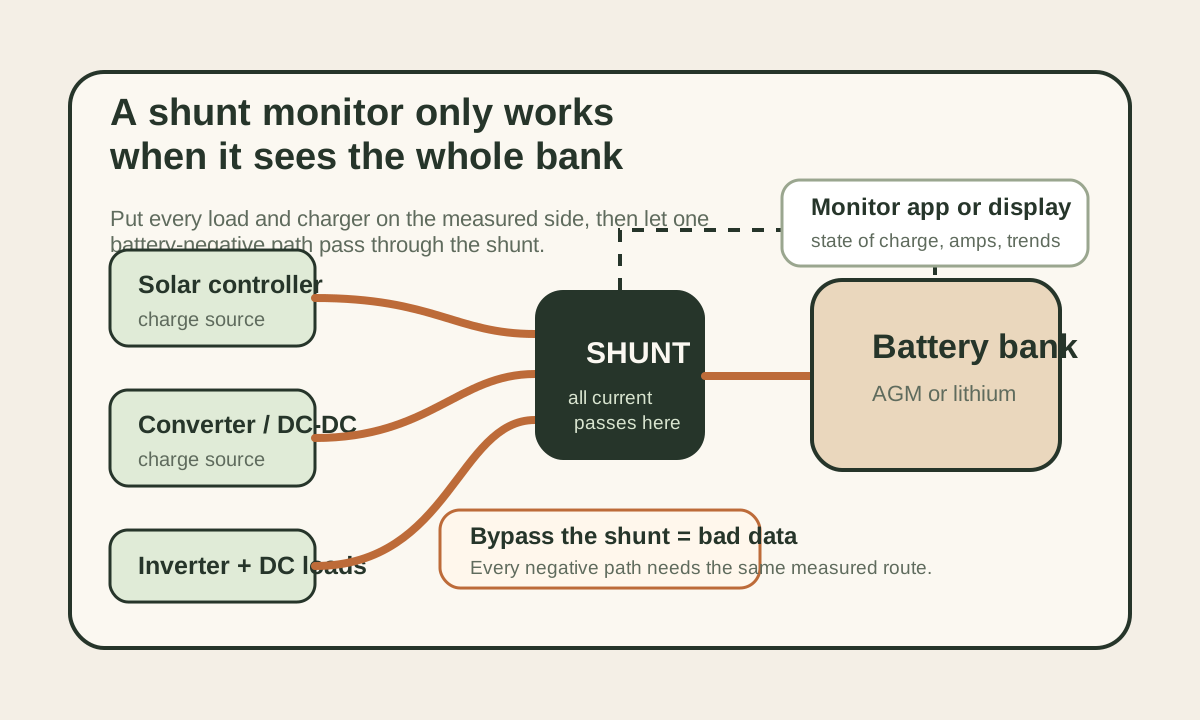
Route every negative through the shunt
A bypassed inverter, charger, solar controller, or chassis ground path can make the state-of-charge number drift out of reality.
Calibrate for the actual bank
Capacity, chemistry, charged-voltage behavior, tail current, and synchronization settings should match the battery bank, not the monitor defaults.
Choose the display habit first
Phone-only, wall display, and budget LCD monitors all work when they match how the people in the rig actually check power.
Exact battery monitors are easier to buy than monitor "types"
Once the battery bank matters, a voltmeter is no longer enough.
The real question becomes: which exact monitor gives you the clearest answer on:
- state of charge
- charge and discharge current
- historical use trends
- whether the bank is actually recovering the way you thought it was
That is why this page compares exact monitors instead of just talking about "app-based" or "display-based" monitoring in general.
Price note
Specs and price signals below were checked against official manufacturer pages and manuals on April 21, 2026. Victron is primarily dealer-priced, so the SmartShunt and BMV-712 are listed that way rather than with one fixed US checkout price.
What matters before you pick the screen style
Shunt size and voltage range decide compatibility
All three picks here are real shunt-based monitors, but they do not present the information in the same way and they do not ask the same install tradeoffs from the coach.
Display style changes whether you will use the monitor
Some people check the electrical system with a phone in hand. Others want an always-visible number on a wall or cabinet face. The right answer is the one you will still use six months from now.
Auxiliary sensing and history matter in larger systems
Second-battery monitoring, midpoint checking, optional temperature sensing, and historical trend data become more useful as the rig gets more electrical complexity.
How to choose the monitor style without overthinking it
Pick the SmartShunt when the electrical system already lives in apps.
That is usually the cleanest answer in modern lithium builds where the owner already opens VictronConnect, a solar controller app, a DC-to-DC charger app, or a Bluetooth battery app. The upside is a cleaner install and fewer holes in the coach. The downside is that anyone who wants to know the battery state needs the phone, the app, and enough interest to check it.
That tradeoff is fine for a solo traveler or one technically minded owner. It can be annoying in a shared rig where a partner, guest, or family member just wants to know whether the battery is low before turning on the inverter.
Pick the BMV-712 when battery status should be visible without a phone.
A round display sounds old-fashioned until you live with it. Full-time RVs, shared coaches, rental-style family use, and rigs with lots of small daily decisions benefit from a number on the wall. People can glance at state of charge, see whether a load is pulling hard, and notice whether charging is happening before the phone comes out.
The install takes more planning because the head unit needs a mounting location and cable path. That is the cost of making the battery state obvious to everyone.
Pick the Renogy monitor when the current problem is voltage-only guessing.
Not every rig needs a premium monitoring ecosystem on day one. A simple shunt-and-display monitor can be a huge upgrade if the current setup is a basic control-panel voltmeter that says "full" until the bank is already under stress. The Renogy lane is strongest when the battery bank is simple, the budget matters, and the goal is to learn real current flow before spending more on lithium, inverter, or solar upgrades.
It is less compelling when the rest of the electrical system is already advanced. If you are building around remote monitoring, GX devices, Victron chargers, or a more integrated dashboard, saving money on the monitor can make the whole system feel more fragmented.
The install detail that decides whether the numbers are real
A shunt monitor is not a magic fuel gauge. It is a measuring device in one current path.
That means the wiring has to force every meaningful load and charging source through the shunt. Solar controller negative, inverter negative, converter negative, DC fuse panel negative, DC-to-DC charger negative, and any added accessory grounds all need to land on the load side of the shunt. The battery side should normally have one path back to the battery negative.
If the inverter is accidentally connected directly to the battery, the monitor may show a quiet overnight while the inverter quietly drains the bank. If a charger bypasses the shunt, the monitor may miss recovery current and stay pessimistic. If a chassis ground path creates a hidden bypass, the state-of-charge number can drift until the owner stops trusting it.
That is why the best install check is not just "does the display turn on?" It is this sequence:
- Turn on a known DC load and confirm the monitor shows discharge current.
- Turn on the inverter with a known AC load and confirm the monitor sees that draw.
- Start shore charging, solar charging, or alternator charging and confirm charge current shows in the correct direction.
- Shut everything down and confirm idle draw makes sense instead of hiding a bypass.
- After a full charge, synchronize the monitor only when the battery bank is actually full by the battery manufacturer's standards.
The shunt should also be physically accessible. If it is buried behind a battery box, under a mess of unlabeled cables, or exposed where tools can short across it, the install may be technically correct and still unfriendly to service.
A 200Ah battery bank example
Imagine a 200Ah lithium bank that usually uses 70Ah overnight between lights, fridge controls, furnace fan, router, laptops, water pump, and small inverter loads. A voltmeter might still look fairly calm in the morning, especially under light load. The shunt monitor tells the more useful story: roughly 130Ah remaining before solar recovery starts.
Now add a cloudy day where solar only returns 35Ah. The monitor shows the bank going into the second night around 165Ah used across the two-day window if the owner does not adjust loads. That is the moment the data becomes valuable. You can decide to reduce inverter use, run the generator briefly, drive with DC-to-DC charging, or shorten the stay before the bank is in a stressful state.
The same logic works for AGM, but with a smaller practical usable window. A 200Ah AGM bank is usually planned around roughly 100Ah usable if you are trying not to abuse the batteries. A monitor helps because it shows when "only one more laptop charge" is actually pushing the bank into the range where voltage sag, slow recovery, and shortened battery life start to matter.
What a monitor will not fix
A monitor does not add capacity, fix a weak charger, make a poor solar layout productive, or turn an undersized battery bank into a full-time system.
It does something more boring and more useful: it makes the system honest.
If the bank is too small, the monitor will prove it. If the fridge is drawing more than expected, the monitor will show the pattern. If the alternator charge lane is weaker than the brochure implied, the monitor will expose the actual amps. If a lithium bank is never reaching a true full charge, history and synchronization behavior will start telling that story.
That can feel disappointing, but it is the point. Good monitoring makes the next purchase better. Instead of guessing whether you need more solar, more battery, a DC-to-DC charger, or a smaller inverter habit, you can see which part of the system is actually limiting the stay.
Compare
Compare fast
Use one comparison matrix to scan the practical differences. Small screens stack each row; wider screens keep the first column pinned.
| Spec | Victron SmartShunt 500A/50mV | Victron BMV-712 Smart | Renogy 500A Battery Monitor |
|---|---|---|---|
| Price checked | Dealer-priced; varies by seller | Dealer-priced; varies by seller | $89.99 |
| Monitor style | App-first shunt | Round panel display + app | Dedicated display + shunt |
| Shunt rating | 500A / 50mV | 500A / 50mV | 500A shunt |
| Voltage range | 6.5-70Vdc | 6.5-70Vdc | 10-120V |
| Connectivity | Bluetooth + VE.Direct | Bluetooth + VE.Direct | Wired display |
| Aux sensing | Second battery, midpoint, or temp sensor input | Second battery, midpoint, or temp sensor input | Basic battery monitoring focus |
| Display hardware | No dedicated display | 68.7 x 68.7 x 30.6 mm head unit | LCD display with 20ft cable |
| Best fit | Clean modern app-based installs | At-a-glance coach visibility | Budget-friendly monitoring upgrades |
The shortlist
- Latest product check
- Specs, fit notes, and current listing context were reviewed June 6, 2026.
- Evidence label
- Spec-verified: Score is based on current published specs, official documentation, pricing context, compatibility, and RV-use fit analysis.
- Price context
- Pricing and availability can change, so confirm the merchant listing before buying.
Product facts last checked June 6, 2026
Victron SmartShunt 500A/50mV
Editorial fit score
Victron positions the SmartShunt as the cleaner alternative to a BMV monitor when you still want serious battery monitoring. The official product page lists Bluetooth, a VE.Direct port, and an auxiliary connection that can be used for a second battery, midpoint monitoring, or an optional temperature sensor. It is the easiest recommendation for app-comfortable RVers who want less panel clutter.
Review verdict
- Short verdict
- The best RV battery monitor when you want full shunt-based data without cutting in a display head or cluttering the coach wall.
- Evidence used
- Spec-verified
- Score is based on current published specs, official documentation, pricing context, compatibility, and RV-use fit analysis.
- Why it made the shortlist
- Best overall
- The first option to evaluate if you want the strongest all-around fit for this guide.
- Best if
- App-first clean install
- Why not this product?
- If you want anyone in the coach to glance at state of charge without opening an app, the BMV-712 is easier to live with.
- Watch for
- No always-visible screen inside the coach
- Product check date
- Specs, fit notes, and current listing context were last checked June 6, 2026.
Key specs
- Price checked
- Dealer-priced; varies
- Shunt rating
- 500A / 50mV
- Voltage range
- 6.5-70Vdc
- Connectivity
- Bluetooth + VE.Direct
Score basis
Score is based on current published specs, official documentation, pricing context, compatibility, and RV-use fit analysis. These are editorial fit scores, not customer-review averages. Read the scoring rubric.
- RV-use fit
- 30% weight
- Verified specs and limits
- 25% weight
- Whole-rig friction
- 20% weight
- Downsides and support risk
- 15% weight
- Value for the job
- 10% weight
How directly the product solves the specific off-grid RV job in this guide.
Capacity, dimensions, electrical limits, protection claims, and compatibility constraints we can verify from current sources.
Install effort, storage, wiring, service access, weight, refill workflow, or daily-use hassle.
Known tradeoffs, unclear claims, warranty coverage, support risk, and wrong-buyer failure modes.
Whether the price makes sense after fit, specs, and tradeoffs still hold.
Testing limits
- This is not a hands-on endurance or lab test unless the review explicitly says so.
- Specs, pricing, bundles, and availability can change, so confirm the current listing and manual before buying.
Reasons to buy
- Best clean-install answer in this comparison
- Strong connectivity and history tools through VictronConnect
- Auxiliary sensing makes it more useful in larger systems
Watch-outs
- No always-visible screen inside the coach
- Dealer-priced instead of simple direct-cart retail pricing
- Best value depends on being comfortable with app-first monitoring
Whole-bank math
Why it wins
Less clutter, same serious data
You still get true shunt-based visibility without cutting in a round display or giving up wall space.
Best buyer
RVer who already uses the phone as the dashboard
Especially strong in modern lithium systems where the owner already checks charge status and solar data in apps.
When to skip it
Multi-user rigs needing a visible panel
If you want anyone in the coach to glance at state of charge without opening an app, the BMV-712 is easier to live with.
Related parts and setup checks
Battery monitor guide
Use this to calibrate the monitor expectation and understand what the numbers mean once it is installed.
Open Battery monitor guideRuntime guide
Helpful if the point of adding a monitor is to stop guessing how long a 100Ah or 200Ah bank really lasts.
Open Runtime guideDC-to-DC charger guide
A monitor becomes much more useful when you are trying to judge whether the alternator lane is actually refilling the bank.
Open DC-to-DC charger guideCheck current listing
Victron SmartShunt 500A/50mV
Use the listing after the fit notes make sense for your rig. Pricing and availability can change, so verify the merchant page before buying.
- Latest product check
- Specs, fit notes, and current listing context were reviewed June 6, 2026.
- Evidence label
- Spec-verified: Score is based on current published specs, official documentation, pricing context, compatibility, and RV-use fit analysis.
- Price context
- Pricing and availability can change, so confirm the merchant listing before buying.
Product facts last checked June 6, 2026
Victron BMV-712 Smart
Editorial fit score
Victron's BMV-712 Smart combines Bluetooth, VE.Direct integration, a round coach display, and the same 6.5-70V monitoring range that makes it comfortable in serious RV battery systems. The official manual also calls out the auxiliary input for second-battery, midpoint, or optional temperature sensing, which keeps it useful long after the install day is over.
Review verdict
- Short verdict
- The best battery monitor when you want serious Victron-grade data plus a dedicated in-coach display that keeps the bank visible without unlocking a phone.
- Evidence used
- Spec-verified
- Score is based on current published specs, official documentation, pricing context, compatibility, and RV-use fit analysis.
- Why it made the shortlist
- Also great
- A strong alternate when its specific tradeoffs fit your rig better than the winner.
- Best if
- Display plus app visibility
- Why not this product?
- If the round display feels like needless clutter, the SmartShunt does nearly the same monitoring job with a cleaner install.
- Watch for
- Requires a place to mount the head unit
- Product check date
- Specs, fit notes, and current listing context were last checked June 6, 2026.
Key specs
- Price checked
- Dealer-priced; varies
- Shunt rating
- 500A / 50mV
- Voltage range
- 6.5-70Vdc
- Connectivity
- Bluetooth + VE.Direct
Score basis
Score is based on current published specs, official documentation, pricing context, compatibility, and RV-use fit analysis. These are editorial fit scores, not customer-review averages. Read the scoring rubric.
- RV-use fit
- 30% weight
- Verified specs and limits
- 25% weight
- Whole-rig friction
- 20% weight
- Downsides and support risk
- 15% weight
- Value for the job
- 10% weight
How directly the product solves the specific off-grid RV job in this guide.
Capacity, dimensions, electrical limits, protection claims, and compatibility constraints we can verify from current sources.
Install effort, storage, wiring, service access, weight, refill workflow, or daily-use hassle.
Known tradeoffs, unclear claims, warranty coverage, support risk, and wrong-buyer failure modes.
Whether the price makes sense after fit, specs, and tradeoffs still hold.
Testing limits
- This is not a hands-on endurance or lab test unless the review explicitly says so.
- Specs, pricing, bundles, and availability can change, so confirm the current listing and manual before buying.
Reasons to buy
- Best balance of display visibility and app access
- Strong fit for multi-user or full-time coaches
- Keeps the electrical state visible without relying on a phone
Watch-outs
- Requires a place to mount the head unit
- Dealer-priced instead of fixed official checkout pricing
- Slightly more install fuss than the SmartShunt
Whole-bank math
Why it wins
Always-visible battery status
It is the monitor most likely to be checked by anyone in the coach, which makes the data more useful day to day.
Best buyer
RVer who wants confidence at a glance
Great for shared rigs, full-timers, and anyone who wants the battery state visible without opening an app first.
When to skip it
Minimalist app-only installs
If the round display feels like needless clutter, the SmartShunt does nearly the same monitoring job with a cleaner install.
Related parts and setup checks
Battery monitor guide
A good follow-up if the goal is to get better at interpreting state of charge and historical consumption rather than just installing hardware.
Open Battery monitor guideBattery sizing guide
A dedicated display is especially useful when the bank is large enough that bad assumptions get expensive quickly.
Open Battery sizing guideCharging strategy guide
Use this when you need to translate monitor data into better shore, alternator, or solar decisions.
Open Charging strategy guideCheck current listing
Victron BMV-712 Smart
Use the listing after the fit notes make sense for your rig. Pricing and availability can change, so verify the merchant page before buying.
- Latest product check
- Specs, fit notes, and current listing context were reviewed June 6, 2026.
- Evidence label
- Spec-verified: Score is based on current published specs, official documentation, pricing context, compatibility, and RV-use fit analysis.
- Price context
- Pricing and availability can change, so confirm the merchant listing before buying.
Product facts last checked June 6, 2026
Renogy 500A Battery Monitor With Shunt
Editorial fit score
Renogy's official product listing puts the 500A Battery Monitor With Shunt at $89.99 and describes a 10-120V operating range, a 500A shunt, 1% current-measurement accuracy, and a 20-foot display cable. It is not the most ecosystem-rich option here, but it is a very practical way to move beyond raw voltage guessing.
Review verdict
- Short verdict
- The best value RV battery monitor when you want a straightforward display-based upgrade without paying Victron money to stop guessing.
- Evidence used
- Spec-verified
- Score is based on current published specs, official documentation, pricing context, compatibility, and RV-use fit analysis.
- Why it made the shortlist
- Best value
- The pick that balances capability and cost pressure best for this decision.
- Best if
- Value display-first upgrade
- Why not this product?
- If the rig already leans on app visibility, remote monitoring, or broader ecosystem integration, the Victron options age better.
- Watch for
- Less polished monitoring ecosystem than Victron
- Product check date
- Specs, fit notes, and current listing context were last checked June 6, 2026.
Key specs
- Price checked
- $89.99
- Shunt rating
- 500A
- Voltage range
- 10-120V
- Accuracy
- 1%
Score basis
Score is based on current published specs, official documentation, pricing context, compatibility, and RV-use fit analysis. These are editorial fit scores, not customer-review averages. Read the scoring rubric.
- RV-use fit
- 30% weight
- Verified specs and limits
- 25% weight
- Whole-rig friction
- 20% weight
- Downsides and support risk
- 15% weight
- Value for the job
- 10% weight
How directly the product solves the specific off-grid RV job in this guide.
Capacity, dimensions, electrical limits, protection claims, and compatibility constraints we can verify from current sources.
Install effort, storage, wiring, service access, weight, refill workflow, or daily-use hassle.
Known tradeoffs, unclear claims, warranty coverage, support risk, and wrong-buyer failure modes.
Whether the price makes sense after fit, specs, and tradeoffs still hold.
Testing limits
- This is not a hands-on endurance or lab test unless the review explicitly says so.
- Specs, pricing, bundles, and availability can change, so confirm the current listing and manual before buying.
Reasons to buy
- Best value in this comparison
- Straightforward dedicated display and long cable run
- Big upgrade over voltage-only guessing
Watch-outs
- Less polished monitoring ecosystem than Victron
- No app-first visibility story
- Best for simpler systems rather than more advanced integrated dashboards
Whole-bank math
Why it wins
Cheap clarity
This is the easy recommendation when you mostly need to stop guessing and do not need a premium app ecosystem to get there.
Best buyer
RVer upgrading from a voltmeter-only setup
A strong first monitor when the coach needs better decisions but the electrical system is still fairly straightforward.
When to skip it
High-integration builds
If the rig already leans on app visibility, remote monitoring, or broader ecosystem integration, the Victron options age better.
Related parts and setup checks
Runtime guide
Use this when the real goal is to connect the new monitor data to how long the coach can actually stay out.
Open Runtime guideBattery monitor guide
Helpful for learning what state of charge, current flow, and charge history actually mean after the monitor is installed.
Open Battery monitor guideCharging-source guide
A good next read if the monitor is being added to understand whether solar, shore, or alternator charging is carrying the right amount of work.
Open Charging-source guideCheck current listing
Renogy 500A Battery Monitor With Shunt
Use the listing after the fit notes make sense for your rig. Pricing and availability can change, so verify the merchant page before buying.
The monitor that gets checked is the monitor that helps
A perfect monitor that you forget to open is less useful than a simpler monitor you actually use on travel days, shore-power days, and cloudy recovery days. Buy the reading style you will trust in real camp life.
The common buying mistake
The biggest mistake is waiting until the bank feels stressful before adding a monitor.
The better move is adding one early enough that it teaches you:
- the real overnight draw
- whether the bank is actually recharging fully
- which loads quietly hurt the most
- how the trip changes the battery story from day to day
What to record during the first week
The monitor becomes more useful after you build a few normal baselines.
Write down the overnight draw after a mild night, a cold furnace night, and a work-heavy night. Those three numbers tell you more than a generic runtime chart because they reflect your actual refrigerator, router, furnace fan, lights, laptop charging, inverter habits, and battery chemistry.
Then record charge recovery on a sunny solar day, a cloudy solar day, and a driving day. The goal is not to create a lab report. The goal is to learn whether the battery bank is actually recovering between camps or just slowly drifting downward while the display still looks reassuring.
A few examples make the data actionable:
- If the bank uses 80Ah overnight and solar only returns 45Ah on cloudy days, you need a backup charging plan before a multi-day storm.
- If the inverter pulls more than expected while "nothing is on," idle draw and parasitic loads deserve attention.
- If driving only returns a small amount of charge, the alternator or DC-to-DC lane may not be doing the work you assumed.
- If the monitor reaches full too quickly, the capacity or synchronization settings may need review.
This is where a battery monitor pays for itself. It turns the electrical system from a feeling into a pattern. Once the pattern is visible, upgrades become easier to prioritize.
Final thought
The best RV battery monitor is the one that turns battery management from guessing into a repeatable habit. Compare the exact models by display style, voltage range, and auxiliary sensing, then choose the monitor you will still check when the weather turns or the stay runs long.
Frequently asked
Questions RVers usually ask next.
Do RVers really need a battery monitor if the rig already has a voltmeter?
If you boondock, use lithium batteries, or rely on inverter power, yes. A voltmeter shows only part of the story, while a shunt-based monitor gives you current flow and much better state-of-charge guidance.
Is a SmartShunt better than a monitor with a screen?
It depends on how you use the rig. A SmartShunt is excellent for app-first owners who want a clean install, while a screen-based monitor is better if you want always-visible information inside the coach.
What should RVers compare first in a battery monitor?
Start with monitor style, shunt rating, voltage range, and whether you need auxiliary sensing like a second battery or temperature input. Those factors matter more than marketing polish.
Is the Renogy 500A monitor good enough for an RV?
For many simple and mid-level RV systems, yes. It is a strong value option when the goal is to stop guessing without paying for a broader ecosystem.
Freshness note
Last checked June 6, 2026
This topic can change when products, plans, prices, campsite rules, or fit guidance move. These notes show what was reviewed most recently.
This review included
- Re-verified on 2026-06-06 that the Victron SmartShunt, Victron BMV-712 Smart, and Renogy 500A Battery Monitor product pages all still resolve, and that the Victron specs (500A/50mV shunt, 6.5-70V monitor, Bluetooth + VE.Direct) are unchanged. Victron units remain dealer-priced; the Renogy monitor's listed price reflects the prior direct check and varies by seller.
- Rechecked the current Victron SmartShunt, Victron BMV-712 Smart, and Renogy 500A Battery Monitor product pages for monitor style, shunt options, app/display setup, and current pricing context.
- Expanded the guide with a shunt-install visual, official-source checks, installation trust checks, a 200Ah bank worked example, and clearer app-versus-display buying guidance.
- Reviewed the price lanes, auxiliary sensing, and setup friction so the shortlist still matches common RV lithium and AGM battery-bank builds.
Recent change log
June 6, 2026
Freshness re-verify: confirmed the three monitor product pages (Victron SmartShunt, Victron BMV-712 Smart, Renogy 500A) still resolve and the Victron specs are unchanged; pricing left as-is (Victron dealer-priced, Renogy direct price seller-variable).
April 21, 2026
Expanded the battery monitor guide with official source checks, a custom shunt map, a worked capacity example, and deeper install/usage guidance.
April 9, 2026
Refreshed exact battery monitor shortlist, monitoring style guidance, and fit notes.
Broader editorial corrections are tracked on the Corrections and Updates page.

