Official monitor references
Use these manufacturer pages for current monitor capabilities before choosing between a display-based monitor, a Bluetooth shunt, or a simpler voltage readout.
Most RV battery confusion starts with incomplete information
If you have ever looked at a battery voltage reading and still felt unsure whether the system was in good shape, that is not because you were missing confidence. It is because voltage alone often leaves too much unsaid.
Voltage can be affected by:
- current loads
- current charging
- battery chemistry
- how long the battery has rested
- recent use patterns
That means a battery can appear healthy or weak depending on what is happening at the moment, not just on how much usable energy is actually left.
This matters even more after a lithium upgrade. Lithium voltage can stay relatively flat through much of the usable range, so a quick glance at voltage can make the bank look more stable than it really is. A shunt-based monitor gives you a better view of current flow, state-of-charge estimates, and whether the system is returning to full after normal use.
A battery monitor solves a different problem than a simple voltage readout
A proper battery monitor, typically using a shunt, tracks current flowing in and out of the bank. That gives you a much more useful picture of how the system is behaving over time.
Instead of asking only:
what is the voltage right now?
you start being able to ask:
- how much power did we really use overnight?
- are we recovering fully on good-sun days?
- what does this appliance actually cost us?
- how far are we usually cycling the bank?
Those are the questions that make off-grid planning easier.
Compare
Compare fast
Use one comparison matrix to scan the practical differences. Small screens stack each row; wider screens keep the first column pinned.
| Monitoring method | What it tells you | Main limitation |
|---|---|---|
| Voltage display | Quick system clue and obvious high/low warnings | Can mislead under load, charging, or flat lithium voltage curves |
| Inverter or solar app only | Useful view into one charging or load device | May not see every source and every load in the whole battery bank |
| Shunt-based battery monitor | Tracks current in and out of the bank for state-of-charge and trend estimates | Needs correct installation, setup, synchronization, and all loads on the measured side |
| Full electrical ecosystem | Combines monitor, charger, inverter, and solar data in one system | Costs more and can be overkill for simple weekend rigs |
Why voltage alone is not enough
Voltage still has value. It can be a useful quick health clue. But as a primary decision-making tool, it leaves too much room for misreading.
Common mistakes that come from relying too heavily on voltage:
- assuming the battery is "full enough" when it is not
- blaming the battery for a problem that is really about charging
- thinking a new battery bank is undersized when usage habits are the real issue
- overreacting to a low reading taken under load
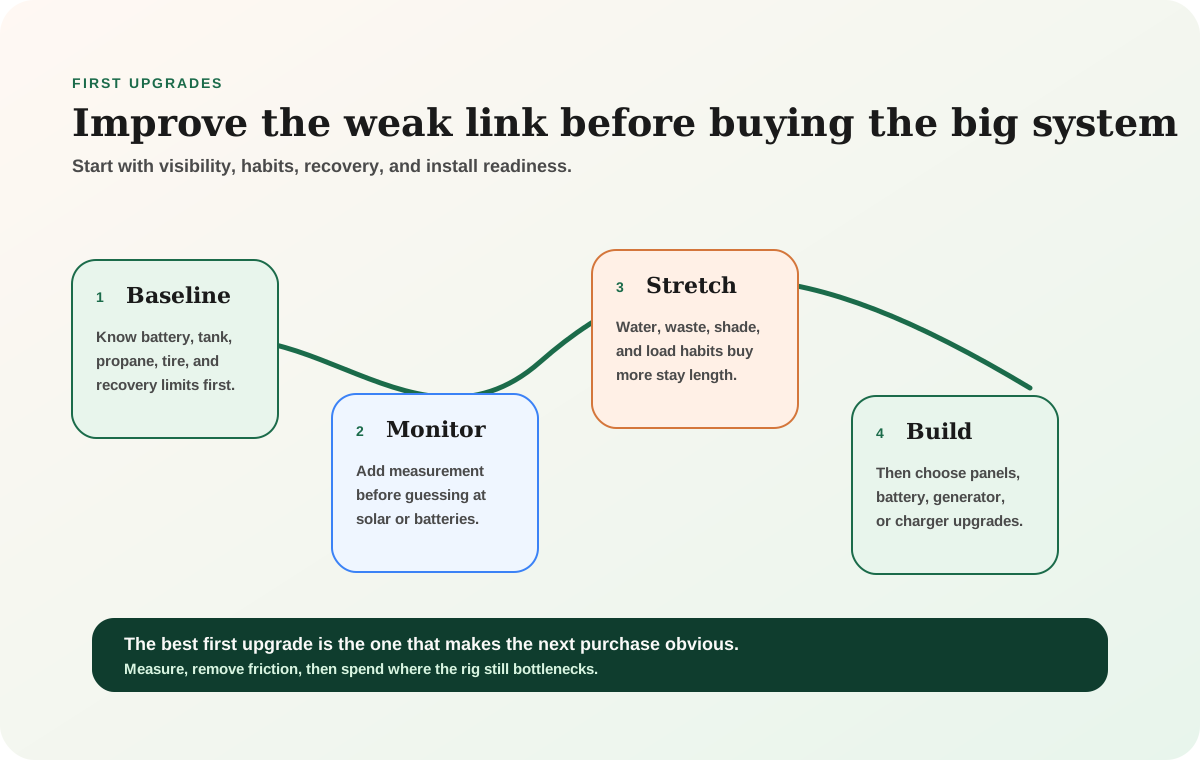
That is why so many smart RV upgrades start with monitoring instead of more hardware.
A monitor changes how you live with the system
This is what makes battery monitors such a high-value improvement. They do not just improve the electrical diagram. They improve day-to-day confidence.
Once you can see what the system is actually doing, you can make better decisions about:
- timing heavier loads
- planning for cloudy days
- deciding whether the battery bank is really too small
- evaluating whether solar is recovering as expected
- separating real problems from normal behavior
That kind of clarity often prevents expensive overbuying.
Measurement often saves more money than the next hardware upgrade
If you do not understand what the current system is doing, buying more battery or more solar can still leave you confused. Good monitoring makes future upgrades much smarter.
Shunt-based tracking is what gives the monitor real value
The shunt is what allows the system to track current in and out of the battery bank. That is what moves the setup beyond a glorified voltage display and into something genuinely useful for off-grid life.
When installed and configured correctly, that style of monitoring helps you understand:
- net battery usage
- charging trends
- overall state of charge estimates
- how quickly certain loads change the system
This is especially helpful once you start running a more serious off-grid setup with solar, inverter loads, remote-work gear, or longer stays.
Who benefits most from a battery monitor
Almost anyone spending meaningful time off-grid can benefit, but the value becomes especially clear for:
- new off-grid RVers who are still learning the rig
- boondockers who want calmer power management
- people deciding whether to expand their bank
- remote workers who need predictable electrical behavior
- anyone frustrated by not knowing whether the system is actually fine
In other words, the monitor is not just for advanced hobbyists. It is often one of the most beginner-friendly confidence upgrades available.
Battery monitors help size systems honestly
One of the best uses of a monitor is that it turns "I think we need more battery" into a question you can answer with evidence.
For example:
- Are you consistently using deeper reserve than intended?
- Are the big daily loads happening at bad times?
- Is the solar system recovering less than you assumed?
- Are hidden draws doing more damage than expected?
Without that information, it is easy to buy the wrong solution.
A monitor does not fix bad design by itself
This is worth saying clearly: a battery monitor improves visibility, not system performance directly.
If the battery bank is truly undersized, or the solar system is weak, or the inverter setup is poor, the monitor will not solve those issues on its own. What it will do is make those weaknesses much easier to identify.
That is still enormously valuable, because clear diagnosis is what keeps upgrades efficient.
That same visibility matters when the bank stops recovering. The RV battery not charging troubleshooting guide shows where monitor data fits into the source, charger, fuse, disconnect, and battery-protection checks.
If the monitor shows the bank is consistently being cycled deeper than planned, use the battery calculator before buying random extra capacity. If the bank is lithium and the voltage behavior is confusing, pair monitor data with the lithium vs AGM guide so the chemistry difference is clear.
Common install mistakes
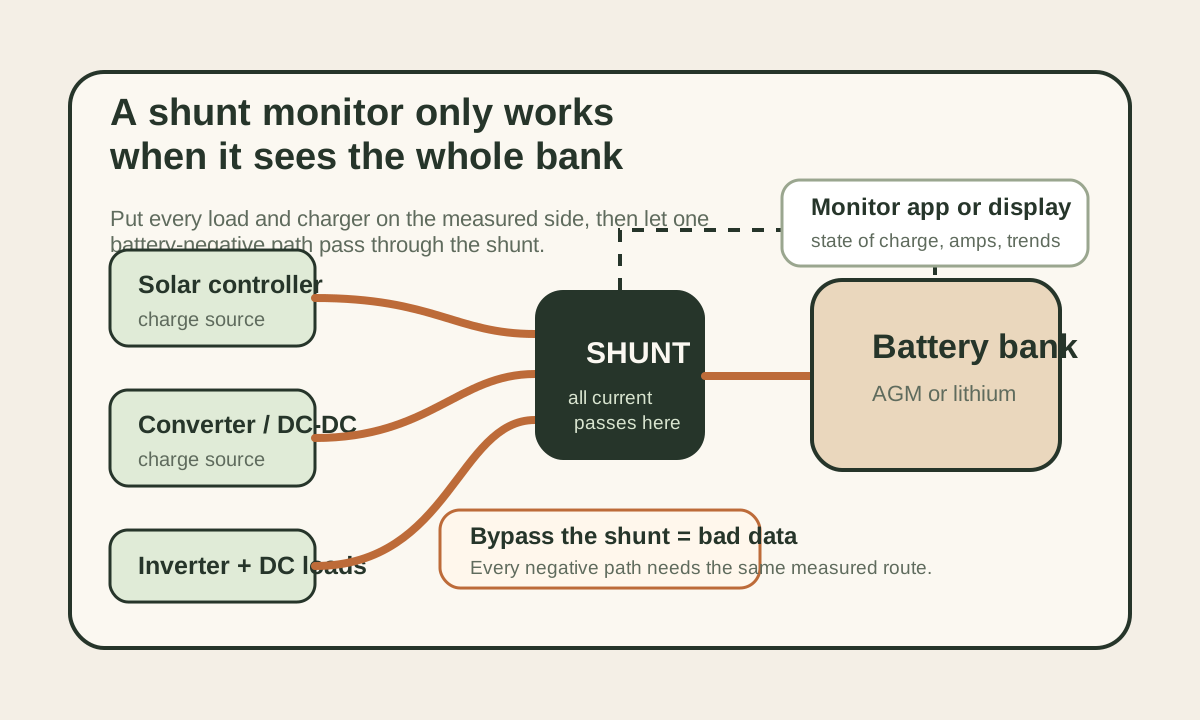
A battery monitor is only as useful as the installation. The shunt needs to measure the whole battery bank, not just some of the loads. If a charger, inverter, solar controller, or DC load bypasses the shunt, the monitor's history becomes incomplete.
Watch for these problems:
- loads connected directly to the battery negative instead of the load side of the shunt
- solar or converter negatives bypassing the shunt
- wrong battery capacity entered during setup
- state of charge never synchronized after the bank is truly full
- old battery assumptions left in the monitor after a chemistry change
That last one matters after a lithium conversion. A monitor that still thinks like an old AGM bank can make a new lithium setup feel more confusing than it should.
What to track for one honest week
The best first use of a battery monitor is not staring at the percentage every ten minutes. It is learning the pattern.
Track three things for a week: overnight drop, daily recharge, and the biggest load of the day. If the bank drops 18% every night and only recovers 12% most days, the system is slowly losing ground. If a remote-work day costs far more than expected, the monitor tells you whether the issue is laptop charging, internet gear, inverter idle draw, or something else hiding in the background.
That evidence makes the next upgrade cleaner. You may need more solar, more battery, a DC-to-DC charger, a smaller inverter habit, or simply better timing. The monitor helps stop the guessing.
What a good monitor setup feels like
Once the monitor is working well, the system usually feels calmer.
You stop guessing as much about:
- whether overnight use was normal
- how much a workday really cost
- whether a cloudy day is manageable
- whether the battery bank is undersized or just being used carelessly
That reduction in uncertainty is why so many experienced off-grid travelers consider monitoring one of the most worthwhile early purchases.
When it becomes almost essential
Monitoring moves from helpful to almost essential when:
- the battery bank is large enough that mistakes become expensive
- the rig depends on solar recovery
- inverter-backed loads matter
- remote work is involved
- you are trying to optimize or expand the system intelligently
At that point, not having a good monitor often means making system decisions with far less information than you should.
Final thought
If off-grid power still feels mysterious, a battery monitor is often the most useful thing you can add next. It gives the system a memory, a trend line, and a language you can actually use.
That kind of visibility is what turns RV power from a guessing game into a manageable system.
Frequently asked
Questions RVers usually ask next.
Why is voltage alone not enough to manage an RV battery bank?
Because voltage changes with load, charging, chemistry, and timing. It can be useful as a clue, but it does not provide the same practical visibility as a monitor that tracks current flow in and out of the bank.
What does a battery monitor tell you that a basic display cannot?
A good monitor helps show usage trends, charging behavior, and overall battery movement over time, which makes it much easier to understand overnight consumption, recovery quality, and whether the bank is actually sized well.
Is a battery monitor worth it for a smaller RV system?
Often yes, especially if you boondock regularly or still feel unsure how the system behaves. The visibility can prevent bad assumptions and improve every later upgrade decision.
Does a monitor mean I do not need to think about battery sizing anymore?
No. It helps you size more intelligently, but it does not replace good system design. What it does is give you much better evidence for whether the current setup is sufficient.
Freshness note
Last checked April 21, 2026
This topic can change when products, plans, prices, campsite rules, or fit guidance move. These notes show what was reviewed most recently.
This review included
- Expanded the guide with official Victron and Renogy monitor source checks, a monitor-type comparison table, installation cautions, internal tool handoffs, and FAQ support.
- Checked current published specs for Victron SmartShunt, BMV-712, and Renogy 500A monitor from official product pages.
- Verified app/Bluetooth and shunt-based monitoring claims from official manufacturer pages.
Recent change log
April 21, 2026
Expanded the guide with official source checks, a comparison table, installation pitfalls, and monitor-data workflows.
April 17, 2026
Published battery monitor guide with current pricing and verified accuracy specs.
Broader editorial corrections are tracked on the Corrections and Updates page.