RV solar installation checkpoints
Use this as the pre-drill sequence before the system moves from cardboard layout to permanent hardware.
Start with
Daily watt-hours
Use load math before buying panels, controller capacity, cable, or batteries.
Roof decision
Mounting surface and sealant
Identify the roof type before assuming one lap sealant or adhesive fits every rig.
Cable entry
Fridge vent or roof gland
The best entry point is the one that creates a protected interior route, not just the easiest roof hole.
Controller location
Close to battery, ventilated
Victron and Go Power both point toward indoor, accessible, properly cooled controller mounting.
Protection
DC-rated fuses and disconnects
Protect battery-connected conductors and give yourself a safe way to isolate PV and battery sides.
Finish line
Commissioning, not mounting
The install is not done until voltage, polarity, current, settings, and heat are checked under real sun.
Compare
Installation decisions before drilling
Use one comparison matrix to scan the practical differences. Small screens stack each row; wider screens keep the first column pinned.
| Spec | Conservative path | Higher-capability path | What to verify first |
|---|---|---|---|
| Panel layout | Fewer panels with clear service paths and minimal shade | Larger roof array with tighter spacing and expansion planning | Roof structure, no-mount zones, AC/vent shade, and future service access |
| Cable entry | Existing fridge vent or solar-ready port if the route is clean | New roof gland when it creates a shorter, protected interior path | Roof material, sealant compatibility, interior chase, drip loop, and water risk |
| Controller placement | Accessible cabinet near the battery with ventilation | Dedicated electrical bay with labeled disconnects, shunt, and service room | Battery-side cable length, heat, mounting orientation, fusing, and manual clearance |
| String layout | Simple parallel or matched pair for small arrays | Series or hybrid strings when voltage and controller headroom support it | Cold open-circuit voltage, controller PV limit, shade pattern, and expansion plan |
| Commissioning | Polarity, voltage, battery profile, and basic charge confirmation | Meter readings, app logs, heat check, labels, photos, and owner notes | Battery connected before PV if the controller manual requires it, plus all unresolved questions cleared |
Official installation references
Official planning links
Use these as verification starting points before you commit to a dispersed campsite.
Pre-arrival checks
Confirm the roof material
Newer TPO roofs and some roof accessories may need different primer or sealant strategy than older EPDM assumptions.
Protect every battery-connected positive conductor
Battery faults are high-current events, so fusing belongs near the source and must be DC-rated for the job.
Follow the controller manual
Many controllers need battery connection before PV so they can detect voltage and charge profile correctly.
Why RV solar installs get expensive after the parts arrive
The panel is rarely the hard part.
Most RV solar installation problems come from the decisions around the panel: where it sits, how the wires enter the roof, what sealant belongs on that roof, where the controller goes, and how the battery side is protected.
That is why the shopping-cart version of solar gets people into trouble. A 400W kit can still turn into a bad install if the cable entry leaks, the controller is buried in a hot cabinet, the battery fuse is missing, or the roof layout puts one panel in the air conditioner shadow every afternoon.
Start with the solar calculator, then sanity-check the wattage result against how many solar watts you actually need. Once the wattage makes sense, use the roof layout planner before you drill.
The clean install sequence
A calm RV solar install follows a sequence. Skip the order and you tend to create rework. Use these tutorial cards as the field workflow, then use the deeper sections below when a step needs more explanation.
Technical tutorial step 1
Size the system before the roof work starts
Step goal
Turn daily loads, reserve target, and camping style into a realistic solar and battery target before buying panels or drilling holes.
Required tools or parts
- Daily load list or power audit
- Solar calculator result
- Battery reserve target
- Current battery and charging-source notes
Safety note
Do not treat sizing as permission to install. The wattage target still has to fit the roof, controller limits, wire run, battery bank, and equipment manuals.
How to check success
You can explain the daily watt-hour target, the battery reserve target, and why the planned array size is enough or intentionally modest.
What can go wrong
A panel kit can look correctly sized while the battery bank, controller, alternator charging, or roof space is actually the limiter.
Step-specific handoff
Solar calculator
Use the calculator result as the sizing input before this becomes a roof-layout project.
Technical tutorial step 2
Map the roof and mark the install lanes
Step goal
Find panel locations, no-mount zones, shade lines, cable-entry options, and service paths before permanent hardware appears.
Required tools or parts
- Tape measure
- Panel dimensions or shipping boxes
- Painter's tape or cardboard mockups
- Roof photos from multiple angles
Safety note
Work from a stable ladder or roof position, avoid fragile roof areas, and stop if the roof feels soft, slick, crowned, or unsafe underfoot.
How to check success
Every panel has a measured location, the vent and AC clearances still work, and the interior cable route has been checked from both roof and cabinet sides.
What can go wrong
The array can fit on paper but block a vent lid, sit in repeated shade, leave no service path, or force wiring through a cabinet that cannot be accessed later.
Step-specific handoff
RV Roof Layout Planner
Use the field-ready planner when the roof dimensions, obstructions, and install sequence need to be saved or handed to an installer.
Technical tutorial step 3
Match the mount and sealant to the actual roof
Step goal
Confirm roof material, mounting method, fastener path, and sealant compatibility before making any penetration.
Required tools or parts
- Roof material information
- Mounting hardware
- Compatible lap sealant or roof-system product
- Cleaner, rags, and surface-prep supplies
Safety note
If the roof is soft, coated, patched, or unknown, pause the install. A solar panel is not worth turning a roof question into water intrusion.
How to check success
The roof material is identified, the sealant is compatible, the mounting surface is sound, and the fastener or adhesive plan matches the hardware guidance.
What can go wrong
Wrong sealant, poor surface prep, weak roof structure, or hidden wiring can create leaks and service problems that cost more than the solar hardware.
Technical tutorial step 4
Choose and protect the cable entry
Step goal
Route PV wiring through a fridge vent, existing chase, or roof gland without sharp edges, strain, water paths, or impossible service access.
Required tools or parts
- Cable gland or verified existing entry path
- UV-resistant PV wire or conduit
- Strain relief
- Interior route inspection light
Safety note
Keep PV wiring disconnected or covered while routing, and do not cut a roof opening until the interior path is confirmed.
How to check success
The cable path has drip awareness, strain relief, abrasion protection, interior access, and a route that avoids drawers, slides, heat, and moving parts.
What can go wrong
The easiest roof hole can land above an impossible cabinet, expose cable to movement, or create a leak path that is hard to inspect later.
Technical tutorial step 5
Place the controller and protection hardware
Step goal
Mount the charge controller, PV disconnect, battery-side protection, bus bars, and shunt where charging stays accurate and service is possible.
Required tools or parts
- Charge controller manual
- DC-rated fuses, breakers, and disconnects
- Correct cable and terminals
- Bus bars, shunt, labels, and torque specs
Safety note
Battery-connected conductors can deliver high fault current. Use DC-rated protection near the source and follow the equipment manuals instead of household AC habits.
How to check success
The controller is dry, ventilated, accessible, close enough to the battery, protected on the battery side, and isolated from PV with a clear disconnect path.
What can go wrong
A controller buried in a hot cabinet, an unfused battery lead, or a shunt bypass can make the system unsafe, inefficient, and hard to diagnose.
Step-specific handoff
RV solar wiring diagram
Use the wiring diagram when the protection path, shunt location, or controller tie-in needs to be drawn before installation.
Technical tutorial step 6
Connect in the controller manual's order
Step goal
Land battery-side wiring, verify system voltage, set the battery profile, then connect PV only when the controller is ready.
Required tools or parts
- Multimeter
- Controller app or display
- Battery profile settings
- Covered panels or open PV disconnect
Safety note
Confirm polarity with a meter before landing conductors. Many controllers need battery connection before PV so they can detect voltage and initialize correctly.
How to check success
The controller sees the correct battery voltage, the charge profile matches the battery chemistry, PV input is connected through the planned disconnect, and current appears under real sun.
What can go wrong
Reversed polarity, wrong battery chemistry, loose terminals, or PV connected too early can damage equipment or leave the controller charging incorrectly.
Technical tutorial step 7
Commission the system before the first trip
Step goal
Prove the finished install works with real measurements, labels, photos, and a shutdown sequence while the tools are still out.
Required tools or parts
- Multimeter or clamp meter
- Controller readings
- Battery monitor
- Label maker or permanent labels
- Phone photos of final wiring
Safety note
Do not call the install done until accessible terminals, heat, polarity, current, shutdown order, and charging settings have been checked under real conditions.
How to check success
Battery voltage, PV voltage, controller current, battery monitor readings, labels, fuse sizes, and shutdown steps are recorded and make sense together.
What can go wrong
A system can charge just enough to look alive while a loose terminal, wrong setting, heat issue, or mislabeled breaker waits for the first rough road.
Step-specific handoff
RV solar not working troubleshooting guide
Use the troubleshooting sequence immediately if commissioning numbers do not match the expected result.
That is more deliberate than "screw panels down and plug them in." It is also how you avoid the two worst outcomes: water intrusion and mystery electrical behavior.
Plan the roof before you plan the controller
Rigid panels need more than open square footage.
Go Power's RV kit manual tells installers to use the panel boxes to mock the layout, keep panels reasonably close together when cable lengths require it, avoid internal wiring when drilling, avoid fixed shade from roof gear, and leave room for future inspection and maintenance. It also calls out keeping panels back from the front of the RV to reduce wind load.
That is practical RV advice because the roof is crowded.
Before choosing final panel locations, mark:
- air conditioners
- vents and skylights
- antennas and Starlink mounts
- racks, rails, and awnings
- roof seams
- possible cable entry points
- walking or service paths
- likely shade lines through the day
Do not assume nameplate wattage will save a bad layout. A panel that spends a predictable chunk of the day shaded by a vent cover or air conditioner shroud may underperform enough that the whole system feels smaller than the receipt says.
Mock the roof before drilling
Cardboard, painter's tape, or the panel shipping boxes can save you from discovering too late that the layout blocks a vent lid, crowds a service path, or forces an ugly interior cable route.
Match the roof type to the sealant
Roof sealant is not a decoration around the feet and cable gland. It is part of the roof system.
The first job is identifying what roof you have:
- EPDM membrane
- TPO membrane
- PVC membrane
- fiberglass
- aluminum or other metal
Dicor's self-leveling lap sealant page lists compatibility with EPDM, TPO, and PVC membranes and adhesion to several materials including aluminum, wood, galvanized metal, fiberglass, and concrete. It also describes self-leveling use for horizontal surfaces, which is why it shows up so often around roof penetrations and screw heads.
The catch is roof history. A newer membrane, a coated roof, an old patch, or a plastic accessory can change the sealant answer. When the roof type or previous coating is uncertain, confirm compatibility with the roof manufacturer or sealant maker before you commit.
The practical rule is simple: identify the roof and check compatibility before the hole exists.
Good sealant prep usually means:
- clean dirt, loose material, oil, and old failed sealant from the work area
- let the surface dry before applying sealant
- use self-leveling sealant on horizontal roof surfaces when compatible
- use non-sag or the roof manufacturer's specified product on vertical or raised surfaces
- cover fastener heads and mount edges enough that water cannot sit at the penetration
- respect skin-over, waterproof, and cure timing before travel or rain exposure
If the roof is old, soft, previously coated, or already patched, slow down. A solar install is not the right moment to discover the roof membrane is barely attached.
Cable entry deserves its own decision
There are two common RV routes from roof to controller: an existing path, such as a refrigerator vent, or a dedicated roof cable entry gland.
The fridge-vent route can avoid a new roof hole, but it is not automatically cleaner. It may create a long or awkward interior run, and not every modern RV has the same vent layout older installation guides assume.
A cable gland or cable entry plate gives you more location control. The tradeoff is that you are intentionally making a roof penetration, so the backing, strain relief, sealant compatibility, and interior access need to be right.
Good cable-entry planning includes:
- a drip-aware roof path into the entry point
- UV-resistant cable or conduit where wiring is exposed
- no sharp edges at the penetration
- strain relief so cable movement does not pull on terminals
- an interior route that avoids heat, abrasion, drawers, slides, and moving parts
- service access near the controller and roof entry
Do not choose the roof hole first and hope the inside route works out. The best cable entry is the one that keeps both sides clean.
Mount rigid panels like they will be inspected later
Most rigid-panel RV installs use brackets, feet, rails, or rack hardware. The specific hardware should match the panel frame, roof structure, and manufacturer guidance.
Go Power's RV kit manual calls for using all mounting feet supplied for a panel and choosing a mounting surface strong enough for the hardware. That does not mean every RV roof can accept the same screw in the same place. Some roofs have plywood decking. Some have aluminum framing. Some are thin, crowned, laminated, or already compromised.
Before fastening a panel, confirm:
- the mount lands on a strong enough roof area
- the fastener will not hit hidden wiring or ducting
- the panel frame is supported the way the hardware expects
- the roof can still be inspected and cleaned
- the panel is not placed where future roof work becomes impossible
Adhesive-only approaches deserve extra caution. They can be useful in the right roof system with the right prep and product, but they are also harder to inspect, harder to undo, and less forgiving if the roof membrane or coating is the weak link.
For most DIY installs, I would rather see a boring, accessible mechanical mount with correct sealant than a clever mount no one can inspect confidently.
Put the charge controller where charging accuracy stays sane
The charge controller should not be mounted wherever the wire happens to appear.
Go Power's controller documentation points toward an indoor, visible, weather-protected location close to the battery. Victron's SmartSolar MPPT manual says to mount the controller vertically, provide cooling clearance, and place it close to the battery but not directly above it.
That advice matches real RV behavior. The controller is making battery-charging decisions, and the battery-side run is often the higher-current, more voltage-drop-sensitive side of the system.
A good controller location is:
- dry and protected
- accessible for setup and troubleshooting
- close enough to the battery to keep voltage drop reasonable
- ventilated enough for heat
- mounted on an appropriate surface
- not directly over a flooded lead-acid battery bank
- not buried behind gear that must be unpacked every time you need to read an error code
If the only convenient location creates a long battery-side run, revisit the layout. Convenience during install can become daily inefficiency later.
Wire protection is where the install becomes serious
An RV solar system has multiple fault paths, and the battery side can deliver a lot of current very quickly. This is where the install has to leave "camp project" mode and become electrical work.
The exact fuses, breakers, wire sizes, and disconnects depend on system voltage, controller rating, panel wiring, battery chemistry, cable length, and the equipment manuals. The durable principle is that every battery-connected positive conductor needs protection appropriate to the wire and source.
Victron's SmartSolar MPPT manual specifies battery-side fuse ranges for the models it covers and calls for a means to disconnect PV conductors. Victron's Wiring Unlimited book also separates core DC topics such as cable selection, bus bars, cable connections, DC fuses, circuit breakers, isolation switches, shunts, and solar.
That is the shape of a serviceable system:
- PV disconnect between array and controller
- battery-side fuse or breaker near the battery source
- properly sized stranded copper cable
- protected cable runs with abrasion control
- bus bars sized for the current if used
- shunt location that captures the loads and charging sources you want measured
- labels that explain what each cable and breaker does
The wire should not be the fuse. If a short happens, the protection device should open before a cable overheats.
Do not improvise DC protection
AC household habits do not transfer cleanly to RV DC systems. Use DC-rated fuses, breakers, disconnects, and cable sized for the actual current and distance, especially on the battery and inverter side.
Connect in the right order
Controller connection order matters.
Many solar charge controllers use the battery connection to detect system voltage and initialize the correct charging behavior. Victron's SmartSolar MPPT manual lists the connection sequence as battery first, system-voltage verification next, then PV. Go Power's controller manual also directs installers to connect battery wiring before solar wiring and to use appropriate circuit protection on battery-connected conductors.
The practical commissioning sequence usually looks like this:
- cover the panels or keep PV disconnected while wiring
- confirm polarity with a meter before landing conductors
- connect the controller battery side first if the manual requires it
- verify the controller has detected the correct system voltage
- set the battery chemistry and charge profile
- connect PV through the planned disconnect or breaker
- verify charging current under real sun
- check terminal torque and look for unexpected heat
- test shutdown by isolating PV first, then battery according to the controller manual
Do not finish a long install day by guessing. Reversed polarity, wrong battery profile, and loose terminals are cheap to catch with a meter and expensive to discover on a trip.
Tie the system into the battery bank deliberately
The controller should charge the house battery bank through a planned battery-side path, not through whichever positive post is easiest to reach.
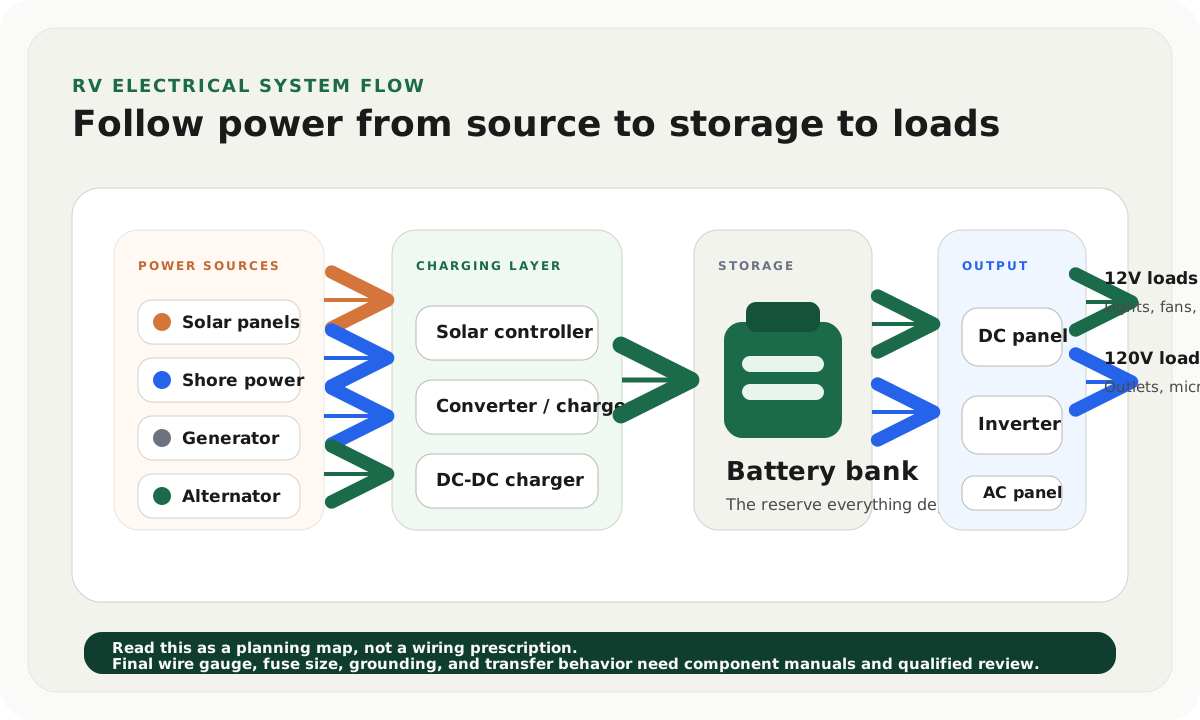
For small systems, that may be a fused controller-to-battery run. For larger systems, it often means controller output to a positive bus, a negative path through the shunt, and a main system layout that also accounts for inverter, converter/charger, DC-DC charger, and house loads.
If you already have multiple charging sources, use the RV electrical system diagram before adding another cable. Solar is easier to understand when it is drawn as one charging source among several, not as a separate island.
The battery bank also has to match the charge profile. A lithium bank, AGM bank, and flooded lead-acid bank do not want identical settings. If battery capacity is still uncertain, step back to the battery bank sizing guide before turning a roof project into a whole-system mismatch.
Commission the system before the first trip
Commissioning is the part that proves the install works.
Do this while you still have tools out:
- photograph the final wiring layout
- record fuse and breaker sizes
- record charge controller settings
- measure battery voltage before solar starts charging
- measure PV voltage at the controller input
- verify controller output current in sun
- compare the controller reading with the battery monitor
- turn on expected daytime loads and watch voltage behavior
- inspect cable glands and mount sealant after the first heat cycle
- recheck accessible terminal tightness after the first week of travel
Go Power's safety section calls out tight, secure connections and rechecking them after installation. That small habit catches a lot of early vibration and torque problems before they become mystery failures.
If the numbers do not match what you expect, use the RV solar not working troubleshooting guide while the install is still fresh.
Common RV solar installation mistakes
The mistake most RVers make is starting with the kit instead of the route.
Other common mistakes are just as expensive:
- skipping the load estimate and overspending in the wrong place
- mounting panels where roof equipment creates repeat shade
- using the wrong sealant for the roof material
- making a cable entry before planning the interior route
- burying the controller where it cannot cool or be read
- leaving out DC-rated disconnects
- placing fuses too far from the source they protect
- using wire that is too small for current and distance
- connecting PV before the controller is ready for the battery
- forgetting to set the charge profile for the actual battery chemistry
- calling the job done before commissioning
Most of these mistakes are not caused by lack of intelligence. They are caused by rushing the point where the project stops being a product install and becomes a system install.
When to DIY and when to hire help
DIY can make sense if the system is simple, you are comfortable with DC wiring, you own the right tools, and you are willing to follow manuals instead of forum shortcuts.
Bring in a qualified RV technician, electrician, or solar installer when:
- the roof structure is uncertain
- the battery bank is large or lithium-based and unfamiliar
- the install includes inverter/charger or transfer-switch changes
- wire sizing, fusing, or grounding decisions feel unclear
- the rig supports full-time travel or income-producing work
- a mistake would strand the trip or create a safety risk
There is no prize for doing the risky part yourself. A very good DIY outcome can still include paid design review, crimping help, or a final inspection.
Final thought
The best RV solar installs feel boring after they are done. The controller is readable, the wires are labeled, the roof is sealed, the disconnects make sense, and the battery monitor confirms the system is doing what the design predicted. That kind of boring is the goal.
Frequently asked
Questions RVers usually ask next.
Can I install RV solar panels myself?
Yes, if the system is straightforward and you are comfortable with roof work, DC wiring, manuals, crimping, fusing, and testing. If the install touches inverter/charger wiring, uncertain roof structure, or large lithium banks, a professional review is the safer move.
What sealant should I use for RV solar panel mounts?
It depends on the roof material and mount location. Self-leveling lap sealant is common on compatible horizontal RV roof surfaces, but some TPO roofs, coated roofs, and raised or vertical surfaces may need a different sealant or primer system.
Should the solar charge controller be close to the panels or the batteries?
In most RV installs, the controller should be closer to the batteries while still staying dry, ventilated, and accessible. That usually keeps the battery-side voltage drop and charging behavior more predictable.
Do RV solar panels need fuses and disconnects?
Yes, the system needs a deliberate protection and isolation plan. Battery-connected conductors need appropriate circuit protection, and the PV side should have a safe way to disconnect current-carrying conductors for service.
What is the most common RV solar installation mistake?
The most common mistake is treating the install like a panel-mounting job instead of a whole electrical system. Roof layout, cable entry, wire sizing, fusing, controller setup, and commissioning all matter as much as the panel wattage.
Freshness note
Last checked April 11, 2026
This topic can change when products, plans, prices, campsite rules, or fit guidance move. These notes show what was reviewed most recently.
This review included
- Checked Go Power RV solar kit installation guidance for roof layout, panel placement, cable entry, controller location, safety sequence, and commissioning checkpoints.
- Checked Victron SmartSolar MPPT documentation for controller mounting, cooling clearance, battery-side fusing, PV disconnects, grounding notes, and battery-before-PV connection order.
- Checked Dicor roof sealant and EPDM/TPO guidance for roof-type identification, lap sealant compatibility, surface prep, cure timing, and horizontal versus raised-surface sealant use.
Recent change log
April 11, 2026
Rebuilt the guide from the new content engine with official installation references, roof-type guidance, cable-entry planning, fusing, disconnects, and commissioning workflow.
Broader editorial corrections are tracked on the Corrections and Updates page.