Official battery references
Exact voltage, storage, and charge-profile guidance varies by battery model. Use your battery manual first, then these manufacturer references for planning context.
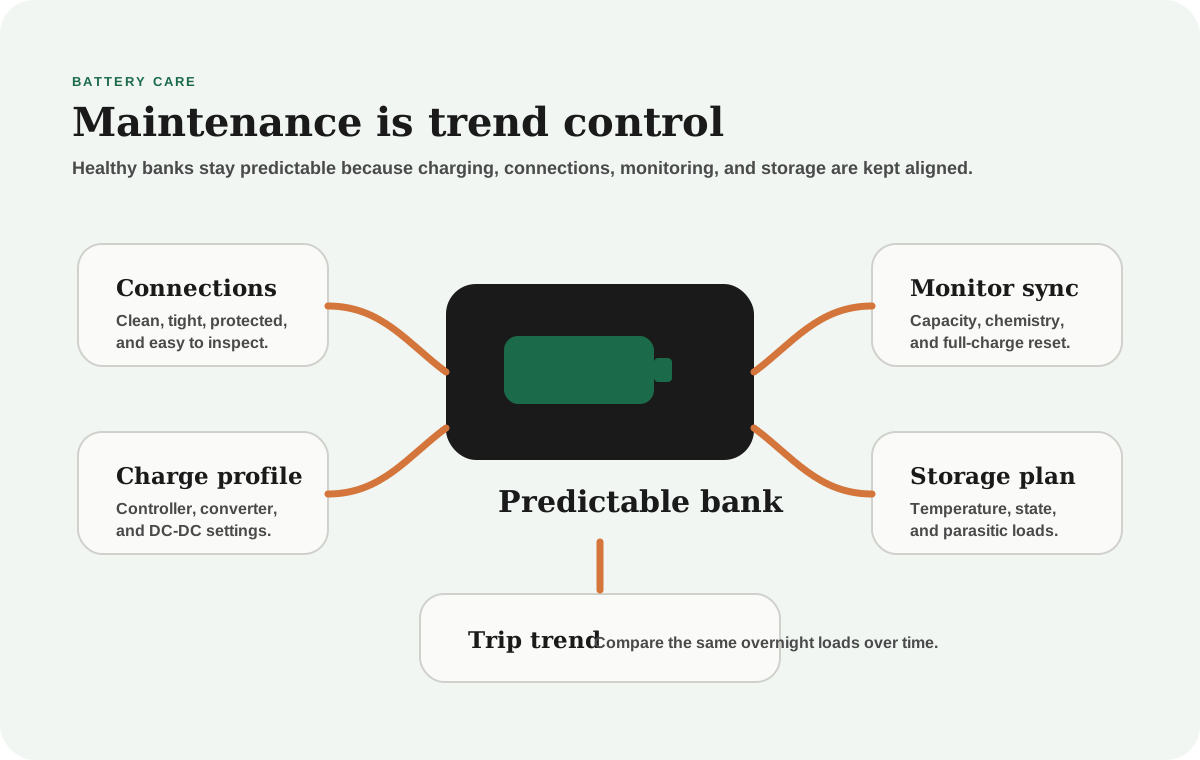
Battery maintenance is less about fussing and more about trend awareness
Most RVers do not want a battery routine that feels like a part-time job. They want a system that works.
That is reasonable. The goal of maintenance is not to touch the battery every day. The goal is to know whether the bank is still behaving like itself.
The earliest warning signs are usually subtle:
- weaker morning reserve
- slower recovery after normal charging
- more voltage sag under familiar loads
- a growing mismatch between the monitor and real use
- a charging source that used to keep up but no longer does
The earlier those patterns are noticed, the cheaper and less dramatic they are to solve.
If the numbers on the screen do not match how the rig feels, read the RV battery monitor guide. If the bank never seems to catch up, use the battery-not-charging troubleshooting guide before replacing batteries.
Use a simple maintenance rhythm
Compare
Compare fast
Use one comparison matrix to scan the practical differences. Small screens stack each row; wider screens keep the first column pinned.
| Spec | Before a trip | Monthly during active use | Before storage |
|---|---|---|---|
| Connections | Look for loose, hot, corroded, or strained terminals | Inspect cable support and any new heat marks | Leave the bank clean, dry, and protected |
| Charging | Confirm charger profile matches battery chemistry | Watch whether solar, converter, and alternator recovery still behave normally | Choose the manufacturer-recommended storage state and charger behavior |
| Monitoring | Confirm state of charge makes sense before departure | Resync or recalibrate if the monitor drifts | Record state before disconnecting or parking |
| Loads | Know the normal overnight baseline | Compare familiar loads against past trips | Disconnect or control parasitic loads |
This rhythm is intentionally simple. If a maintenance routine is too fussy, it gets skipped. A skipped perfect routine is worse than a repeatable basic one.
Connections deserve more attention than they get
Whether the bank is lithium, AGM, or flooded lead-acid, connections are part of battery performance.
Loose, dirty, undersized, or stressed connections can create:
- voltage drop
- heat
- intermittent charging
- inverter complaints
- misleading battery symptoms
- monitor readings that do not match reality
Do not only inspect the battery posts. Follow the path:
- battery terminals
- busbars
- shunt connections
- fuse holders
- inverter cables
- charger cables
- ground path
- strain relief and cable support
If any connection looks discolored, melted, loose, wet, or hard to identify, treat it as a system issue before blaming the battery.
Do not diagnose battery health through a loose cable
A weak connection can imitate a weak bank. If voltage sag, inverter alarms, or charging weirdness appear suddenly, inspect the physical path before buying batteries.
Charge settings must match chemistry
Battery maintenance changes when the battery chemistry changes.
AGM, flooded lead-acid, and LiFePO4 batteries use different charging assumptions. If a converter, solar controller, or DC-to-DC charger is still set for the wrong chemistry, the bank may be poorly charged even when the hardware is expensive.
Check:
- converter or inverter-charger profile
- solar charge controller profile
- DC-to-DC charger profile
- absorption and float behavior
- temperature compensation rules
- lithium low-temperature charge protection
- whether multiple chargers are fighting each other
This is especially important after an upgrade. A new lithium bank connected to old lead-acid charging assumptions may work, but it is not necessarily being treated correctly.
Use the battery charging from shore, solar, and alternator guide if you are not sure how the charge sources interact.
AGM, flooded, and lithium maintenance are different
Compare
Compare fast
Use one comparison matrix to scan the practical differences. Small screens stack each row; wider screens keep the first column pinned.
| Spec | Flooded lead-acid | AGM | LiFePO4 lithium |
|---|---|---|---|
| Main routine | Electrolyte level, ventilation, clean terminals, correct charging | Clean terminals, correct AGM profile, avoid chronic undercharge | Correct profile, BMS awareness, cold-charge protection, monitor accuracy |
| Common stress | Low water, sulfation, corrosion, poor ventilation | Deep cycling, partial-state use, heat, aging capacity loss | Wrong charger profile, cold charging, poor system integration |
| What to watch | Water level and corrosion | Usable capacity trend and voltage sag | Charge acceptance, BMS cutoffs, low-temperature behavior |
| Storage focus | Manufacturer state-of-charge and maintenance charging guidance | Avoid long undercharged storage | Follow manufacturer storage state and parasitic-load guidance |
This is why generic "RV battery care" advice can be dangerous. It may be correct for one chemistry and wrong for another.
If your AGM bank is already showing weak reserve, compare symptoms against when to replace AGM RV batteries. If you are deciding whether lithium is the next move, use lithium vs AGM before assuming the replacement chemistry.
Monitor sync is maintenance
A shunt-style monitor is one of the best maintenance tools in the RV, but only if it is set up and kept honest.
Check that the monitor:
- is programmed for the current battery capacity
- matches the current chemistry
- sees all charge and load paths through the shunt
- is synchronized after a true full charge
- is not using old assumptions after a bank replacement
If you replace batteries, change capacity, add an inverter, reroute charging, or add a DC-to-DC charger, treat the monitor setup as part of the maintenance job.
Otherwise, the monitor can become a confident liar.
Troubleshoot the pattern, not just the battery
When the rig feels weaker, do not jump straight to "bad battery." Start with the pattern.
If the weakness appeared after a new inverter, the load may have changed. If it appeared after a long storage period, parasitic draw or storage state may be part of the answer. If it appeared after a solar-controller setting change, the charging profile may be wrong. If it appeared after rough roads, a connection may have loosened.
Battery problems are real, but RV systems create convincing lookalikes:
- a loose ground can imitate voltage sag
- a mis-set charger can imitate aging capacity
- a parasitic load can imitate weak overnight reserve
- a monitor programmed for the old bank can imitate confusing state of charge
- shaded solar can imitate poor charge acceptance
The better question is: what changed before the symptom changed?
Storage periods deserve a plan
Some of the most confusing battery problems show up after the RV sits.
Storage still affects:
- state of charge
- parasitic loads
- temperature exposure
- charger behavior
- confidence at the next departure
Before storage, decide:
- What state of charge does the battery manufacturer recommend?
- Will the bank remain connected to any load?
- Will solar, shore power, or a maintainer remain active?
- Is the charger profile appropriate for unattended storage?
- What will you check before the next trip?
That last question matters. A battery can look "fine" in storage and still surprise you when real loads return.
A simple inspection workflow
Use the same order each time so you do not miss the obvious.
Start with safety. If anything smells hot, looks melted, is swollen, is wet, or sparks unexpectedly, stop and get qualified help.
Then inspect the physical system. Look at terminals, cable support, fuses, breakers, busbars, shunt wiring, and charger connections. The goal is not to polish for appearance. It is to confirm the path looks secure and understandable.
Next check charging. Confirm the converter, solar controller, and DC-to-DC charger are using the right profile for the chemistry. Watch whether the bank reaches the expected end-of-charge behavior.
Then check loads. Compare the same overnight pattern to a previous trip. If the battery dropped more, ask what changed: temperature, furnace use, fridge behavior, inverter time, laptop charging, or a forgotten device.
Finally, update notes. Maintenance that leaves no record is harder to use later.
What to record
You do not need a complicated logbook. A few repeated notes can make diagnosis much easier.
Record:
- state of charge before bed
- state of charge in the morning
- weather and furnace use
- solar recovery by late afternoon
- any inverter alarms
- unusual voltage sag
- charge source used
- whether the bank reached full
Those notes are useful because battery problems often reveal themselves as changing trends, not one dramatic failure.
Final thought
Battery maintenance is successful when the bank becomes less mysterious.
Clean connections, correct charge profiles, chemistry-specific storage, and monitor trend awareness will not make a battery last forever. They will make the system easier to understand, easier to trust, and easier to diagnose before the next trip depends on guesswork.
Frequently asked
Questions RVers usually ask next.
What is the most important RV battery maintenance habit?
The most useful habit is watching trends: overnight drop, recovery quality, voltage sag under familiar loads, and whether the monitor still matches real behavior. Clean connections and correct charge settings support that trend awareness.
Do lithium and AGM batteries need the same maintenance?
No. AGM care focuses heavily on correct charging, avoiding chronic under-recovery, and watching capacity decline. Lithium care focuses on correct charger profiles, BMS behavior, cold-charge protection, and monitor accuracy.
How often should I inspect RV battery connections?
Inspect before trips, after rough travel, after electrical work, and whenever symptoms change suddenly. Look for looseness, corrosion, heat marks, water intrusion, cable strain, and anything that no longer looks calm.
Can a battery monitor help with maintenance?
Yes. A shunt-based monitor helps reveal usage and recovery trends over time. It is most useful when programmed for the correct bank and synchronized after true full charges.
Freshness note
Last checked April 21, 2026
This topic can change when products, plans, prices, campsite rules, or fit guidance move. These notes show what was reviewed most recently.
This review included
- Checked current battery manufacturer maintenance resources for AGM, flooded lead-acid, and LiFePO4 charging and storage guidance.
- Expanded the guide with maintenance intervals, chemistry-specific checks, monitor synchronization, storage planning, and diagnostic lookalikes.
Recent change log
April 21, 2026
Expanded the battery maintenance guide with official source checks, a custom maintenance visual, chemistry-specific tables, and practical inspection workflows.
Broader editorial corrections are tracked on the Corrections and Updates page.
