Starlink for RVs at a glance
Plan and hardware details were checked against official Starlink pages and spec sheets on May 5, 2026. Starlink can vary offers by address, region, and account status.
Current Roam entry lane
$50/mo lower-data Roam
Starlink's public plan wording has recently shown both 50GB and 100GB language for the lower Roam lane, so verify the current data bucket at checkout.
Current frequent-travel lane
$165/mo Roam Unlimited
The cleaner fit for regular RV workdays if satellite is a primary connection instead of an occasional fallback.
Mini power draw
25-40W average
About 200-320Wh over an 8-hour connected day before conversion losses.
Standard power draw
75-100W average
About 600-800Wh over an 8-hour connected day before conversion losses.
Setup requirement
Clear sky matters
Trees, canyon walls, storage position, and cable routing can matter more than the plan tier.
Use next
Internet backup planner
Use it to decide whether satellite is primary, backup, or unnecessary for your route.
Official Starlink references
Official planning links
Use these as verification starting points before you commit to a dispersed campsite.
Pre-arrival checks
Verify the plan at checkout
Starlink has recently shown both 50GB and 100GB lower-lane language, and hardware promos can be address-specific.
Run the power math before buying
A satellite terminal can become a daily electrical load, especially if it stays on through a whole work block.
Plan the mount before the trip
Portable placement, roof mounting, security, cable routing, and tree cover decide whether the system is easy to use.
Why Starlink for RVs gets misunderstood
Starlink is often talked about like it is a direct replacement for a hotspot. That is the first place the decision gets sideways.
A hotspot is a small cellular tool. Starlink is a satellite internet system that needs power, sky, hardware handling, and a service plan that costs enough to deserve a real job in the rig.
The right question is not "Is Starlink good?" The better question is "What failure does it solve in my travel pattern?"
If you camp mostly near towns, state parks with usable cell service, RV parks, or population corridors, a well-chosen cellular setup may still be the simpler answer. If you regularly work from public land, forest edges, high desert pullouts, or places where cell maps turn optimistic, Starlink starts to make more sense.
Before you buy hardware, run the internet backup planner. It forces the important sequence: work demand, route risk, primary connection, backup path, and power draw.
Current Starlink Roam plan lanes
As of the May 5, 2026 check, Starlink's public Roam and service-plan wording did not leave one durable lower-data label to quote forever. The $50/mo lower Roam lane has recently appeared with both 50GB and 100GB language. The safer planning answer is to treat it as a lower-data Roam lane and verify the included bucket in checkout.
- Lower-data Roam lane at $50/mo
- Roam Unlimited at $165/mo
The important decision is not which old screenshot wins. It is whether the lower Roam lane gives you enough data for the workday you actually need. Roam Unlimited is the cleaner answer when satellite is supposed to carry repeated workdays. If the lower lane matters to your budget, confirm the current data bucket, overage or lower-speed behavior, and travel rules in the Starlink checkout flow before buying hardware.
Hardware price is the number I would verify last, not first. Starlink has shown Mini promotions on its Roam page, but checkout pricing can vary by region, shipping, account, and promotion window. Use the official Starlink checkout number on the day you buy, not a stale screenshot from an RV forum.
That matters if you are deciding whether Starlink is occasional insurance or your main work connection.
The lower-data Roam lane is better for:
- occasional trips
- backup use
- light work blocks
- a traveler who only needs satellite when cell coverage disappears
Roam Unlimited is better for:
- frequent RV remote work
- repeated video calls from coverage-poor places
- households where satellite is a primary connection
- users who do not want to manage a small monthly data bucket
Starlink also describes Roam around travel, in-motion use, coastal and inland water use, and pause/reactivation through Standby Mode. Treat those as plan rules to verify before checkout, not as assumptions to carry forever. Starlink changes plan names and offers more often than most RV hardware categories change specs.
Standard vs Mini hardware
The Standard kit and Starlink Mini are not just two sizes of the same RV idea.
Mini is the cleaner RV fit when portability, low power draw, and quick storage matter. Its official spec sheet lists a 25-40W average draw, 11.75 x 10.2 x 1.45 in dimensions, and 2.56 lb weight with the kickstand. It also has integrated Wi-Fi, DC input support, and a smaller footprint that is easier to move around camp.
Standard has the larger antenna and Router 3 system. Its official spec sheet lists a 75-100W average draw, 23.4 x 15.07 x 1.5 in antenna dimensions, and 7 lb weight with kickstand. It is still portable enough for many RVers, but it behaves more like a serious camp setup than a small packable tool.
Compare
Compare fast
Use one comparison matrix to scan the practical differences. Small screens stack each row; wider screens keep the first column pinned.
| Spec | Starlink Mini | Starlink Standard | Dual-carrier cellular |
|---|---|---|---|
| Best fit | Portable RV satellite | Higher-draw camp satellite | Connected-route travel |
| Average power draw | 25-40W | 75-100W | Usually single-digit watts per hotspot |
| 8-hour energy use | 200-320Wh | 600-800Wh | Often under 100Wh |
| 12V battery draw estimate | 17-27Ah before losses | 50-67Ah before losses | Often under 10Ah |
| Hardware friction | Low to moderate | Moderate | Low |
| Clear-sky dependence | High | High | None |
| Best weakness solved | Remote coverage gaps | Remote coverage gaps | Carrier or tower variability |
The practical takeaway is simple: Mini is easier to justify in a modest off-grid electrical system. Standard may still be the right fit if your use case benefits from the larger system, but the power budget needs to know about it.
For a deeper Mini-specific fit check, read Starlink Mini for RVers. If your main question is satellite versus cellular, read the narrower Starlink vs hotspot comparison.
Power draw changes the decision
Starlink is internet gear, but in an RV it is also an appliance.
An 8-hour workday on Starlink Mini can use roughly 200-320Wh before inverter or DC conversion losses. At 12V, that is about 17-27Ah before losses.
An 8-hour workday on the Standard kit can use roughly 600-800Wh before losses. At 12V, that is about 50-67Ah before losses.
That is not automatically a dealbreaker. It just means the internet decision belongs in the same math as laptops, monitors, fridge load, fans, routers, and evening recovery.
If your rig already runs close to the edge, adding satellite can be the thing that turns a normal workday into a battery-management day. Use the solar calculator or the RV appliance wattage chart to put the Starlink load beside the rest of the rig instead of treating it as a separate gadget.
The cleanest Starlink setups usually do one of three things:
- use Mini on DC power where practical
- turn the system off when it is not needed
- size solar and battery reserve around the actual workday, not a best-case brochure day
Mounting and sky access are not side details
Starlink needs a clear view of the sky. In RV life, that means the best campsite for shade may be the worst campsite for satellite.
Portable placement gives you flexibility. You can move the unit away from the rig, dodge some roof obstructions, and chase better sky. The downside is setup time, theft awareness, cable routing, storage, and the little ritual of finding the right spot when you are tired from a travel day.
Roof or ladder mounting reduces daily handling. The downside is that the RV itself may be parked under the exact shade or tree cover that blocks the dish. Permanent or semi-permanent mounting also deserves more thought around wind, height clearance, serviceability, and whether the hardware is approved for the kind of use you expect.
This is where many buyers learn that "works almost anywhere" does not mean "works from every beautiful campsite." If satellite will be important to your income, build your campsite selection around both sky and cellular. The broader internet for RVers guide is a better starting point if you are still deciding the whole stack.
When Starlink makes sense
Starlink makes the most sense when the same failure keeps repeating: your cellular setup cannot support the places you actually camp.
Good-fit Starlink users often have one or more of these patterns:
- they camp on public land or remote routes often
- they need video calls, uploads, or live collaboration
- they lose meaningful work time when cellular coverage is weak
- they already have enough battery and charging capacity
- they are willing to manage placement and setup
Starlink can also be a strong backup even when cellular is the primary connection. That is especially true if your backup needs to solve a different failure mode than your phone or hotspot. The backup internet options guide walks through that redundancy logic without assuming everyone needs every service.
When hotspot-only still makes more sense
Hotspot-only is still the right starting point for many RVers.
It usually wins when:
- you travel mostly in or near coverage-rich corridors
- your work is light or flexible
- you do not want a larger monthly bill
- your battery system is modest
- you move often and value fast setup
- you do not camp in places where cell coverage repeatedly fails
The cheapest internet setup is not always the best one, but the simplest working setup often is. If a phone hotspot or dedicated cellular router already covers the real workday, satellite may add cost and friction without lowering much risk.
That changes quickly when missed calls, delayed uploads, or unstable client work become normal. At that point, the cost comparison should include the cost of failure, not just the subscription price.
Common mistakes
The most common mistake is buying Starlink from anxiety instead of evidence.
If you have not tracked where your current setup fails, it is easy to buy satellite for a trip you imagine instead of the route you actually drive.
The second mistake is ignoring trees. Starlink can be excellent in open sky and frustrating under the wrong canopy. Forested camps, canyon walls, steep terrain, and crowded shaded loops can all turn the hardware into a campsite-selection problem.
The third mistake is leaving it on all day without counting the power. That may be fine on shore power or with a big solar/battery system. It is not fine if your rig is already rationing laptop time, fridge load, and evening lights.
The fourth mistake is treating Starlink as the only connection. A small cellular fallback still matters for travel days, quick stops, weather-limited setup, urban errands, and any place where satellite placement is awkward.
Final thought
Starlink for RVs is best understood as infrastructure, not a gadget. If your route repeatedly breaks cellular and your workday needs a stronger connection, it can earn the cost and setup friction. If your current cellular stack already works in the places you camp, keep the system simple until failure gives you a real reason to add satellite.
Frequently asked
Questions RVers usually ask next.
Is Starlink worth it for RVers?
It is worth it when your normal camping pattern repeatedly outruns reliable cellular coverage and being offline creates a real problem. It is less compelling for RVers who mostly camp near usable cell service and only need light browsing or occasional work.
Which Starlink plan is best for RV use?
The lower-data Roam lane is the better fit for occasional trips or backup use when the current checkout bucket fits your workday. Roam Unlimited is the cleaner fit if Starlink is a primary internet connection for frequent RV workdays.
Is Starlink Mini better than the Standard kit for RVs?
Mini is usually easier for RV use because it draws less power, stores more easily, and has integrated Wi-Fi. Standard can still make sense for some users, but its 75-100W average draw makes the battery math much more important.
Can Starlink replace my hotspot?
Sometimes, but many RVers are better served by keeping both. Starlink covers weak-cell camps better, while cellular is easier for travel days, quick stops, obstructed camps, and backup use.
How much battery does Starlink use in an RV?
Mini uses about 200-320Wh over an 8-hour workday before losses. The Standard kit uses about 600-800Wh over the same period, which is why satellite internet belongs in your solar and battery sizing math.
Freshness note
Last checked May 5, 2026
This topic can change when products, plans, prices, campsite rules, or fit guidance move. These notes show what was reviewed most recently.
This review included
- Checked current Starlink Roam and service-plan pages, including recent public plan wording that has shown both 50GB and 100GB language for the lower-data Roam lane plus the $165/mo Roam Unlimited anchor.
- Verified Starlink Mini and Standard 4 X hardware dimensions, weight, field of view, power draw, Router 3 details, and environmental specs against official Starlink PDF spec sheets.
- Reviewed Starlink's current Roam positioning for in-motion use, coastal/inland water use, clear-sky setup requirements, and current Starlink Mini hardware promo availability.
Recent change log
May 5, 2026
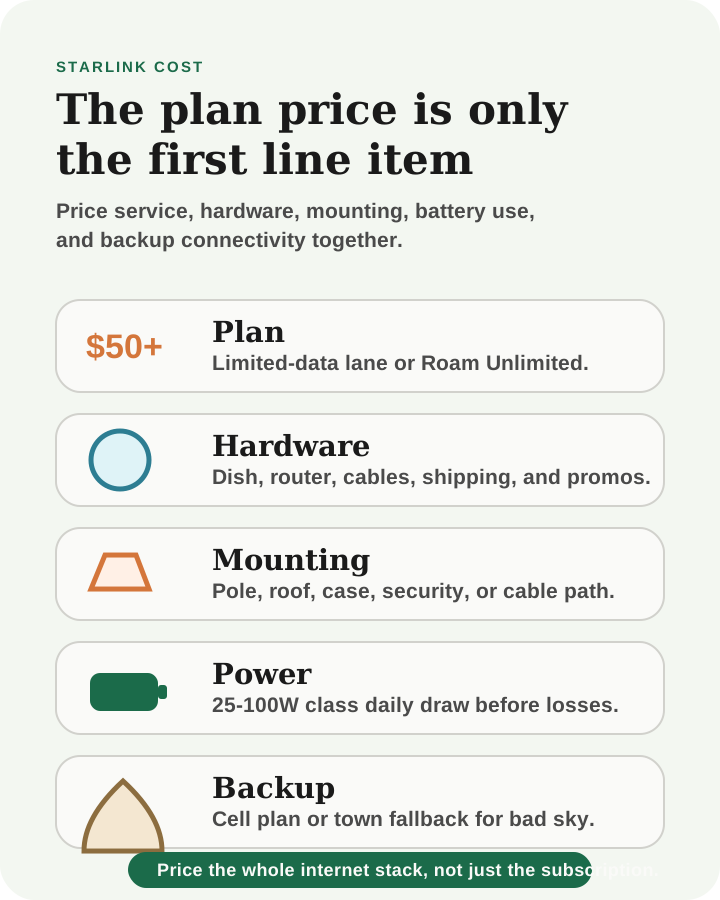
Refreshed the Starlink RV guide so the lower Roam lane is described as checkout-confirmed instead of hard-coded to one data bucket, added a Starlink cost-stack visual, and aligned the guide with the updated RV internet overview.
April 11, 2026
Published Starlink RV guide with current Roam plan lanes, hardware specs, and setup tradeoffs.
Broader editorial corrections are tracked on the Corrections and Updates page.


