Key takeaways
- The monthly Starlink plan is only one part of the RV cost. Add hardware, taxes, mounts, storage, cables, power draw, and whatever backup internet you still need.
- At the latest official U.S. Roam check, the public comparison showed a lower-data Roam lane around $50/month and Roam Unlimited at $165/month, but Starlink plan names and availability change often.
- Starlink is easiest to justify when failed internet would cost more than the subscription or when your camps repeatedly outrun cellular coverage.
Official Starlink checks
Starlink changes plan names, eligibility, promos, and hardware offers often enough that checkout should be treated as the final price check.
The short answer
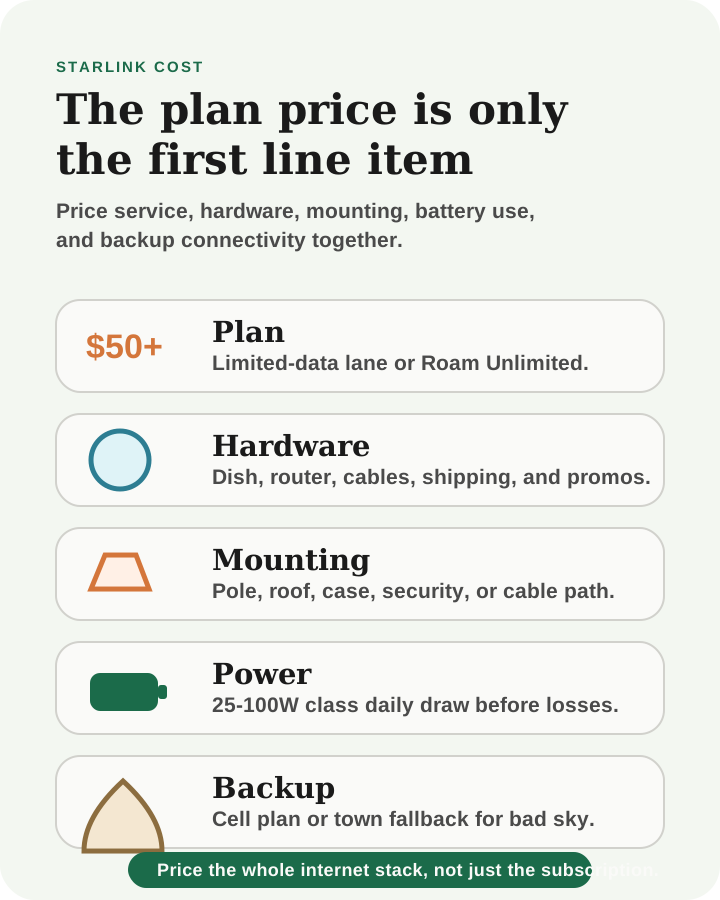
For U.S. RVers, Starlink cost usually has five parts:
- monthly Roam service
- hardware
- mounts, case, cable, or roof/pole accessories
- taxes and fees
- battery and charging capacity to run the system
At the latest official U.S. Roam check, Starlink's public Roam page showed a lower-data Roam lane around $50/month and Roam Unlimited at $165/month. That is the planning comparison, not a permanent promise.
Starlink plan names, data tiers, hardware offers, discounts, and regional availability change often. Before buying, confirm the final number in Starlink checkout for your service address, hardware, and account.
The RV cost stack
Compare
Compare fast
Use one comparison matrix to scan the practical differences. Small screens stack each row; wider screens keep the first column pinned.
| Spec | Occasional Roam user | Working RVer | Full-time internet backup plan |
|---|---|---|---|
| Typical plan lane | Limited-data Roam if available | Roam Unlimited if data risk is high | Starlink plus cellular backup |
| Monthly cost | Lowest Starlink bill, but data discipline matters | $165/month class for the U.S. unlimited Roam lane at latest check | Starlink plan plus hotspot or phone-plan costs |
| Hidden costs | Hardware, storage, and occasional accessories | Mounting, longer cable path, battery draw | Redundant devices, plans, power, and fallback sites |
| Best fit | Casual trips and backup use | Income-dependent work from open-sky sites | Travelers who cannot let one network failure end the workday |
Limited data vs unlimited is the real monthly decision
The lower-cost Roam tier is appealing because it makes Starlink feel more like a backup or occasional-travel tool. The tradeoff is data discipline.
Data disappears quickly when the rig uses:
- video calls
- cloud backups
- app and OS updates
- streaming
- large file uploads
- multiple devices
- kids' tablets or entertainment
If you mostly use Starlink as a campsite backup, limited data may be plenty. If your income depends on several workdays per week, a limited-data plan can become stressful unless you know your actual usage.
Use the internet data usage calculator before choosing the plan. Then compare Starlink against the Starlink vs hotspot guide.
Hardware and mounting are part of the purchase
The dish is not the only hardware decision.
RVers may also need:
- a storage case
- a pole mount
- roof mount or ladder mount
- cable routing plan
- theft-resistant storage habits
- DC power accessory path for Mini setups
- a way to move the dish when trees block the sky
The cheapest checkout is not always the cheapest usable RV setup. A dish that is awkward to deploy or hard to aim may spend more time in a storage bay than online.
For mount choices, use the RV Starlink mounting options guide.
Power draw has a real RV cost
Starlink is an internet bill and an electrical load.
The official Mini specification sheet lists average power consumption at 25-40W. Over an 8-hour workday, that is about 200-320Wh before any extra router gear, inverter losses, laptop, monitor, or charging overhead.
The Standard kit draws more. The official Standard specification sheet lists higher average consumption than Mini, which can turn a long workday into a meaningful battery load.
This matters most when:
- the battery bank is small
- the dish runs all day
- the rig is parked in shade
- clouds reduce solar recovery
- the same day also includes laptops, monitors, fans, and fridge load
Use the RV remote-work power budget before treating Starlink as electrically invisible.
Price the failure, not only the plan
If missing a client call, workday, or upload would cost more than the subscription, Starlink belongs in the serious comparison. If the worst case is waiting until town, a hotspot-first stack may be cheaper and simpler.
When Starlink is worth the cost
Starlink becomes easier to justify when:
- you work from the RV
- cell coverage regularly fails where you camp
- your preferred sites have open sky
- campground Wi-Fi is not a dependable plan
- you need a backup that is not tied to the same towers
- your power system can support the dish without rationing
It is harder to justify when:
- you mostly camp near towns
- cellular coverage is strong on your normal routes
- data use is light
- the rig is small and battery-limited
- most camps are under trees
- internet failure is inconvenient but not costly
A simple monthly decision
Ask three questions:
- How many workdays or high-data days will Starlink support this month?
- Would a limited-data plan cover those days without stress?
- Does the route make cellular backup enough?
If the answer is "two casual weekends and some browsing," Starlink may be optional. If the answer is "four workdays from BLM land with weak towers," Starlink may be the calmest paid tool in the rig.
Best next move
Do not buy from the monthly number alone.
Run your data through the internet usage calculator, check your normal routes against cellular coverage, then price Starlink with hardware, accessories, power draw, and backup cellular included.
That is the real RV cost.
Frequently asked
Questions RVers usually ask next.
How much is Starlink Roam for RVers?
At the latest official U.S. Roam check, Starlink showed a lower-data Roam lane around $50/month and Roam Unlimited at $165/month. Starlink changes availability and offers often, so confirm final pricing in checkout.
Is Starlink cheaper than using a hotspot?
Usually not for casual data near towns. Starlink becomes more competitive when cellular fails often, work depends on internet, or a separate satellite backup prevents expensive missed workdays.
How much battery does Starlink use in an RV?
Starlink Mini's official average draw is 25-40W, or about 200-320Wh across an 8-hour workday before other network gear or inverter losses. The Standard kit draws more, so power budget matters.
Do I still need cellular if I have Starlink?
Many serious RV remote workers still carry cellular because it fails differently. Starlink can struggle under trees or obstructions, while cellular can struggle far from towers.
Related guides
Keep moving with the most relevant guides.

Starlink for RVs: Plans, Power Draw, Hardware, and Hotspot Tradeoffs
A practical Starlink for RV guide comparing Roam plan lanes, Standard and Mini hardware, power draw, mounting friction, and when cellular still belongs in the stack.
Starlink vs Hotspot for RVers: Which Internet Setup Actually Fits Your Workday?
Compare Starlink and cellular hotspots for RV travel by route style, trees, data limits, power draw, latency, video calls, setup friction, and backup strategy.