Official plan checks
Carrier plan pages change often. These links were checked on April 21, 2026, and should be rechecked before switching plans.
Pre-arrival checks
Before switching
Confirm coverage on your actual route, whether hotspot data is phone-only or device-plan data, video quality limits, post-threshold speeds, taxes, fees, autopay terms, and whether your existing line is eligible.
Shortlist first
Use this to find the winner first, then compare the alternates only if their tradeoffs fit your rig better.
Shortlist labels are editorial recommendations, not popularity rankings. Fit score still matters, but the label tells you why each pick made this guide.
How fit scores work
Scores are editorial fit scores, not user-review averages. The rubric weighs stated RV-use fit, verified specs and limits, whole-rig friction, visible downsides or support risk, and value for the specific job in this guide. Read the full scoring rubric.
If you need one baseline option before reading the full guide, start with Verizon Unlimited Ultimate for phone-plan-first remote workers.
The first option to evaluate if you want the strongest all-around fit for this guide. Check the other cards only if their award label matches your constraint better.
| Product | Why shortlisted | Fit score | Key spec | Best for | Skip if | Actions |
|---|---|---|---|---|---|---|
| Verizon Unlimited Ultimate Links to: Verizon Unlimited Ultimate | Best overall The first option to evaluate if you want the strongest all-around fit for this guide. | 4.8 / 5 fit scoreScore rubric | 200GB premium hotspot, then lower-speed hotspot; 5G UW and enhanced video features where available | Phone-plan-first remote workers | Verizon is weak in your usual camping regions or you need a dedicated router/SIM lane. | Read Verizon Unlimited Ultimate notesCheck listing at VerizonMerchant link - direct listing. Verify price and specs at Verizon. |
| AT&T Premium 2.0 Links to: AT&T Premium 2.0 | Also great A strong alternate when its specific tradeoffs fit your rig better than the winner. | 4.6 / 5 fit score | 100GB hotspot per line on the public plan page; high-speed phone data details | AT&T-route travelers | Your route favors Verizon/T-Mobile coverage or you need more than phone hotspot behavior. | Read AT&T Premium 2.0 notesCheck listing at AT&TMerchant link - direct listing. Verify price and specs at AT&T. |
| T-Mobile 100GB Hotspot Plan Links to: T-Mobile 100GB Mobile Internet plan | Best value The pick that balances capability and cost pressure best for this decision. | 4.5 / 5 fit score | $50/month public plan tier with 100GB high-speed hotspot data | Dedicated hotspot add-on | T-Mobile coverage is spotty where you camp or 100GB will not cover your work month. | Read T-Mobile 100GB Hotspot Plan notesCheck listing at T-MobileMerchant link - direct listing. Verify price and specs at T-Mobile. |
| Starlink Roam Unlimited Links to: Starlink Roam Unlimited | Specialized pick A narrower recommendation that wins only for a specific use case. | 4.4 / 5 fit score | $165/month public Roam Unlimited plan; solves a different failure mode than cellular | Remote-site satellite fallback | You mostly camp under trees, in urban parks with good cellular, or cannot budget the power draw and setup friction. | Read Starlink Roam Unlimited notesCheck listing at StarlinkMerchant link - direct listing. Verify price and specs at Starlink. |
What mobile internet plan is best for RVers?
The best mobile internet plan for RVers is the plan that matches the workday, route, hotspot demand, and backup strategy. For a phone-plan-first setup, start with a premium plan that publishes meaningful hotspot data. For a work-dependent setup, add a second carrier or dedicated hotspot lane. For remote public-land routes where cellular fails often, satellite becomes the backup layer.
That is a different answer than "buy the plan with the biggest number."
The right plan depends on:
- how much laptop traffic you use
- whether video calls are mandatory
- which carrier covers your actual route
- whether the phone can be tied up as a hotspot all day
- whether one failure would cost money or just be annoying
- whether you camp in trees, canyons, state parks, or open desert
Use the internet backup planner before switching plans. It forces the conversation beyond carrier names into primary path, backup path, power, and workday risk.
Why this comparison exists
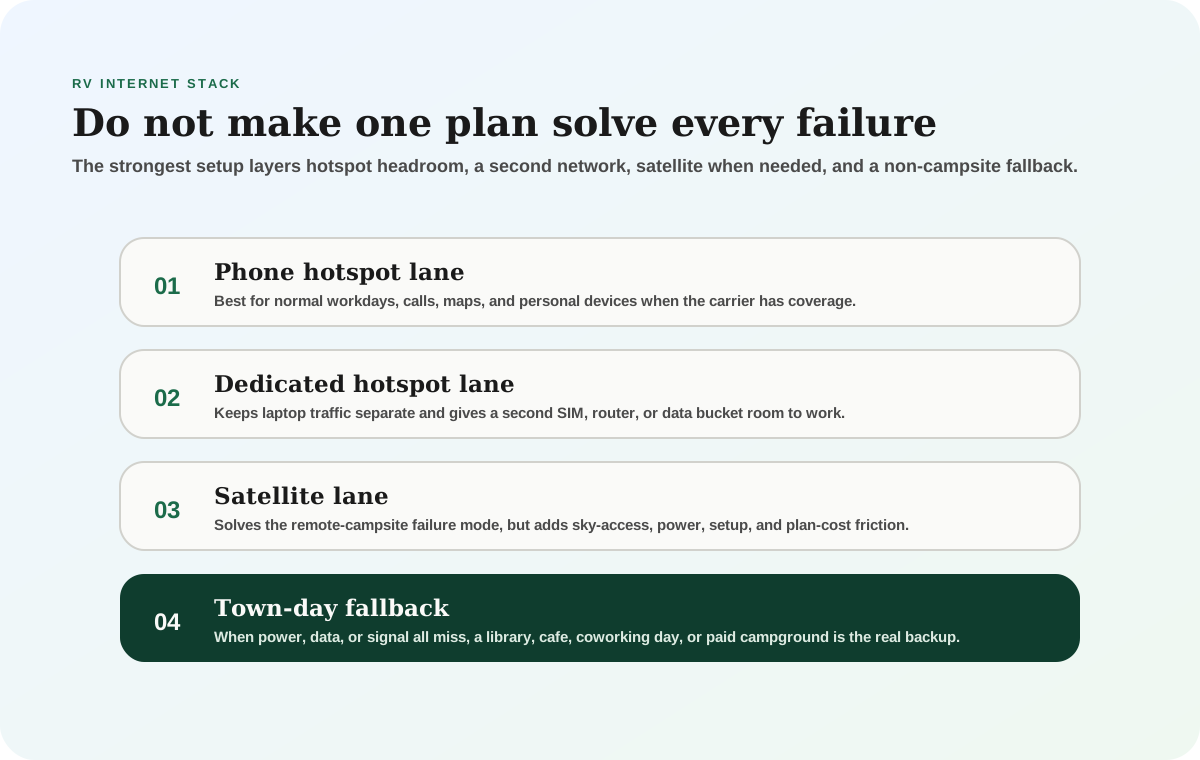
RVers usually do not need one perfect internet plan. They need the right failure stack.
A normal workday might be handled by a phone hotspot. A stormy state-park week might need a second carrier. A remote desert work week might need Starlink. A high-stakes client-call day might need a town fallback even if the campsite usually works.
That is why this guide compares plan roles, not just plan names.
Compare
RV mobile internet plan roles
Use one comparison matrix to scan the practical differences. Small screens stack each row; wider screens keep the first column pinned.
| Spec | Best job | Best fit | Main watchout |
|---|---|---|---|
| Premium phone plan | Primary workday connection when carrier coverage is good | Solo or couple travelers who can use phone hotspot as the normal laptop lane | Phone battery, hotspot limits, video throttles, and tying up the phone |
| Dedicated hotspot plan | Separate laptop/router lane and second-device workflow | Remote workers who want cleaner separation between phone use and work traffic | Still depends on that carrier's coverage and data bucket |
| Second carrier | Coverage redundancy when one network is weak | Travelers moving across regions instead of camping in one known coverage area | Costs more and still may fail in no-service terrain |
| Starlink Roam | Remote-site fallback where cellular is unreliable | Open-sky camps, public-land routes, and workdays where a second cellular carrier is not enough | Power draw, sky obstruction, setup friction, plan cost, and capacity policies |
| Town fallback | The safety net when campsite internet and power both miss | Workers with hard deadlines or upload-heavy days | Requires route planning and admitting the campsite is not the office that day |
How much data does an RV workday use?
Data use varies more than people expect. Email, docs, maps, and light browsing can stay modest. Video calls, cloud sync, operating-system updates, shared drives, and streaming can blow through a bucket quickly.
A practical planning range:
- light admin day: 1-3GB
- normal workday with browsing, files, and some calls: 4-8GB
- Zoom-heavy day with screen sharing and background cloud sync: 8-15GB
- streaming after work on the same line: add another 3-10GB depending on quality and hours
At 8GB per workday, 100GB covers about 12 workdays before entertainment and updates. At 12GB per workday, the same bucket covers about eight workdays. That is why a plan that looks huge for weekend travel can feel small for full-time remote work.
If you want to estimate the month instead of guessing, use the internet data usage calculator and compare the result with the backup internet options guide.
How to read carrier plans without getting fooled
Carrier pages are written for phone buyers first, not RV workers trying to keep a laptop connected in a canyon, forest campground, or fairgrounds overflow site. That means the plan headline is rarely the whole answer.
Read the plan in this order:
- Hotspot data: This is the laptop bucket. A plan can say unlimited phone data and still become much less useful once the phone starts feeding a laptop, router, or tablet.
- Post-threshold behavior: The question is not only how many gigabytes are included. The question is what happens afterward. Lower-speed hotspot can still send a text or load a basic page, but it may not support a work call, file upload, or VPN session.
- Device rules: Some plans are phone-hotspot plans, while others are dedicated mobile-internet or hotspot-device plans. A phone hotspot, a Jetpack-style hotspot, and a router SIM are not always treated the same way.
- Video management: Video quality settings can affect meeting quality and entertainment use. If a plan advertises HD or 4K streaming, confirm whether it requires an app setting, compatible device, or premium network area.
- Taxes, fees, autopay, and line count: The advertised monthly number may assume autopay, multiple lines, or a specific billing setup. For a solo RVer, the final cost can be different from the big-page price.
- Account eligibility: Existing customers, business accounts, legacy plans, device financing, and promotions can all change the real switching path.
This is also why old forum posts age badly. A plan name from last year may still appear in search results while the carrier has already changed the hotspot amount, video terms, or plan family. Treat current carrier pages as the source of truth, then use real campsite testing to decide whether the plan belongs in your stack.
Three practical RV internet stacks
Weekend traveler with light work
Start with the best phone carrier for the route and make the phone hotspot the normal laptop lane. If work is occasional, the key is not building the most complicated setup; it is making sure the plan has enough hotspot data for the few days when email, maps, campground research, and a short call matter.
For this traveler, Verizon Unlimited Ultimate or AT&T Premium 2.0 may be overkill if work is rare, but they become reasonable when the phone is also the only backup for bad campground Wi-Fi. T-Mobile's dedicated hotspot plan can make sense as a second lane if the main phone carrier is not T-Mobile and the route has good T-Mobile coverage.
The fallback is simple: download entertainment in town, keep a town-day option for important calls, and avoid letting streaming consume the same bucket needed for work.
Full-time remote worker
A full-time remote worker should usually avoid a one-plan strategy. One phone line can carry a surprising amount of work, but it is fragile when the campsite, tower, weather, account setting, or device fails.
A stronger setup is:
- primary phone plan on the carrier that wins most often
- second carrier through a dedicated hotspot, router SIM, or second phone line
- Starlink only if the route includes enough open-sky remote sites to justify cost and power
- town fallback for hard-deadline days
The second carrier does not need to beat the first carrier everywhere. It only needs to fail differently. If Verizon is strong on highways and AT&T is stronger near your favorite state parks, that difference is useful. If both carriers fail in the same mountain basin, satellite or a town day is the honest backup.
Remote public-land worker
If the work pattern includes BLM land, forest roads, desert boondocking, or winter long-term visitor areas, cellular alone can become too optimistic. Starlink Roam belongs in the conversation here because it solves the no-tower problem, not because it is cheaper or easier than a hotspot.
Satellite still has its own constraints. Trees, canyon walls, roof mounting, setup time, router placement, and 12V power all matter. A Starlink plan can remove the data-cap anxiety of a cellular bucket, but it can add battery pressure if the dish runs all day. If your workday already includes laptop, monitor, router, fans, and inverter losses, put satellite power into the same daily energy plan as everything else.
What to test before committing
Do not judge a carrier plan from one speed test at a gas station. Test it the way you will use it.
At a real campsite, run a morning video call, an afternoon upload, an evening congestion check, and a router or phone-hotspot session from the desk location. Try it with the RV door closed. Try it with the hotspot where it will actually sit. If you use a booster, antenna, or router, test that setup separately from the phone alone.
Keep notes by location:
- carrier and plan
- device used
- whether the connection supported video calls
- upload speed, not just download speed
- campground congestion time
- tree cover or terrain problem
- whether the fallback worked
After five to ten real locations, the right plan usually becomes obvious. The winning setup is the one that produces fewer work interruptions, not the one with the most impressive marketing name.
The shortlist
- Latest product check
- Specs, fit notes, and current listing context were reviewed May 13, 2026.
- Evidence label
- Spec-verified: Score is based on current published specs, official documentation, pricing context, compatibility, and RV-use fit analysis.
- Price context
- Pricing and availability can change, so confirm the merchant listing before buying.
Product facts last checked May 13, 2026
Verizon Unlimited Ultimate
Editorial fit score
Verizon's public Unlimited Ultimate page lists unlimited mobile hotspot with 200GB of premium hotspot data before lower-speed hotspot service. For RVers who want one phone line to carry real laptop work, that is the clearest mainstream phone-plan starting point.
Review verdict
- Short verdict
- The strongest phone-plan-first pick when Verizon coverage fits your route and you want a large published hotspot bucket before lower-speed hotspot behavior.
- Evidence used
- Spec-verified
- Score is based on current published specs, official documentation, pricing context, compatibility, and RV-use fit analysis.
- Why it made the shortlist
- Best overall
- The first option to evaluate if you want the strongest all-around fit for this guide.
- Best if
- Phone-plan-first remote workers
- Why not this product?
- Your repeated routes favor AT&T or T-Mobile, or you need a dedicated router/SIM setup that does not depend on a phone hotspot.
- Watch for
- Only as useful as Verizon coverage where you camp
- Product check date
- Specs, fit notes, and current listing context were last checked May 13, 2026.
Key specs
- Hotspot data
- 200GB premium hotspot threshold
- After threshold
- Lower-speed hotspot for rest of month
- Best role
- Primary phone hotspot lane
- Checked
- Verizon public plan page, Apr 21 2026
Score basis
Score is based on current published specs, official documentation, pricing context, compatibility, and RV-use fit analysis. These are editorial fit scores, not customer-review averages. Read the scoring rubric.
- RV-use fit
- 30% weight
- Verified specs and limits
- 25% weight
- Whole-rig friction
- 20% weight
- Downsides and support risk
- 15% weight
- Value for the job
- 10% weight
How directly the product solves the specific off-grid RV job in this guide.
Capacity, dimensions, electrical limits, protection claims, and compatibility constraints we can verify from current sources.
Install effort, storage, wiring, service access, weight, refill workflow, or daily-use hassle.
Known tradeoffs, unclear claims, warranty coverage, support risk, and wrong-buyer failure modes.
Whether the price makes sense after fit, specs, and tradeoffs still hold.
Testing limits
- This is not a hands-on endurance or lab test unless the review explicitly says so.
- Specs, pricing, bundles, and availability can change, so confirm the current listing and manual before buying.
Reasons to buy
- Largest mainstream phone-plan hotspot bucket in this shortlist
- Good fit when the phone is the normal laptop tethering tool
- Strong starting point before adding a second carrier or satellite layer
Watch-outs
- Only as useful as Verizon coverage where you camp
- Phone hotspot workflow can be clumsy for router-based work setups
- Plan terms, taxes, fees, promos, and video settings still need account-level verification
Whole-bank math
Workday example
8GB/day = about 25 workdays before 200GB
That ignores streaming, updates, family devices, and cloud backup traffic.
Best stack
Verizon primary + second carrier or Starlink backup
Do not let one phone line be the only work-critical path.
Check current listing
Verizon Unlimited Ultimate
Use the listing after the fit notes make sense for your rig. Pricing and availability can change, so verify the merchant page before buying.
- Latest product check
- Specs, fit notes, and current listing context were reviewed May 13, 2026.
- Evidence label
- Spec-verified: Score is based on current published specs, official documentation, pricing context, compatibility, and RV-use fit analysis.
- Price context
- Pricing and availability can change, so confirm the merchant listing before buying.
Product facts last checked May 13, 2026
T-Mobile 100GB Hotspot Plan
Editorial fit score
T-Mobile's public hotspot page lists a 100GB high-speed data plan at $50/month with AutoPay language. For RVers who already have a phone plan elsewhere, this can be a simple second lane for laptop traffic, router testing, or backup workdays.
Review verdict
- Short verdict
- The cleanest dedicated-hotspot add-on when T-Mobile coverage fits your route and you want a separate work data bucket.
- Evidence used
- Spec-verified
- Score is based on current published specs, official documentation, pricing context, compatibility, and RV-use fit analysis.
- Why it made the shortlist
- Best value
- The pick that balances capability and cost pressure best for this decision.
- Best if
- Dedicated hotspot add-on
- Why not this product?
- You camp where T-Mobile coverage is weak or 100GB is not enough for the month.
- Watch for
- 100GB can vanish quickly with video calls, streaming, and updates
- Product check date
- Specs, fit notes, and current listing context were last checked May 13, 2026.
Key specs
- Data bucket
- 100GB high-speed data
- Public price
- $50/month with AutoPay language
- After threshold
- Lower-speed service listed after bucket
- Checked
- T-Mobile public hotspot page, Apr 21 2026
Score basis
Score is based on current published specs, official documentation, pricing context, compatibility, and RV-use fit analysis. These are editorial fit scores, not customer-review averages. Read the scoring rubric.
- RV-use fit
- 30% weight
- Verified specs and limits
- 25% weight
- Whole-rig friction
- 20% weight
- Downsides and support risk
- 15% weight
- Value for the job
- 10% weight
How directly the product solves the specific off-grid RV job in this guide.
Capacity, dimensions, electrical limits, protection claims, and compatibility constraints we can verify from current sources.
Install effort, storage, wiring, service access, weight, refill workflow, or daily-use hassle.
Known tradeoffs, unclear claims, warranty coverage, support risk, and wrong-buyer failure modes.
Whether the price makes sense after fit, specs, and tradeoffs still hold.
Testing limits
- This is not a hands-on endurance or lab test unless the review explicitly says so.
- Specs, pricing, bundles, and availability can change, so confirm the current listing and manual before buying.
Reasons to buy
- Clear dedicated data bucket separate from the phone line
- Good value when T-Mobile coverage is strong
- Easy way to test a second-carrier workflow without changing the main phone plan
Watch-outs
- 100GB can vanish quickly with video calls, streaming, and updates
- Coverage can be excellent in one region and frustrating in another
- Requires a hotspot-device workflow and account verification
Whole-bank math
Workday example
12GB/day = about 8 workdays before 100GB
Treat it as a work lane, not a household streaming bucket.
Best stack
Phone plan primary + T-Mobile hotspot backup
Best when T-Mobile solves a coverage gap left by the primary carrier.
Check current listing
T-Mobile 100GB Mobile Internet plan
Use the listing after the fit notes make sense for your rig. Pricing and availability can change, so verify the merchant page before buying.
- Latest product check
- Specs, fit notes, and current listing context were reviewed May 13, 2026.
- Evidence label
- Spec-verified: Score is based on current published specs, official documentation, pricing context, compatibility, and RV-use fit analysis.
- Price context
- Pricing and availability can change, so confirm the merchant listing before buying.
Product facts last checked May 13, 2026
Starlink Roam Unlimited
Editorial fit score
Starlink Roam belongs in the RV internet conversation because it solves a different problem than Verizon, AT&T, or T-Mobile. It is not the cheapest or lowest-power path. It is the path for sites where cellular is unreliable and work still has to happen.
Review verdict
- Short verdict
- The specialized pick for open-sky remote camps where a second cellular plan still does not solve the workday risk.
- Evidence used
- Spec-verified
- Score is based on current published specs, official documentation, pricing context, compatibility, and RV-use fit analysis.
- Why it made the shortlist
- Specialized pick
- A narrower recommendation that wins only for a specific use case.
- Best if
- Remote-site satellite fallback
- Why not this product?
- You mostly camp under tree cover, have strong cellular coverage, or cannot support the power draw and setup rhythm.
- Watch for
- Needs sky access and power planning
- Product check date
- Specs, fit notes, and current listing context were last checked May 13, 2026.
Key specs
- Public plan result
- Lower-data Roam lane (recently labeled 50GB or 100GB) and Roam Unlimited shown in service-plan results
- Unlimited plan
- $165/month public result for Roam Unlimited
- Best role
- Satellite layer, not phone replacement
- Checked
- Starlink public Roam/service-plan results, May 13 2026
Score basis
Score is based on current published specs, official documentation, pricing context, compatibility, and RV-use fit analysis. These are editorial fit scores, not customer-review averages. Read the scoring rubric.
- RV-use fit
- 30% weight
- Verified specs and limits
- 25% weight
- Whole-rig friction
- 20% weight
- Downsides and support risk
- 15% weight
- Value for the job
- 10% weight
How directly the product solves the specific off-grid RV job in this guide.
Capacity, dimensions, electrical limits, protection claims, and compatibility constraints we can verify from current sources.
Install effort, storage, wiring, service access, weight, refill workflow, or daily-use hassle.
Known tradeoffs, unclear claims, warranty coverage, support risk, and wrong-buyer failure modes.
Whether the price makes sense after fit, specs, and tradeoffs still hold.
Testing limits
- This is not a hands-on endurance or lab test unless the review explicitly says so.
- Specs, pricing, bundles, and availability can change, so confirm the current listing and manual before buying.
Reasons to buy
- Solves many no-cell-service campsite problems
- Good for open-sky remote work where cellular backup is not enough
- Can be paused or changed depending on current Starlink account options
Watch-outs
- Needs sky access and power planning
- More setup friction than phone or hotspot tethering
- Plan availability and terms can vary by account, market, and hardware
Whole-bank math
Power example
Treat satellite as a work load
If the dish/router stack runs all day, it belongs in the battery budget next to the laptop.
Best stack
Cellular primary + Starlink remote fallback
Use it when the campsite is worth the power, cost, and sky-access tradeoff.
Check current listing
Starlink Roam Unlimited
Use the listing after the fit notes make sense for your rig. Pricing and availability can change, so verify the merchant page before buying.
Which plan should you start with?
Start with the carrier that works where you actually camp.
If Verizon is consistently strong on your route and the phone can be the primary work hotspot, Unlimited Ultimate is the cleanest first look. If AT&T is stronger in your region, Premium 2.0 is the more honest phone-plan comparison. If you already have a good phone plan but need a second data bucket, T-Mobile's 100GB hotspot plan is a practical add-on. If the problem is no cellular signal at all, compare Starlink Roam against the cost of moving campsites or working from town.
The mistake is buying satellite for a campground where cellular is already good, or buying a cheap phone plan for a month that actually needs 150GB of laptop data.
Common mistakes
Counting phone data but ignoring hotspot data
Many unlimited phone plans are generous on phone-screen data and much stricter once the phone becomes a laptop hotspot. For RV work, hotspot language matters more than the word unlimited.
Treating one carrier map as a route plan
Carrier maps are a starting point. Campsite terrain, trees, congestion, distance from the tower, and device antennas decide the real connection.
Forgetting the power budget
A hotspot may be easy to power. A router, booster, Starlink kit, laptop, monitor, and inverter are a different system. Pair this guide with the RV remote-work power budget if the connection has to last all day.
Letting entertainment consume the work bucket
Streaming on the same plan that supports client calls is how a good plan starts feeling bad. Put entertainment on campground Wi-Fi, downloaded media, or a separate rule if the work bucket is finite.
Final thought
The best RV internet plan is not the one with the flashiest headline. It is the one that lowers the chance of missed calls, broken uploads, and frantic campsite moves in the way you actually travel.
Pick a primary carrier. Add a second lane only if it solves a real failure. Use Starlink when cellular coverage is the wrong tool. Keep a town-day fallback for the days when both power and signal do not cooperate.
Frequently asked
Questions RVers usually ask next.
What kind of mobile plan works best for RV remote work?
A plan with meaningful hotspot allowance works best if your phone is part of your real work setup. For many RVers, that means a premium phone plan such as Verizon Unlimited Ultimate or AT&T Premium 2.0, plus a second carrier or satellite fallback if work cannot fail.
Should RVers use a phone plan or a dedicated hotspot plan?
Use a phone plan when the phone hotspot can comfortably handle normal work traffic. Add a dedicated hotspot plan when you want a separate data bucket, router workflow, or second carrier without changing the main phone line.
Does Starlink replace a mobile phone plan for RVers?
Usually not by itself. Starlink is better viewed as a satellite layer for remote open-sky camps where cellular options are unreliable. You still need a phone plan for travel days, errands, calls, and places where Starlink setup or sky access is poor.
How often do RV internet plans change?
Carrier names, hotspot allotments, discounts, and plan structures change regularly. Recheck the official carrier page before switching, especially if an article, forum post, or YouTube video references older plan names.
Freshness note
Last checked May 13, 2026
This topic can change when products, plans, prices, campsite rules, or fit guidance move. These notes show what was reviewed most recently.
This review included
- Re-checked current public Verizon, AT&T, T-Mobile, and Starlink plan pages for the tiers discussed here.
- Re-checked Starlink's public Roam wording for the lower-data Roam lane (recently shown with both 50GB and 100GB labels) and the $165/mo Roam Unlimited anchor.
- Updated AT&T plan naming to the current 2.0 public plan labels and refreshed hotspot allotments where the public plan page changed.
- Added a plan-stack visual, official source grid, quick-pick shortlist, product-style plan cards, and concrete remote-work usage scenarios.
Recent change log
May 13, 2026
Replaced hard-coded Roam 100GB language with checkout-safe lower-data Roam wording so the guide stays accurate while Starlink's public plan labels move between 50GB and 100GB on the lower lane.
April 21, 2026
Rebuilt the guide around current public plan names, official source checks, hotspot-data numbers, a layered stack visual, and exact plan shortlist cards.
April 10, 2026
Added a visible freshness log because carrier plan names, hotspot allotments, and Starlink plan details are especially volatile.
April 9, 2026
Reframed the guide around plan-stack fit instead of one-size-fits-all carrier rankings.
Broader editorial corrections are tracked on the Corrections and Updates page.
