Source checks used for this guide
The examples below use official communication and hardware references as planning anchors, then translate them into RV workday decisions.
Pre-arrival checks
Before a work trip
Measure the laptop, internet hardware, and inverter baseline separately. A small hidden load can matter more than one obvious meeting.
Limited power does not have to mean unreliable work
Many RVers assume a modest battery bank makes serious remote work unrealistic. That is only half true.
Limited power becomes unreliable when the workday is run as if the RV were plugged into a house outlet. Every charger stays connected. The inverter idles because it is convenient. Video calls, uploads, laptop charging, coffee, and comfort devices all happen whenever the calendar happens to place them.
That is not a power system. That is a pileup.
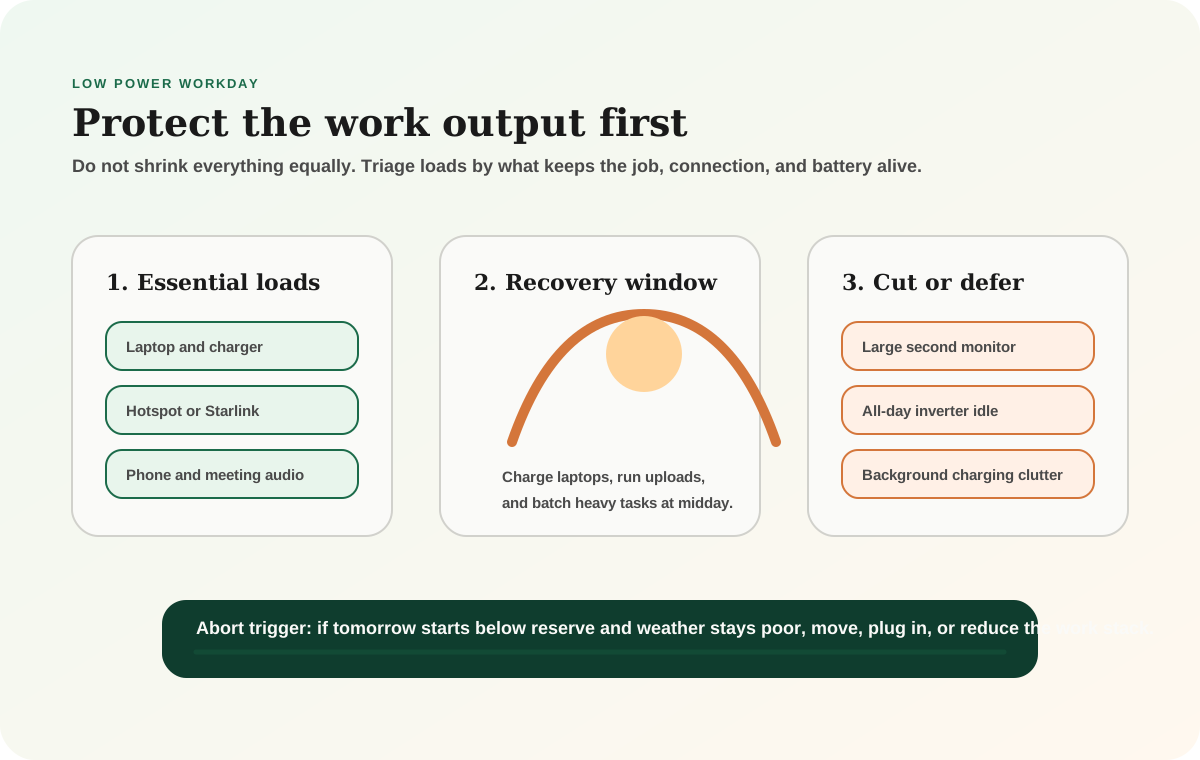
The better approach is to build the day around three questions:
- What has to stay on for me to do my job?
- What can wait until the rig is recovering?
- What should be turned off unless it is actively earning its draw?
Start with the RV remote-work power budget, then test your battery reserve in the battery calculator. The goal is not to make the workday tiny. The goal is to make the important work predictable.
Sort the work stack before you sort the gear
The first mistake is treating every device as equal.
For most RV workers, the essential stack is short:
- laptop
- internet hardware
- phone
- meeting audio
- one backup way to stay reachable
Everything else has to earn its place. A large second monitor may be useful, but it is not the same priority as the laptop. A printer, speaker, monitor light, tablet, camera charger, and inverter-fed dock can all be fine on a strong day and silly on a tight day.
This is where limited-power work starts to feel calmer. You are not asking, "Can I run my whole office exactly the same way?" You are asking, "What is the smallest stack that keeps the work credible today?"
Low-power workday targets
Use these as planning ranges until you measure your own devices with a plug-in meter, shunt, or battery monitor.
Minimum work stack
Laptop + connection + phone
The stack to protect if the battery forecast is tight.
Common workday draw
600-1,200Wh
Typical planning range for laptop, internet hardware, charging losses, and light peripheral use.
High-risk load
All-day AC inverter
Idle draw can quietly consume useful battery before the work itself starts.
Best recovery window
Late morning to mid-afternoon
Usually the best time to charge laptops, upload files, and handle optional device charging.
Compare the loads that shape the day
Do not start by arguing about battery chemistry. Start by identifying the loads that actually move the workday.
Compare
Low-power remote work load priorities
Use one comparison matrix to scan the practical differences. Small screens stack each row; wider screens keep the first column pinned.
| Spec | Protect | Schedule | Cut first |
|---|---|---|---|
| Laptop | Core work device; budget 45-100W while charging depending on model and load | Charge during solar recovery when possible | Do not cut unless there is an alternate work plan |
| Internet hardware | Hotspot, router, or Starlink if work depends on it | Run high-draw gear only when the connection quality justifies it | Drop to phone hotspot or lower-power backup for light tasks |
| Inverter | Use when AC is required for a specific device | Batch AC charging instead of leaving it on all day | Turn off if only DC/USB devices are active |
| Monitor and dock | Useful for productivity, not always essential | Use during focused work blocks | Skip on battery-tight or weather-poor days |
| Uploads and video calls | Protect scheduled meetings and client deadlines | Place heavy calls during stronger power and signal windows | Move non-urgent uploads to a town day or stronger signal site |
The point is not to live like a miser. It is to stop spending battery on convenience before the real work has been protected.
A worked example: the 900Wh workday
Here is a realistic planning example for a modest off-grid workday.
Assume:
- laptop averages 55W for 7 hours: 385Wh
- hotspot/router averages 10W for 8 hours: 80Wh
- phone, headset, and small device charging: 40Wh
- inverter losses and short AC charging windows: 100Wh
- one external monitor averages 25W for 4 hours: 100Wh
- margin for screen brightness, weak signal, and charger losses: 150-250Wh
That puts the workday around 855-955Wh before cooking, furnace fan, fridge, lights, water pump, or entertainment.
Now change only one thing: leave a larger satellite internet system, inverter, monitor, and accessory dock running for the whole day. The same workday can push past 1,400Wh without feeling dramatically different from the desk chair.
That is the trap. Limited-power work is rarely ruined by one obvious load. It is usually drained by several devices that looked too small to matter.
Timing is the cheapest upgrade
The same laptop charger is a different problem at 7 a.m. than it is at noon.
If you start the morning with 62 percent battery and weak weather in the forecast, charging everything before breakfast may steal the reserve you needed for meetings. If you wait until strong sun or a drive window, the exact same charger may be nearly harmless.
Build the day around confidence windows:
- morning: protect battery and do low-draw work if the bank started low
- late morning: start laptop charging if solar is climbing
- midday: run uploads, device charging, and heavier work blocks
- late afternoon: stop creating avoidable loads if recovery was weak
- evening: keep the inverter off unless it has a specific job
This overlaps directly with the boondocking power management guide. Timing does not create energy, but it makes the energy you have feel less fragile.
Internet choice changes the power plan
Internet planning is not only about signal. It is also about watts.
A phone hotspot or small cellular router may be the lowest-draw option for email, documents, admin work, and light calls. Satellite internet can be worth the draw when the site has weak cellular coverage or the work cannot fail, but it should be treated like a meaningful load rather than a background appliance.
Use the internet backup planner before assuming the highest-power internet option should stay on all day. A good stack might look like:
- phone hotspot for low-stakes admin
- dedicated cellular router for normal work
- Starlink only for weak-cell sites, large uploads, or critical call windows
- town day or cafe backup for a heavy video or upload day after bad weather
If calls are the non-negotiable part of the day, use the video calls from an RV guide to protect the meeting window first.
Inverter discipline matters more than people think
An inverter can be necessary, but it should not become the default way every device gets power.
Ask three questions:
- Does this device truly need AC power?
- Could it charge from USB-C, 12V, or DC more efficiently?
- Does the inverter need to be on now, or only during a charging block?
A 10-25W idle load does not sound dramatic until it runs for 12 hours. That is 120-300Wh before it has done any useful work. On a small bank, that can be the difference between a calm morning and a forced move.
Protect the battery for the work that pays the bills
When power is limited, do not shrink the whole day equally. Protect the devices and work blocks that keep you employed, then be ruthless with optional comfort loads.
Decide your abort trigger before the day gets stressful
Limited-power work goes sideways when the decision to move or plug in is made too late.
Set a simple trigger before the trip:
- If the battery starts below your morning reserve target two days in a row, move or plug in.
- If tomorrow has mandatory calls and the bank is low tonight, move before dark.
- If the forecast shows poor solar recovery and the generator is not a safe or acceptable option, shorten the stay.
- If the internet backup also depends on the same weak battery bank, treat that as a work-risk problem, not a camping inconvenience.
This is not failure. It is professional planning.
Common mistakes
Counting battery capacity but not inverter behavior
Battery capacity tells you what is available. Inverter behavior tells you how much of it quietly disappears before the work happens.
Scheduling the hardest work during the weakest power window
If you can choose, place video calls, uploads, laptop charging, and high-brightness monitor work during the strongest recovery window.
Buying a bigger battery before measuring the workday
More battery may be the right answer, but it should solve a measured problem. Run the battery calculator, measure one real workday, and then decide.
Treating internet power as separate from work power
The laptop, router, hotspot, satellite terminal, phone, and inverter are one work system. If any piece depends on battery reserve, it belongs in the same budget.
Final thought
Working off-grid with limited power gets easier when the workday becomes deliberate.
Protect the essential stack. Put heavy tasks in the recovery window. Turn off the inverter when it is not doing real work. Use lower-power internet when the job allows it. Decide early when a site is no longer a work site.
That operating style can make a modest system feel surprisingly capable. If it still feels fragile after that, you have earned a real upgrade because the problem is measured, not guessed.
Frequently asked
Questions RVers usually ask next.
Can you work remotely from an RV with a small power system?
Yes, especially if the workday is designed around the system's limits. Prioritize the laptop, connection, phone, and meeting windows first, then schedule heavier charging and uploads during the strongest recovery window.
How much power does a remote workday use in an RV?
A light laptop-and-hotspot day may land around 600Wh, while a video-heavy day with satellite internet, an inverter, and a monitor can pass 1,200Wh. Measure your own gear because weak signal, charger losses, and screen brightness can change the number.
Is Starlink too much power for limited off-grid work?
Not necessarily, but it should be treated as a meaningful work load rather than a device that stays on casually. Use it when the connection value justifies the draw, and use lower-power cellular options when they are good enough.
What should I turn off first when power is tight?
Start with optional comfort loads, all-day inverter idle, extra monitors, accessory docks, and background charging clutter. Protect the job-critical stack before cutting the devices that keep you reachable and productive.
Freshness note
Last checked April 21, 2026
This topic can change when products, plans, prices, campsite rules, or fit guidance move. These notes show what was reviewed most recently.
This review included
- Checked Zoom bandwidth guidance, Starlink Mini published power use, and off-grid backup-power safety references.
- Expanded the guide with a low-power workday triage visual, comparison table, and worked power examples.
Recent change log
April 21, 2026
Added source-backed planning ranges, a concrete low-power workday example, and a decision table for protecting essential work loads.
April 17, 2026
Published limited-power remote work guide with verified appliance wattage and power management strategies.
Broader editorial corrections are tracked on the Corrections and Updates page.

